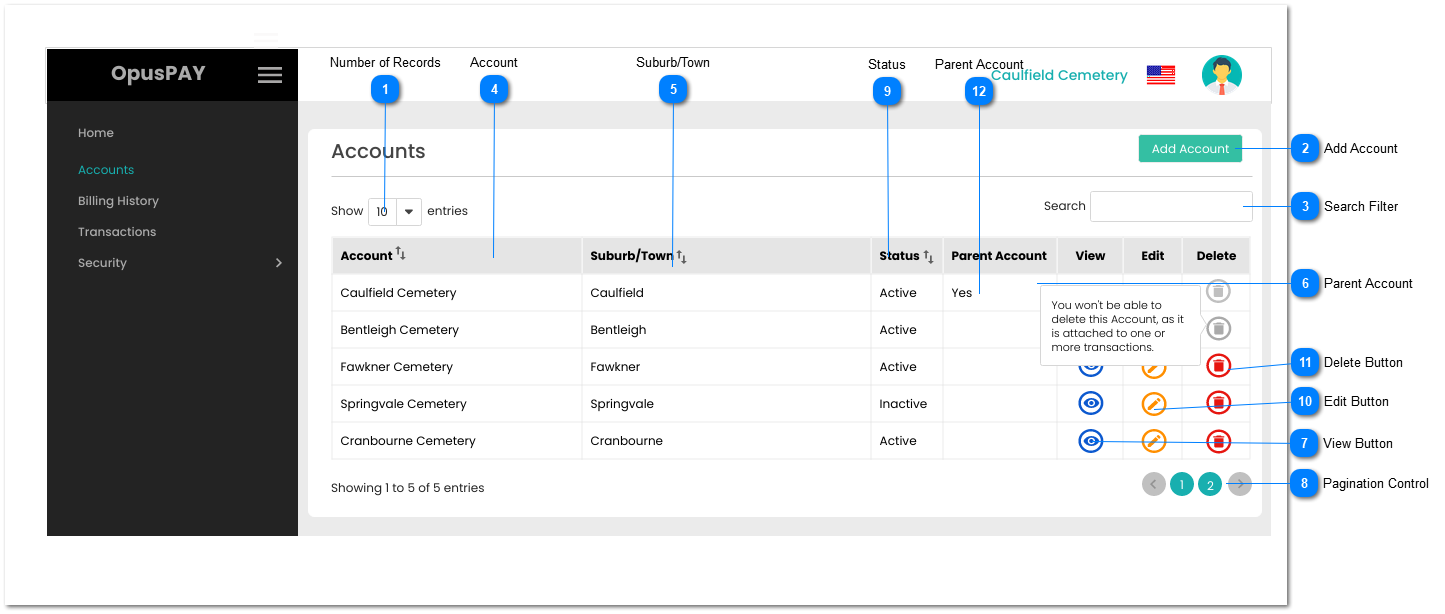
The Accounts screen lists all merchants registered with OpusPAY belonging to an organisation that has multiple cemeteries. It also enables users to search for Accounts, sort the grid results by columns, and view more details about a Merchant Account.
Number of Records
Type
Notes
Rules
Compulsory
Format
Edit
Size
Default
Error Message
Combo-Box
-
1. This should allow the user to select an option to control the number of Merchant Account records visible in the grid.
1. Filters the grid by matching the input entered by the user across the Account and Suburb/Town grid columns.
2. Filter results based on each character entered. For example:
if "c" is entered, only the first and fifth rows in the on screen example will be displayed. This is based on "Caulfield" and "Cranbourne" in both the Account and Suburb/Town columns.
If "ca" is entered only the first row in the on screen example will be displayed based on "Caulfield".
2. This should be greyed out and disabled if an Account has a sub Account or has at least one transaction attached. User should see a pop-up message upon hovering action over the button: "You won't be able to delete this Account as it has a sub Account and/or is attached to one or more transactions."
3. If there are any users assigned to the Account, their access to the Account should be disabled and the Account should be removed from the "Assign Account Access" screen.