To properly display this page you need a browser with JavaScript support.
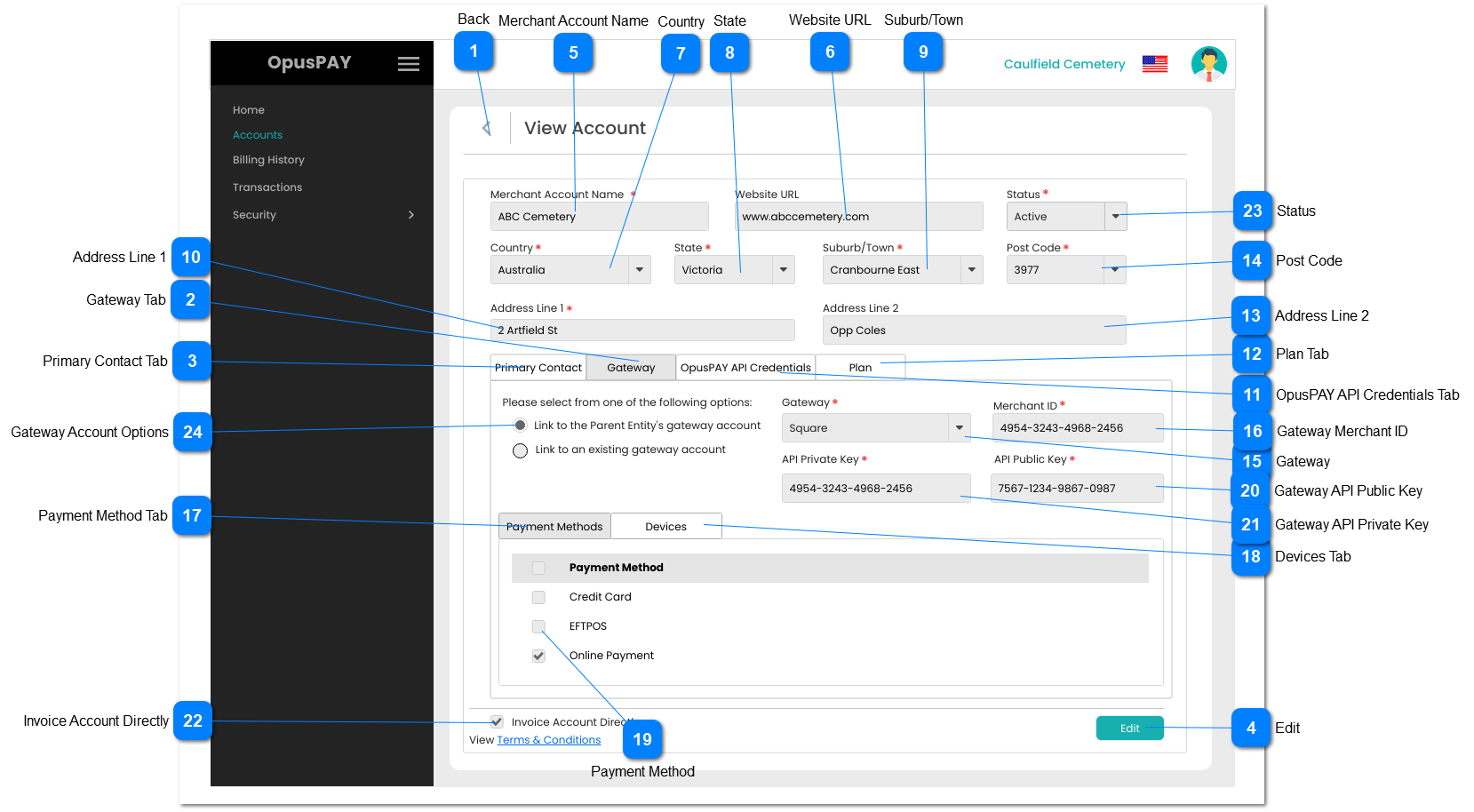
View Account - Gateway Details - PM
This screen allows the user to add sub-accounts to their merchant portal.
Back
Type
Notes
Rules
Compulsory
Format
Edit
Size
Default
Error Message
Button
-
1. When clicked this should navigate the user to the Accounts screen without saving any changes. Refer to the specification for that page here .
-
-
Y
-
-
-
Gateway Tab
Type
Notes
Rules
Compulsory
Format
Edit
Size
Default
Error Message
Tab
-
1. This should display the Gateway details.
2. This tab should be highlighted to identify the tab the user is on.
-
-
Y
-
-
-
Primary Contact Tab
Type
Notes
Rules
Compulsory
Format
Edit
Size
Default
Error Message
Tab
-
1. This displays and allows the user to edit the Primary Contact of the Account. Refer to the specifications for that screen here .
-
-
Y
-
-
-
Edit
Type
Notes
Rules
Compulsory
Format
Edit
Size
Default
Error Message
Button
-
1. Navigate the user to the Edit Account - Gateway Details - PM screen. Refer to the specifications for that screen here .
-
-
-
-
-
-
Merchant Account Name
Type
Notes
Rules
Compulsory
Format
Edit
Size
Default
Error Message
Text
-
1. This should display the Merchant Account name.
Y
-
N
255
-
-
Website URL
Type
Notes
Rules
Compulsory
Format
Edit
Size
Default
Error Message
Text
-
1. This should display the website of the organisation.
-
-
N
255
-
-
Country
Type
Notes
Rules
Compulsory
Format
Edit
Size
Default
Error Message
Combo-Box
-
1. This should display the Country for the organisation.
Y
-
N
255
-
-
State
Type
Notes
Rules
Compulsory
Format
Edit
Size
Default
Error Message
Combo-Box
-
1. This should display the State for the organisation.
Y
-
N
255
-
-
Suburb/Town
Type
Notes
Rules
Compulsory
Format
Edit
Size
Default
Error Message
Combo-Box
-
1. This should display the Suburb/Town for the organisation.
Y
-
N
255
-
-
Address Line 1
Type
Notes
Rules
Compulsory
Format
Edit
Size
Default
Error Message
Text
-
1. This should display Address Line 1 for the organisation.
Y
-
N
255
-
-
OpusPAY API Credentials Tab
Type
Notes
Rules
Compulsory
Format
Edit
Size
Default
Error Message
Tab
-
1. This displays the Accounts API Credentials. Refer to the specifications for that screen here .
-
-
Y
-
-
-
Plan Tab
Type
Notes
Rules
Compulsory
Format
Edit
Size
Default
Error Message
Tab
-
1. This displays the Plan assigned to the Parent Entity. Refer to the specifications for that screen here .
-
-
Y
-
-
-
Address Line 2
Type
Notes
Rules
Compulsory
Format
Edit
Size
Default
Error Message
Text
-
1. This should display the Address Line 2 for the organisation.
-
-
N
255
-
-
Post Code
Type
Notes
Rules
Compulsory
Format
Edit
Size
Default
Error Message
Combo-Box
-
1. This should display the Post Code for the organisation.
Y
-
N
255
-
-
Gateway
Type
Notes
Rules
Compulsory
Format
Edit
Size
Default
Error Message
Dropdown
-
1. This will display the current Gateway for the Account.
Y
-
N
-
-
-
Gateway Merchant ID
Type
Notes
Rules
Compulsory
Format
Edit
Size
Default
Error Message
Text
-
1. This displays the Gateway Merchant ID for the account.
Y
-
N
255
Disabled.
-
Payment Method Tab
Type
Notes
Rules
Compulsory
Format
Edit
Size
Default
Error Message
Tab
-
1. This displays the Gateway's Payment Methods.
2. This tab should be highlighted to identify the tab the user is on
-
-
Y
-
-
-
Devices Tab
Type
Notes
Rules
Compulsory
Format
Edit
Size
Default
Error Message
Tab
-
1. This displays the Devices the Account uses. Refer to the specifications for that screen here .
-
-
Y
-
-
-
Payment Method
Type
Notes
Rules
Compulsory
Format
Edit
Size
Default
Error Message
Column
-
1. This will display the selected Payment Methods for the Gateway.
Y
-
N
-
-
-
Gateway API Public Key
Type
Notes
Rules
Compulsory
Format
Edit
Size
Default
Error Message
Text
-
1. This displays the Gateway API Public Key for the account.
Y
-
N
255
Disabled.
-
Gateway API Private Key
Type
Notes
Rules
Compulsory
Format
Edit
Size
Default
Error Message
Text
-
1. This displays the Gateway API Private Key for the account.
Y
-
N
255
Disabled.
-
Invoice Account Directly
Type
Notes
Rules
Compulsory
Format
Edit
Size
Default
Error Message
Checkbox
-
1. If checked, indicate in the database that this account is to be invoiced directly for it's transactions.
N
-
N
-
-
-
Status
Type
Notes
Rules
Compulsory
Format
Edit
Size
Default
Error Message
Combo-Box
-
1. This should display the Status for the organisation.
Y
-
N
255
-
-
Gateway Account Options
Type
Notes
Rules
Compulsory
Format
Edit
Size
Default
Error Message
Text
-
1. These radio buttons determine if the Account is linked to the Parent Entity's Gateway account or if the Account will have it's own Gateway account.
2. If the "Link to the Parent Entity's Gateway account" option is selected, disable and autopopulate the Gateway, Merchant ID, API Private Key, and API Public Key.
3. If the "Link to an existing gateway account" option is selected, clear and enable the Gateway, Merchant ID, API Private Key, and API Public Key fields.
-
-
N
-
Link to Parent Entity's Gateway Account
-