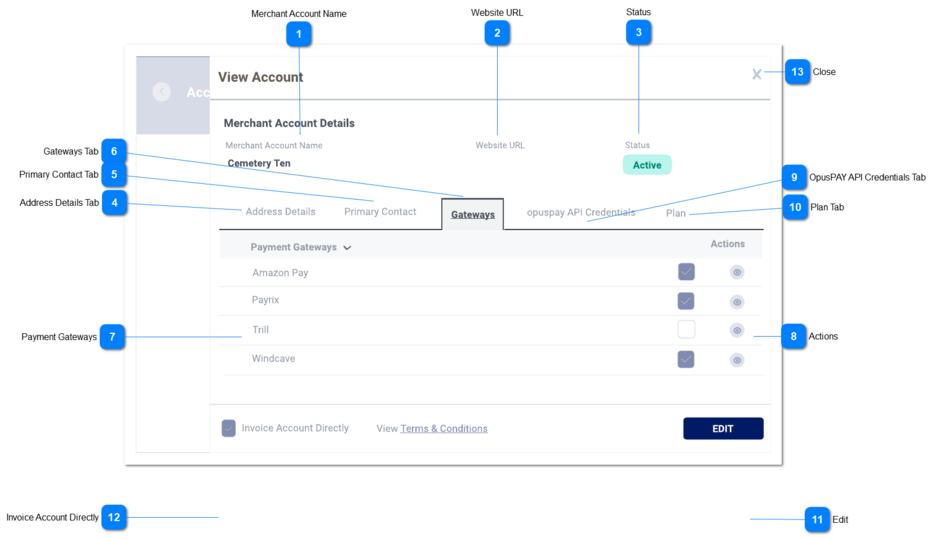
View Account - Gateway Details
This screen allows the user to view the gateways within their merchant account.
 Merchant Account Name
|
Type
|
Notes
|
Rules
|
Compulsory
|
Format
|
Edit
|
Size
|
Default
|
Error Message
|
|
Text
|
-
|
1. This should display the Merchant Account name.
|
Y
|
-
|
N
|
255
|
-
|
-
| |
|
 Website URL
|
Type
|
Notes
|
Rules
|
Compulsory
|
Format
|
Edit
|
Size
|
Default
|
Error Message
|
|
Text
|
-
|
1. This should display the website of the organisation.
|
-
|
-
|
N
|
255
|
-
|
-
| |
|
 Status
|
Type
|
Notes
|
Rules
|
Compulsory
|
Format
|
Edit
|
Size
|
Default
|
Error Message
|
|
Combo-Box
|
-
|
1. This should display the Status for the organisation (active or deactive).
|
-
|
-
|
N
|
255
|
-
|
-
| |
|
 Address Details Tab
|
Type
|
Notes
|
Rules
|
Compulsory
|
Format
|
Edit
|
Size
|
Default
|
Error Message
|
|
Text
|
-
|
1. This tab should display the address details for the organisation.
|
-
|
-
|
N
|
-
|
-
|
-
| |
|
 Primary Contact Tab
|
Type
|
Notes
|
Rules
|
Compulsory
|
Format
|
Edit
|
Size
|
Default
|
Error Message
|
|
Tab
|
-
|
1. This displays and allows the user to edit the Primary Contact of the Account. Refer to the specifications for that screen here.
|
-
|
-
|
N
|
-
|
-
|
-
| |
|
 Gateways Tab
|
Type
|
Notes
|
Rules
|
Compulsory
|
Format
|
Edit
|
Size
|
Default
|
Error Message
|
|
Tab
|
-
|
1. This should display the Gateway details.
2. This tab should be highlighted to identify the tab the user is on.
|
-
|
-
|
N
|
-
|
-
|
-
| |
|
 Payment Gateways
|
Type
|
Notes
|
Rules
|
Compulsory
|
Format
|
Edit
|
Size
|
Default
|
Error Message
|
|
Text
|
-
|
|
-
|
-
|
N
|
-
|
-
|
-
| |
|
 Actions
|
Type
|
Notes
|
Rules
|
Compulsory
|
Format
|
Edit
|
Size
|
Default
|
Error Message
|
|
Text
|
-
|
-
This column will display a view button.
-
Clicking on the view button should navigate the user to the Payment Gateways screen.
|
-
|
-
|
N
|
-
|
-
|
-
| |
|
 OpusPAY API Credentials Tab
|
Type
|
Notes
|
Rules
|
Compulsory
|
Format
|
Edit
|
Size
|
Default
|
Error Message
|
|
Tab
|
-
|
1. This displays the Accounts API Credentials. Refer to the specifications for that screen here.
|
-
|
-
|
-
|
-
|
-
|
-
| |
|
 Plan Tab
|
Type
|
Notes
|
Rules
|
Compulsory
|
Format
|
Edit
|
Size
|
Default
|
Error Message
|
|
Tab
|
-
|
1. This displays the Plan assigned to the Parent Entity. Refer to the specifications for that screen here.
|
-
|
-
|
N
|
-
|
-
|
-
| |
|
 Edit
|
Type
|
Notes
|
Rules
|
Compulsory
|
Format
|
Edit
|
Size
|
Default
|
Error Message
|
|
Button
|
-
|
1. Navigate the user to the Edit Account - Gateway Details screen. Refer to the specifications for that screen here.
|
-
|
-
|
-
|
-
|
-
|
-
| |
|
 Invoice Account Directly
|
Type
|
Notes
|
Rules
|
Compulsory
|
Format
|
Edit
|
Size
|
Default
|
Error Message
|
|
Checkbox
|
-
|
1. If checked, indicate in the database that this account is to be invoiced directly for it's transactions.
|
N
|
-
|
N
|
-
|
-
|
-
| |
|
 Close
|
Type
|
Notes
|
Rules
|
Compulsory
|
Format
|
Edit
|
Size
|
Default
|
Error Message
|
|
Button
|
-
|
1. When clicked this should navigate the user to the Accounts screen. Refer to the specification for that page here.
|
-
|
-
|
-
|
-
|
-
|
-
| |
|