To properly display this page you need a browser with JavaScript support.
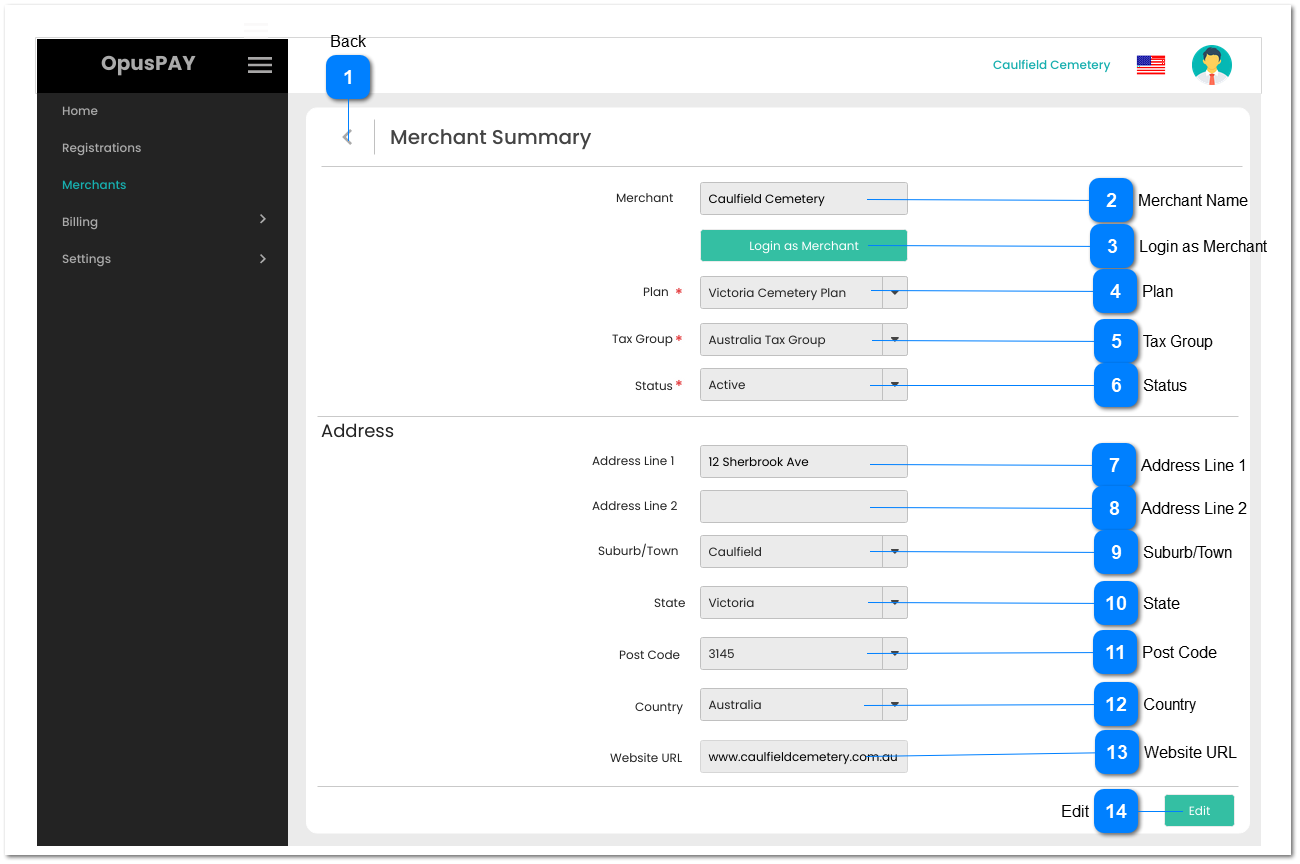
This screen allows the user to Login as Merchant, view their Plan, Tax Group, and Address details.
Back
Type
Notes
Rules
Compulsory
Format
Edit
Size
Default
Error Message
Button
-
1. This should navigate the user to the Merchants Grid when clicked. Refer to the specification for Merchants Grid here .
-
-
-
-
-
-
Merchant Name
Type
Notes
Rules
Compulsory
Format
Edit
Size
Default
Error Message
Text
-
1. This should display the name of a Merchant.
-
-
N
255
-
-
Login as Merchant
Type
Notes
Rules
Compulsory
Format
Edit
Size
Default
Error Message
Button
-
1. This should be only visible to users linked to a profile having access to this function.
2. The user is able to log into a merchant's portal after clicking this button. The level of access to the merchan t's portal will be dependent on the Security Profile assigned to the user. Refer to the specifications for Security Profiles here .
3. When logged in as Merchant, display "Logged in as: " before Organisation name at top of window. Refer to the specification for this screen here .
-
-
-
-
-
-
Plan
Type
Notes
Rules
Compulsory
Format
Edit
Size
Default
Error Message
Combo-Box
-
1. This should display the Plan assigned to a merchant.
Y
-
N
-
-
-
Tax Group
Type
Notes
Rules
Compulsory
Format
Edit
Size
Default
Error Message
Combo-Box
-
1. This should display the Tax Group assigned to a merchant.
Y
-
N
-
-
-
Status
Type
Notes
Rules
Compulsory
Format
Edit
Size
Default
Error Message
Column
1. Active merchants should be able to be transactions via OpusPAY.
2. When a merchant is inactivate they will no longer be able to process transactions via OpusPAY. However, they will still be able to log into the Merchant Portal.
1. This should display the Status of the merchant.
-
-
N
-
-
-
Address Line 1
Type
Notes
Rules
Compulsory
Format
Edit
Size
Default
Error Message
Text
-
1. This should display the Address Line 1 of the primary address of a merchant.
-
-
N
255
-
-
Address Line 2
Type
Notes
Rules
Compulsory
Format
Edit
Size
Default
Error Message
Text
-
1. This should display the Address Line 2 of the primary address of a merchant.
-
-
N
255
-
-
Suburb/Town
Type
Notes
Rules
Compulsory
Format
Edit
Size
Default
Error Message
Combo-Box
-
1. This should display the Suburb/Town of the primary address of a merchant.
-
-
N
-
-
-
State
Type
Notes
Rules
Compulsory
Format
Edit
Size
Default
Error Message
Combo-Box
-
1. This should display the State of the primary address of a merchant.
-
-
N
-
-
-
Post Code
Type
Notes
Rules
Compulsory
Format
Edit
Size
Default
Error Message
Combo-Box
-
1. This should display the Post Code of the primary address of a merchant.
-
-
N
-
-
-
Country
Type
Notes
Rules
Compulsory
Format
Edit
Size
Default
Error Message
Combo-Box
-
1. This should display the Country of the primary address of a merchant.
-
-
N
-
-
-
Website URL
Type
Notes
Rules
Compulsory
Format
Edit
Size
Default
Error Message
Text
-
1. This should display the website URL of a merchant.
-
-
N
-
-
-
Edit
Type
Notes
Rules
Compulsory
Format
Edit
Size
Default
Error Message
Button
-
1. This should open the Merchant Summary screen in edit mode. Refer to the specification for that screen here .
-
-
N
-
-
-