OpusPAY
User guide
×
Menu
Index

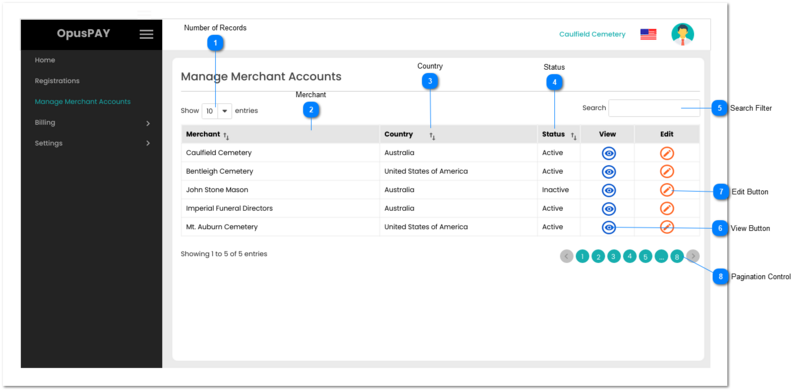
Merchants Grid

The Merchants Grid lists all Merchants registered with OpusPAY and approved by an OpusPAY administrator. It also enables users to search Merchants, sort the grid results by columns, and view more details about a Merchant.
 
Merchants Grid
1

Number of Records

 
Type
Notes
Rules
Compulsory
Format
Edit
Size
Default
Error Message
Combo-Box
-
1. This should allow the user to select an option to control the number of merchant records visible in the grid.
 
2. Displays following options to select from:
 
  • 10
  • 25
  • 50
  • 100
 
-
-
Y
-
10
-
2

Merchant

 
Type
Notes
Rules
Compulsory
Format
Edit
Size
Default
Error Message
Column
-
1. This column should display the names of the merchants with a status of Approved.
 
2. This should be sortable.
-
-
N
-
-
-
3

Country

 
Type
Notes
Rules
Compulsory
Format
Edit
Size
Default
Error Message
Column
-
1. This column should display the country the merchants is located in.
 
2. This should be sortable.
-
-
N
-
-
-
4

Status

 
Type
Notes
Rules
Compulsory
Format
Edit
Size
Default
Error Message
Column
1. Active merchants should be able to be transactions via OpusPAY.
 
2. When a merchant is inactivate they will no longer be able to process transactions via OpusPAY. However, they will still be able to log into the Merchant Portal.
1. This should display the Status of the merchant.
 
2. This should be sortable.
-
-
N
-
-
-
5

Search Filter

 
Type
Notes
Rules
Compulsory
Format
Edit
Size
Default
Error Message
Text
-
1. Filters the grid by matching the input entered by the user across the "Merchant" and "Country" grid columns.
 
2. Filter results based on each character entered. For example:
  • if "f" is entered, only the fourth row in the on screen example will be displayed. This is based on "Funeral" within the merchant name of Imperial Funeral Directors in the Merchant column
  • If "un" is entered only the second and fifth row in the on screen example will be displayed based on "United" in the Country column
 
-
-
Y
-
-
-
6

View Button

 
Type
Notes
Rules
Compulsory
Format
Edit
Size
Default
Error Message
Button
-
1. This should navigate the user to the Merchant Summary screen and display it in view mode. Refer to the specification for that screen here.
-
-
Y
-
-
-
7

Edit Button

 
Type
Notes
Rules
Compulsory
Format
Edit
Size
Default
Error Message
Button
-
1. This should navigate the user to the Merchant Summary screen and display it in edit mode. Refer to the specification for that screen here.
-
-
Y
-
-
-
8

Pagination Control

 
Type
Notes
Rules
Compulsory
Format
Edit
Size
Default
Error Message
Button
-
1. This should allow the users to paginate through the Merchant grid records.
 
2. To determine the number of pagination buttons to display please follow the current logic that is being used in byondcloud.
-
-
Y
-
-
-