OpusPAY
User guide
×
Menu
Index

Security Profiles

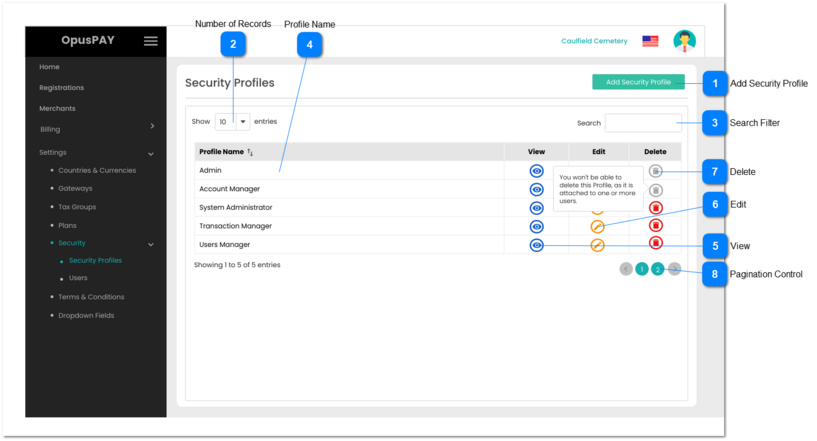
This screen allows the user to manage security profiles in OpusPAY administrator portal.
 
Admin profile needs to be created and be available to all users by default. Admin Profile has full access to all functions and cannot be Edited or Deleted.
 
Security Profiles
1

Add Security Profile

 
Type
Notes
Rules
Compulsory
Format
Edit
Size
Default
Error Message
Button
-
1. The user is navigated to the Add\Edit Profile page after clicking this button. Refer to the specification for that page here.
-
-
-
-
-
-
2

Number of Records

 
Type
Notes
Rules
Compulsory
Format
Edit
Size
Default
Error Message
Combo-Box
-
1. This should allow the user to select an option to control the number of Security Profile records visible in the grid.
 
2. Displays following options to select from:
 
  • 10
  • 25
  • 50
  • 100
 
-
-
Y
-
10
-
3

Search Filter

 
Type
Notes
Rules
Compulsory
Format
Edit
Size
Default
Error Message
Text
-
1. Filters the grid by matching the input entered by the user across the Profile Name column.
-
-
Y
-
-
-
4

Profile Name

 
Type
Notes
Rules
Compulsory
Format
Edit
Size
Default
Error Message
Column
-
1. This should display the Security Profile Names.
 
2. This should be sortable.
-
-
N
-
-
-
5

View

 
Type
Notes
Rules
Compulsory
Format
Edit
Size
Default
Error Message
Button
-
1. This should open the Security Profile screen in view mode. Refer to the specification for that screen here.
-
-
-
-
-
-
6

Edit

 
Type
Notes
Rules
Compulsory
Format
Edit
Size
Default
Error Message
Button
-
1. The should open the Security Profile screen in edit mode. Refer to the specification for that screen here.
 
2. Edit button for the Admin profile should be greyed out and disabled. Hovering over this button should display the following message to the user: "Admin profile cannot be edited."
-
-
-
-
-
-
7

Delete

 
Type
Notes
Rules
Compulsory
Format
Edit
Size
Default
Error Message
Button
-
1. This should allow the user to delete a Security Profile.
 
2. This should be greyed out and disabled if a Security Profile is attached to a User. Hovering over this button should display the following message to the user: "You won't be able to delete this Profile, as it is attached to one or more users."
 
3. Delete button for the Admin profile should be greyed out and disabled. Hovering over this button should display the following message to the user: "Admin profile cannot be deleted."
-
-
-
-
-
-
8

Pagination Control

 
Type
Notes
Rules
Compulsory
Format
Edit
Size
Default
Error Message
Button
-
1. This should allow the users to paginate through the Security Profile grid records.
 
2. To determine the number of pagination buttons to display please follow the current logic that is being used in byondcloud.
-
-
-
-
-
-