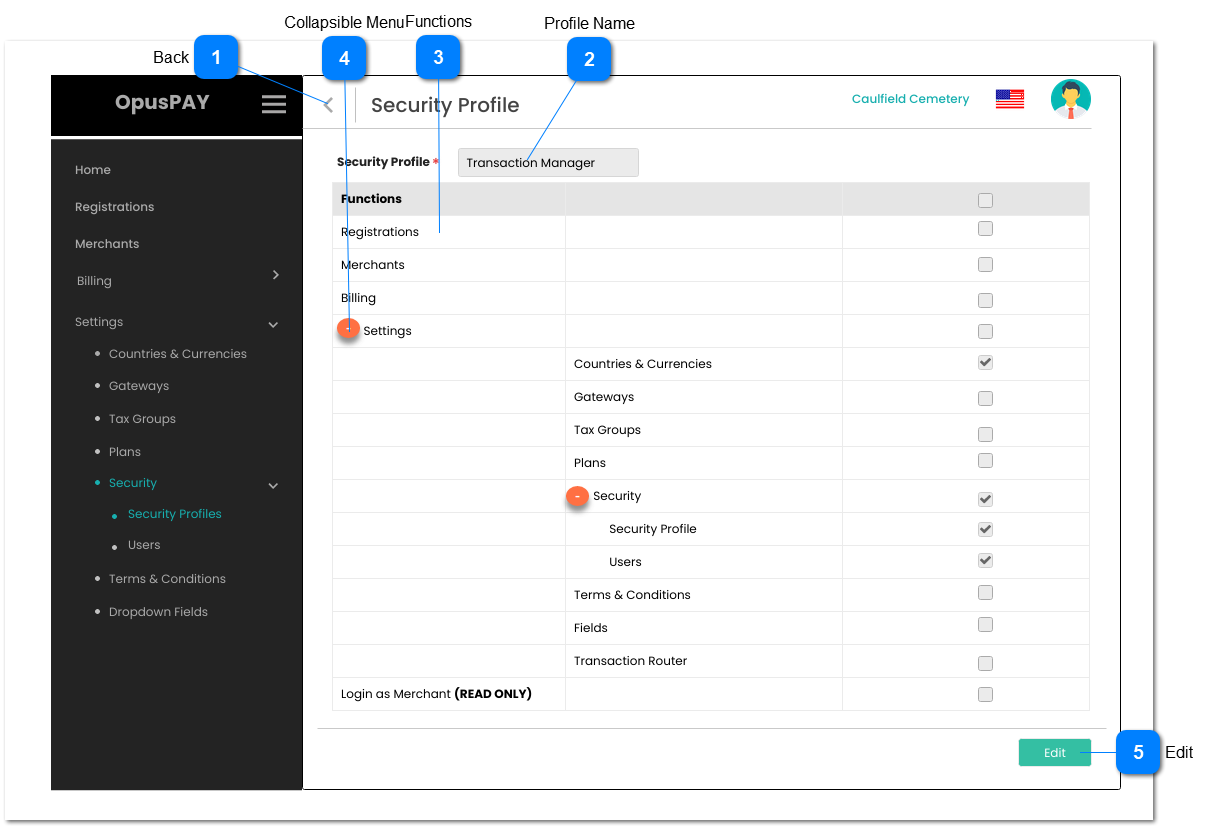
This page allows the user to view Security Profile details.
 Back
|
Type
|
Notes
|
Rules
|
Compulsory
|
Format
|
Edit
|
Size
|
Default
|
Error Message
|
|
Button
|
-
|
1. This should allow the user to navigate to Security Profiles screen when clicked. Refer to the specification for that screen here.
|
-
|
-
|
Y
|
-
|
-
|
-
| |
|
 Profile Name
|
Type
|
Notes
|
Rules
|
Compulsory
|
Format
|
Edit
|
Size
|
Default
|
Error Message
|
|
Text
|
-
|
1. This should display the Security Profile name to the user.
|
Y
|
-
|
N
|
255
|
-
|
-
| |
|
 Functions
|
Type
|
Notes
|
Rules
|
Compulsory
|
Format
|
Edit
|
Size
|
Default
|
Error Message
|
|
Column
|
-
|
1. Lists all the functions in OpusPAY admin portal.
|
-
|
-
|
-
|
-
|
-
|
-
| |
|
 Collapsible Menu
|
Type
|
Notes
|
Rules
|
Compulsory
|
Format
|
Edit
|
Size
|
Default
|
Error Message
|
|
Menu Icon
|
-
|
1. The Collapsible menu allows the functions to appear in groups to reflect the OpusPAY admin portal's menu structure.
2. The menu icon should swap to minus "-" symbol when clicked and expanded.
3. The menu icon should swap to plus "+" when clicked and collapsed.
|
-
|
-
|
-
|
-
|
-
|
-
| |
|
 Edit
|
Type
|
Notes
|
Rules
|
Compulsory
|
Format
|
Edit
|
Size
|
Default
|
Error Message
|
|
Button
|
-
|
1. This should allow the user to open the Security Profile screen in edit mode. Refer to the specification for that screen here.
|
-
|
-
|
Y
|
-
|
-
|
-
| |
|