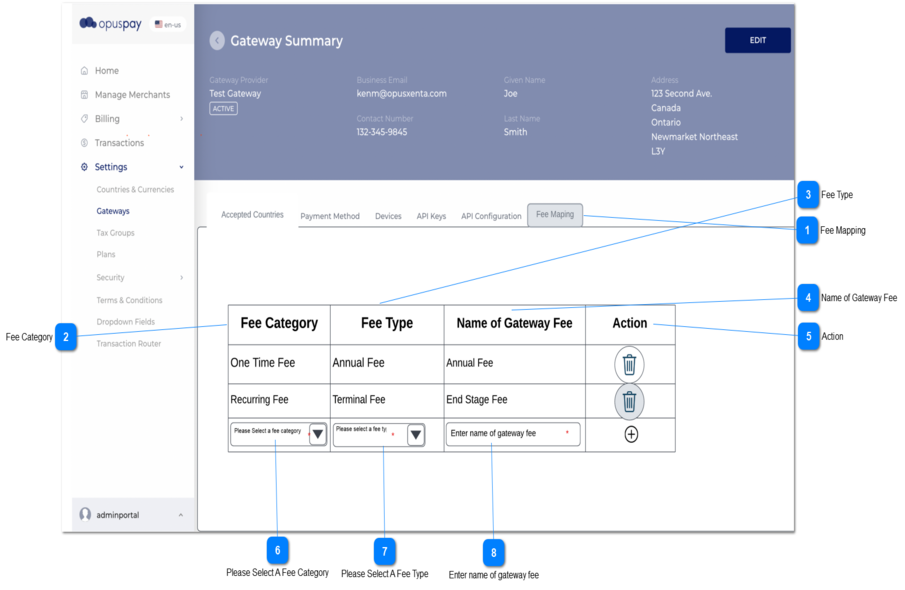
1. The Delete button will be shown against each existing record in the table.
1a. From the back-end, the system will check whether a record is currently using in the gateway, if it is using then the delete button should be inactive else it should be active.
1b. A notification message should also be displayed once the user hovers over a disabled delete button.
1c. Once the user clicks on the delete button, then Delete confirmation message will be displayed.
2. Add button will be always be shown as the last row of the table.
2b. To add a record to the table, the user should click on Add button in last row once the Fee Category, Fee Type and Name of the Gateway are added to the relevant fields.
3. Above conditions will be checked and warning messages will be displayed once the user clicks on Add button.
--
-
-
-
-
1b. You won't be able to delete this record, as it is linked with a gateway.
1.Under Fee Type column, there should be a dropdown called 'please select a Fee Type', the user can select an option from the dropdown list. Dropdown list has following hard - coded fee types:
Transaction Fee
Event Based Fee
Recurring Fee
One Time Fee
2. If the user is trying to Save a record without selecting the Fee Category, then a message will be displayed.