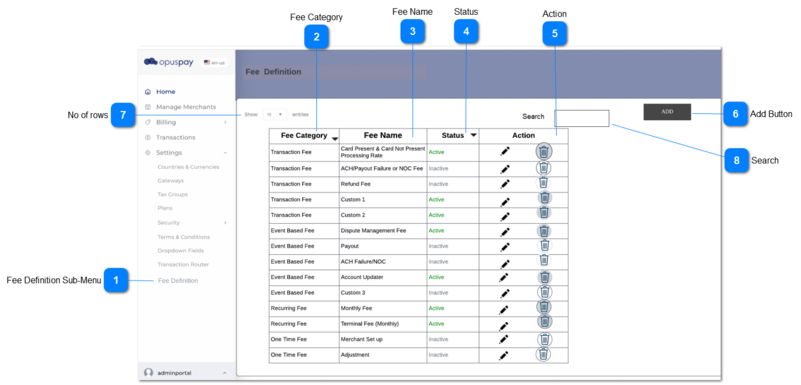
1. There will be following buttons in action column.
1a. Delete
This should display a button to delete rows from the grid.
Once the user clicks on delete button in a row, the system should pop up a delete confirmation message.
If the fee is mapped with a gateway, then the system disable the delete button, once the user hover the cursor over the disabled delete button, a warning message (tool Tip) should be displayed.
1b. Edit
I. Once the user clicks on the Edit button, the record will open in New Fee Definition side panel and that record is editable there, therefore the user can edit 'Fee Category', 'Fee Name' and 'Status'.
User can edit only records which are not in use by a gateway. (System should check wether a record is linked to a gateway or not from the back-end)
a. All active fee definition records may / may not be used by a gateway but definitely an inactive record cannot be used for gateways
b. Therefore when editing a record,
if it is active, the system should check whether it is in use by a gateway from the back-end.
II. After editing the user should click on the save button to save the record in database.
-
-
N
-
-
1a. II. ''You are about to delete a record. This cannot be undone. Are you sure want to continue?'
1a. III. You won't be able to delete this record, as it is linked with a gateway.