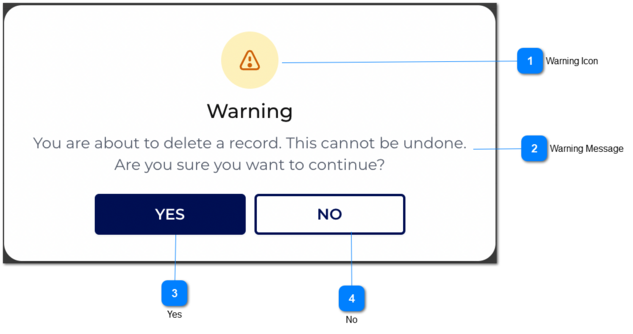
Delete Confirmation Message
 Warning Icon
|
Type
|
Notes
|
Rules
|
Compulsory
|
Format
|
Edit
|
Size
|
Default
|
Error Message
|
|
Icon
|
-
|
1. There should be a warning icon as per the image.
|
-
|
-
|
-
|
-
|
-
|
-
| |
|
 Warning Message
|
Type
|
Notes
|
Rules
|
Compulsory
|
Format
|
Edit
|
Size
|
Default
|
Error Message
|
|
Warning Message
|
-
|
1. The heading will be the 'Warning'.
2. A warning message should be displayed.
|
-
|
-
|
-
|
-
|
-
|
'You are about to delete a record. This cannot be undone. Are you sure want to continue?'
| |
|
 Yes
|
Type
|
Notes
|
Rules
|
Compulsory
|
Format
|
Edit
|
Size
|
Default
|
Error Message
|
|
Button
|
-
|
1. The name of the button is 'Yes'.
2. If the user clicks on 'Yes' button, then the relevant record should be deleted from database and also it should not be shown in following modules.
|
-
|
-
|
-
|
-
|
-
|
-
| |
|
 No
|
Type
|
Notes
|
Rules
|
Compulsory
|
Format
|
Edit
|
Size
|
Default
|
Error Message
|
|
Button
|
-
|
1. The name of the button is 'NO'.
2. If the user clicks on 'NO' button, then the relevant record should not be deleted from database therefore it should be shown in following modules.
|
-
|
-
|
-
|
-
|
-
|
-
| |
|