To properly display this page you need a browser with JavaScript support.
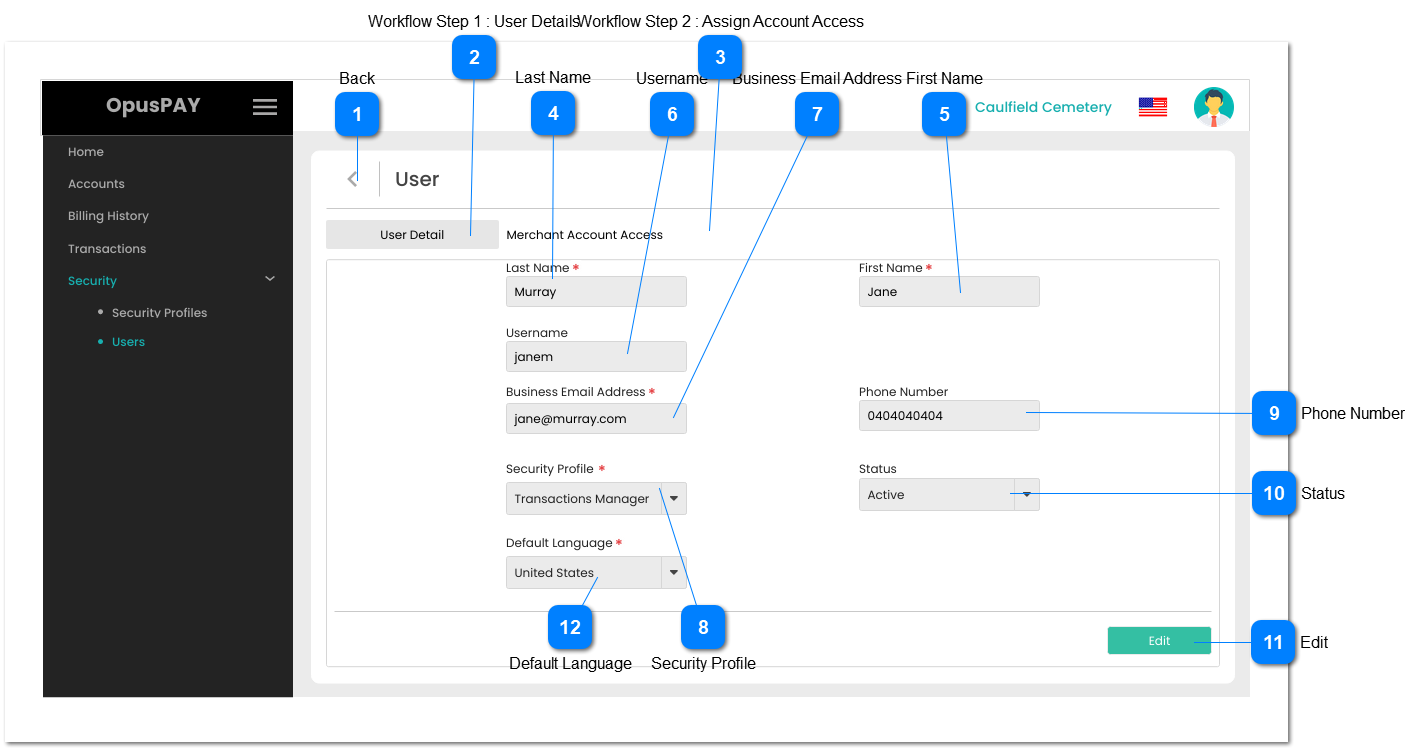
This screen allows the user to view user details.
Back
Type
Notes
Rules
Compulsory
Format
Edit
Size
Default
Error Message
Button
-
1. This should allow the user to navigate to Users screen when clicked. Refer to the specification for that screen here .
-
-
-
-
-
-
Workflow Step 1 : User Details
Type
Notes
Rules
Compulsory
Format
Edit
Size
Default
Error Message
Tab
-
1. This displays the User Details.
2. The tab should be highlighted to identify the tab the user is currently on.
-
-
-
-
-
-
Workflow Step 2 : Assign Account Access
Type
Notes
Rules
Compulsory
Format
Edit
Size
Default
Error Message
Tab
-
1. This is the second tab allowing the user to view their Merchant Account Access.
2. Clicking on this tab will navigate the user to the Merchant Account Access screen. Refer to the specification for that screen here .
-
-
Y
-
-
-
Last Name
Type
Notes
Rules
Compulsory
Format
Edit
Size
Default
Error Message
Text
-
1. This should display the user's Last Name.
Y
-
N
255
-
-
First Name
Type
Notes
Rules
Compulsory
Format
Edit
Size
Default
Error Message
Text
-
1. This should display the user's First Name.
Y
-
N
255
-
-
Username
Type
Notes
Rules
Compulsory
Format
Edit
Size
Default
Error Message
Text
-
1. This should display the user's Username.
Y
-
N
255
-
-
Business Email Address
Type
Notes
Rules
Compulsory
Format
Edit
Size
Default
Error Message
Text
-
1. This should display the user's Business Email Address.
Y
-
N
255
-
-
Security Profile
Type
Notes
Rules
Compulsory
Format
Edit
Size
Default
Error Message
Combo-Box
-
1. This should display the Security Profile assigned to the user.
Y
-
N
255
-
-
Phone Number
Type
Notes
Rules
Compulsory
Format
Edit
Size
Default
Error Message
Text
-
1. This should display the user's Phone Number.
-
-
N
255
-
-
Status
Type
Notes
Rules
Compulsory
Format
Edit
Size
Default
Error Message
Combo-Box
-
1. This should display the user's Status.
-
-
N
-
-
-
Edit
Type
Notes
Rules
Compulsory
Format
Edit
Size
Default
Error Message
Button
-
1. If the user is editing their own profile, navigate the user to the Edit User's Own Details screen. Refer to specifications for that screen here .
2. If the user is editing someone else's profile, navigate the user to the Edit User (Details) screen. Refer to the specification for that screen here .
-
-
-
-
-
-
Default Language
Type
Notes
Rules
Compulsory
Format
Edit
Size
Default
Error Message
Combo-Box
-
1. This should display the Default Language the user selected.
Y
-
N
255
First language in the list
-