OpusPAY
User guide
×
Menu
Index

Sign in Password

 
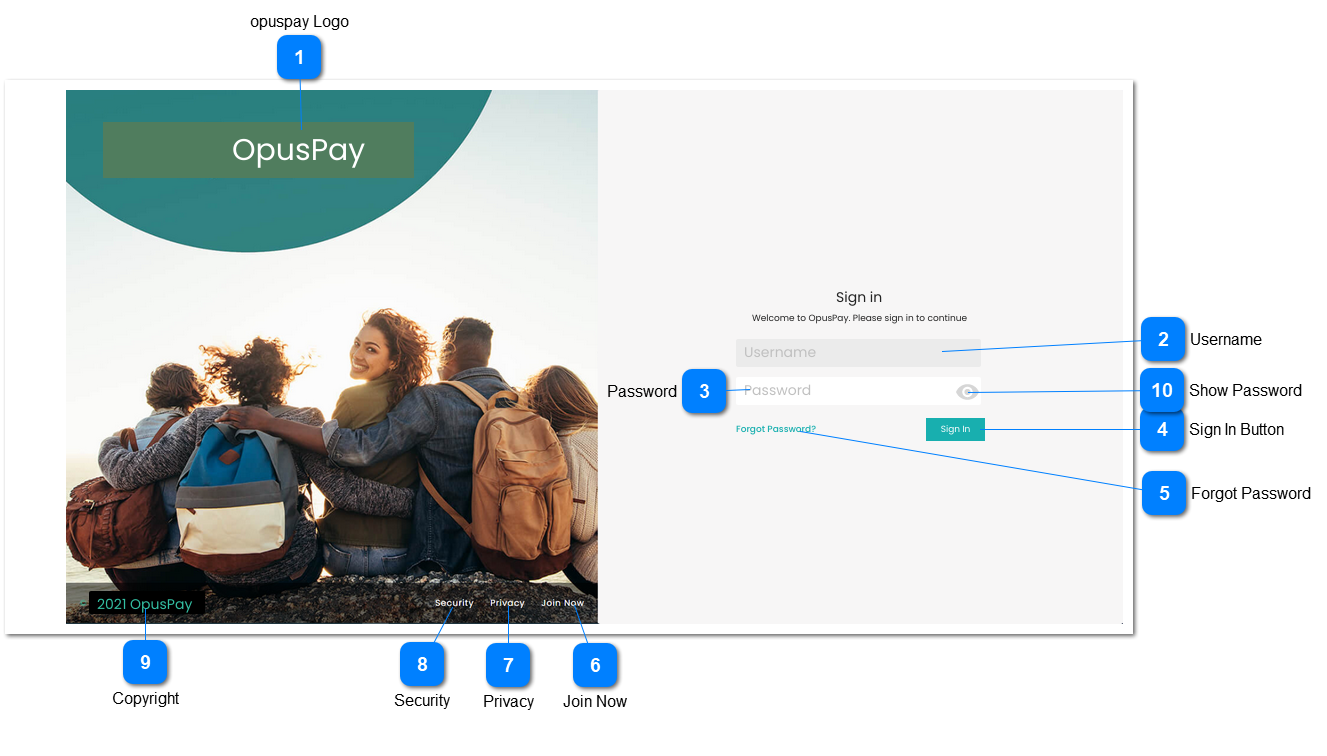
Sign in password entry screen for opuspay. Same sign in password page would be used for both Admin and Merchant portals. This screen will function in the same way as the byondcloud Sign in password screen.
 
Sign in Password
1

opuspay Logo

 
Type
Notes
Rules
Compulsory
Format
Edit
Size
Default
Error Message
Logo
-
1. This should display the opuspay logo.
-
-
-
-
-
-
-
2

Username

 
Type
Notes
Rules
Compulsory
Format
Edit
Size
Default
Error Message
Text
-
1. This should display the users username.
Y
-
N
-
-
-
3

Password

 
Type
Notes
Rules
Compulsory
Format
Edit
Size
Default
Error Message
Text
-
1. This allows the user to enter their password.
 
2. Passwords must be salted and hashed.
 
3. Display an inline error message in red text below password field If password is blank or invalid and user presses <ENTER>.
Y
-
Y
255
-
3. Invalid password.
4

Sign In Button

 
Type
Notes
Rules
Compulsory
Format
Edit
Size
Default
Error Message
Button
-
1. Searches database for matching password for user.
 
2. If password matches AND this is Sign In for the Admin Portal, display Admin Portal Home screen. Refer to the specification of that screen here.
 
3. If password matches AND this is Sign In for the Merchant Portal, display Merchant Portal Home screen. Refer to the specification of that screen here.
 
4. Display an inline error message in red text below password field If password is blank or invalid.
-
-
-
-
-
5. Invalid password.
5

Forgot Password

 
Type
Notes
Rules
Compulsory
Format
Edit
Size
Default
Error Message
Hyperlink
-
1. Display Forgot Password screen. Refer to the specifications of that screen here.
-
-
-
-
-
-
6

Join Now

 
Type
Notes
Rules
Compulsory
Format
Edit
Size
Default
Error Message
Hyperlink
-
1. Display Registration screen. Refer to the specifications of that screen here.
-
-
-
-
-
-
7

Privacy

 
Type
Notes
Rules
Compulsory
Format
Edit
Size
Default
Error Message
Hyperlink
-
1. Display OpusXenta Privacy Policy. URL is  https://opusxenta.com/privacy
-
-
-
-
-
-
8

Security

 
Type
Notes
Rules
Compulsory
Format
Edit
Size
Default
Error Message
Hyperlink
-
1. Display OpusXenta Infrastructure, Data and Security Overview. URL is  https://opusxenta.com/security
-
-
-
-
-
-
9

Copyright

 
Type
Notes
Rules
Compulsory
Format
Edit
Size
Default
Error Message
Text
-
1. Display opuspay copyright.
-
-
-
-
-
-
10

Show Password

 
Type
Notes
Rules
Compulsory
Format
Edit
Size
Default
Error Message
Icon
 
1. This should allow the user to view their hashed password in a readable format if clicked.
 
2. This should allow the user to revert to hashed password from readable format if clicked.
-
-
-
-
-
-