To properly display this page you need a browser with JavaScript support.
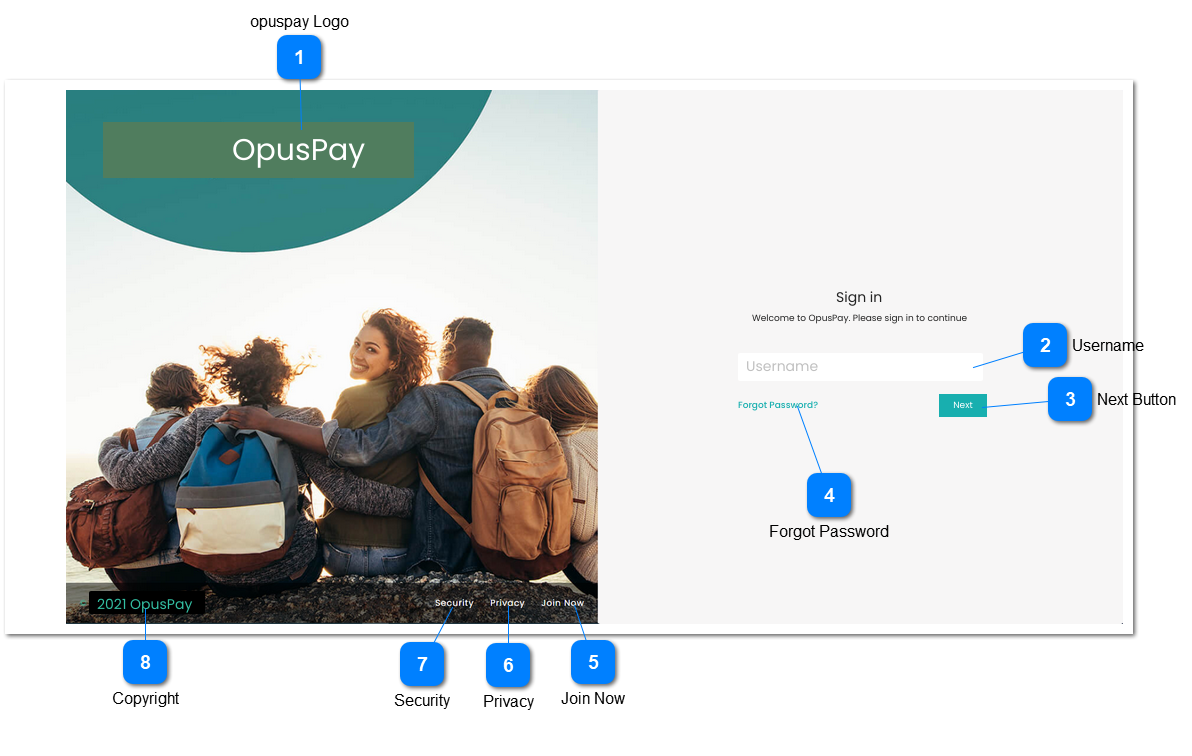
Sign in screen for opuspay. Same sign in page would be used for both Admin and Merchant portals. This screen will function in the same way as the byondcloud Sign in screen.
opuspay Logo
Type
Notes
Rules
Compulsory
Format
Edit
Size
Default
Error Message
Logo
-
1. This should display the opuspay logo.
-
-
-
-
-
-
Username
Type
Notes
Rules
Compulsory
Format
Edit
Size
Default
Error Message
Text
-
1. This should allow the user to enter their username.
2. This should display an inline error message in red text below this field if the user presses <ENTER> without populating this field.
3. This should display an inline error message in red text below this field if the user enters an incorrect username and presses <ENTER>.
Y
-
Y
255
-
2. Username is required.
3. Invalid username.
Next Button
Type
Notes
Rules
Compulsory
Format
Edit
Size
Default
Error Message
Button
-
1. Searches database for matching username.
2. If username is found, display Password screen. Refer to the specification of that screen here .
3. Display an inline error message in red text below username field if username is not populated.
4. Display an inline error message in red text below username field If username is not found.
-
-
-
-
-
3. Username is required.
4. Invalid username.
Forgot Password
Type
Notes
Rules
Compulsory
Format
Edit
Size
Default
Error Message
Hyperlink
-
1. Display Forgot Password screen. Refer to the specifications of that screen here .
-
-
-
-
-
-
Join Now
Type
Notes
Rules
Compulsory
Format
Edit
Size
Default
Error Message
Hyperlink
-
1. Display Registration screen. Refer to the specifications of that screen here .
-
-
-
-
-
-
Privacy
Type
Notes
Rules
Compulsory
Format
Edit
Size
Default
Error Message
Hyperlink
-
-
-
-
-
-
-
Security
Type
Notes
Rules
Compulsory
Format
Edit
Size
Default
Error Message
Hyperlink
-
-
-
-
-
-
-
Copyright
Type
Notes
Rules
Compulsory
Format
Edit
Size
Default
Error Message
Text
-
-
-
-
-
-
-