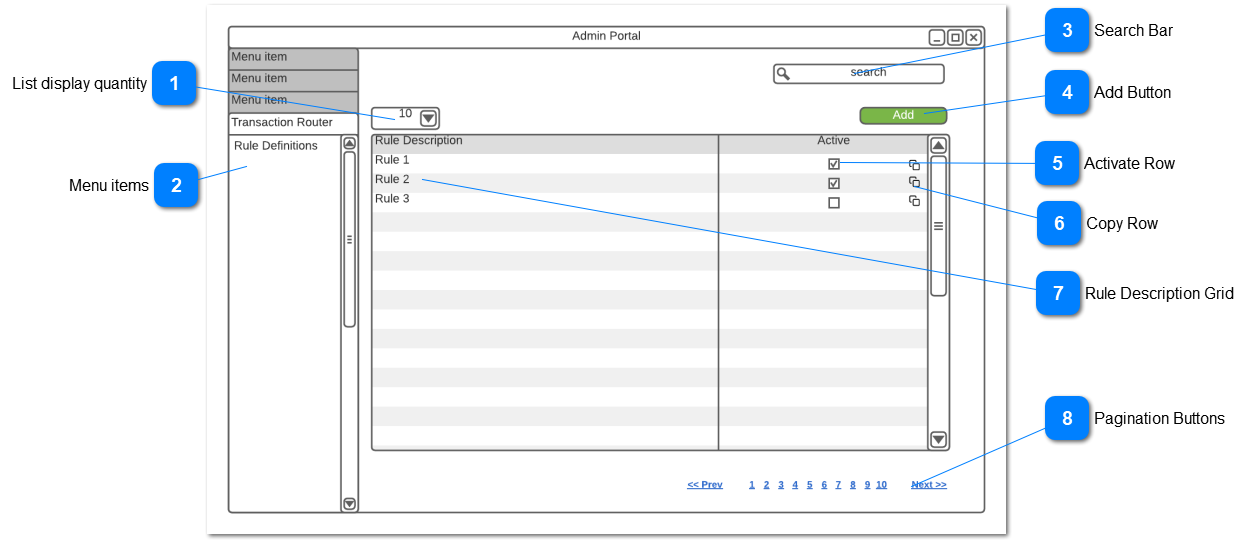
Show a list of rules that have already been defined.
 List display quantity
Select the quantity of records to display
|
Type
|
Notes
|
Rules
|
Compulsory
|
Format
|
Edit
|
Size
|
Default
|
Error Message
|
|
ComboxBox
|
|
Default list quantity display widget
|
|
|
|
|
10
|
| |
|
 Menu items
These menu items provide access to the Trnasaction Router functions
|
Type
|
Notes
|
Rules
|
Compulsory
|
Format
|
Edit
|
Size
|
Default
|
Error Message
|
|
Menu
|
Security Profiles and security functions to be updated to include these menu items
|
-
Follow default menu styling and functions
-
Menu grouping for Transaction Router
-
Menu item for Rule Definitions
|
-
|
Text
|
-
|
-
|
-
|
-
| |
|
 Search Bar
Allows for the search of rule definitions
|
Type
|
Notes
|
Rules
|
Compulsory
|
Format
|
Edit
|
Size
|
Default
|
Error Message
|
|
Text
|
|
-
Perform a search on the Rules Definition description field
-
Use default search rules and widgets
|
-
|
Search
|
-
|
-
|
Blank
|
-
| |
|
 Add Button
This button is used to add new rules
|
Type
|
Notes
|
Rules
|
Compulsory
|
Format
|
Edit
|
Size
|
Default
|
Error Message
|
|
Button
|
|
|
-
|
Button
|
-
|
-
|
-
|
-
| |
|
 Activate Row
Function to activate or de-activate a row
|
Type
|
Notes
|
Rules
|
Compulsory
|
Format
|
Edit
|
Size
|
Default
|
Error Message
|
|
Checkbox
|
|
-
If selected then open Activate Pop-up
-
If de-selected then open De-Activate Pop-up
|
|
-
|
Y
|
|
Active
|
-
|
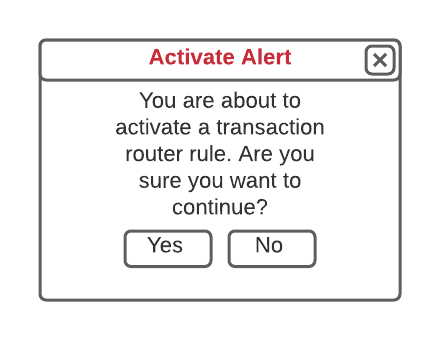
Activate Pop-Up
|
Type
|
Notes
|
Rules
|
Compulsory
|
Format
|
Edit
|
Size
|
Default
|
Error Message
|
|
Pop-Up
|
|
-
If Yes is selected then check the Active checkbox for that row and return to the rules list
-
If No, then close pop-up and return to the rules definition list
|
|
|
|
|
|
|
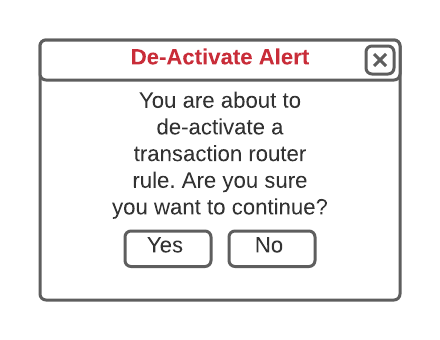
De-Activate Pop-Up
|
Type
|
Notes
|
Rules
|
Compulsory
|
Format
|
Edit
|
Size
|
Default
|
Error Message
|
|
Pop-Up
|
|
-
If Yes is selected then un-check the Active checkbox for that row and return to the rules list
-
If No, then close pop-up and return to the rules definition list
|
|
|
|
|
|
|
|
|
 Copy Row
Allows to copy a rule with all its definitions
|
Type
|
Notes
|
Rules
|
Compulsory
|
Format
|
Edit
|
Size
|
Default
|
Error Message
|
|
Button
|
|
-
If selected, then insert a new row into the grid
-
Copy the selected rule to the new row with the same rule name but with the words "[COPY]" at the front of the description
-
Insert all the rule definition detail from the copied ruled into the new rule
-
Mark the rule as In-Active
|
|
Button
|
|
|
|
| |
|
 Rule Description Grid
Shows a list of all (or search filtered) rule definitions.
|
Type
|
Notes
|
Rules
|
Compulsory
|
Format
|
Edit
|
Size
|
Default
|
Error Message
|
|
Grid
|
|
Displays a list of transaction router rules
|
|
|
N
|
|
|
|
|
Text
|
Rule Description column
|
-
-
Hyperlink each rule description
-
|
|
|
N
|
|
|
|
|
CheckBox
|
Active
|
-
CheckBox to show if a rul is active or not
-
|
|
|
Y
|
|
|
| |
|
 Pagination Buttons
Allows for the selection of pages where the quantity of records in the system/filtered exceed those being displayed
|
Type
|
Notes
|
Rules
|
Compulsory
|
Format
|
Edit
|
Size
|
Default
|
Error Message
|
|
Buttongroup
|
|
-
Use default pagination widget and functions
|
-
|
-
|
-
|
-
|
-
|
-
| |
|