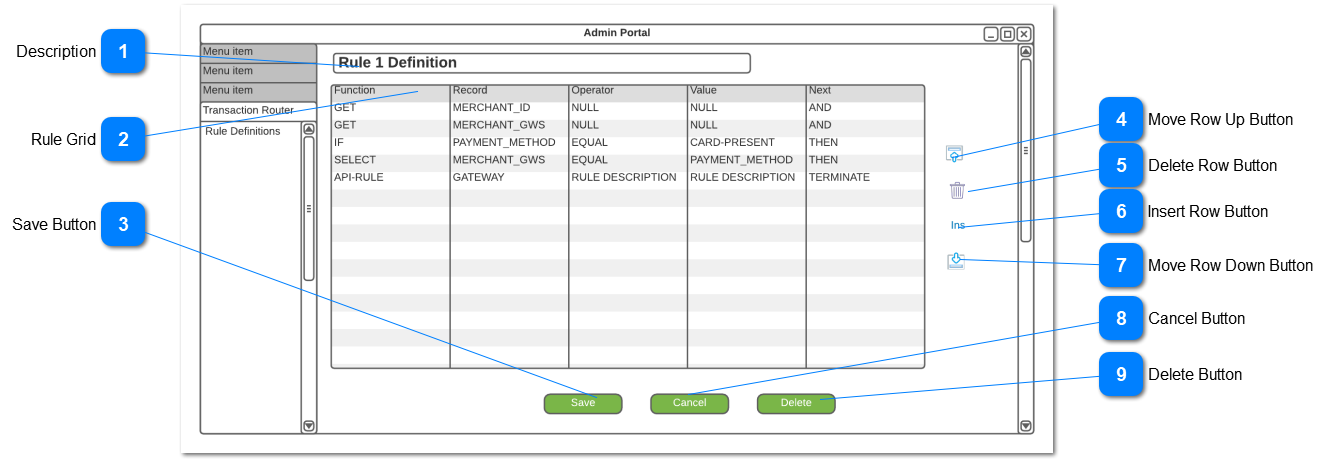
This function allows for the creation of the Transaction Router Rules that are to be applied to each transaction going through OpusPAY.
 Description
To describe the rule
|
Type
|
Notes
|
Rules
|
Compulsory
|
Format
|
Edit
|
Size
|
Default
|
Error Message
|
|
TextField
|
|
|
Y
|
Text
|
Y
|
200
|
|
-
Please enter a rule description
| |
|
 Rule Grid
Define the rule detail applicable to this rule
|
Type
|
Notes
|
Rules
|
Compulsory
|
Format
|
Edit
|
Size
|
Default
|
Error Message
|
|
Grid
|
|
-
A minimum of two rows is required
-
-
One row where "Next" is equal to "Terminate"
|
Y
|
Text
|
Y
|
|
|
Please add rules
|
|
ComboBox
|
Function
|
|
Y
|
Text
|
Y
|
|
|
Please add a function
|
|
ComboBox
|
Record
|
-
This will provide a list of all relevant fields in OpusPAY from which the user can select the field required for this rule
-
Where the Function is equal to "API RULE", allow for the selection of the Gateway applicable to this rule
|
Y
|
Text
|
Y
|
|
|
Please add a record
|
|
ComboBox
|
Operator
|
-
-
-
-
-
-
NULL will mean the operator is "Not Required"
|
Y
|
Text
|
Y
|
|
|
Please add an operator
|
|
ComboBox
|
Value
|
-
-
-
-
-
-
If Operator is RULE DESCRIPTIONS, allow for selection of a pre-defined RULE DESCRIPTION (e.g. payment)
-
-
If OTHER is selected then the user can enter any value
|
Y
|
Text
|
Y
|
|
|
Please add a value
|
|
ComboBox
|
Next
|
|
Y
|
Text
|
Y
|
|
|
Please add a condition
| |
|
 Save Button
Saves all the data in the grid
|
Type
|
Notes
|
Rules
|
Compulsory
|
Format
|
Edit
|
Size
|
Default
|
Error Message
|
|
Button
|
|
-
Perform validation to ensure that all rules in the grid are being adhered to
-
Save all lines in the grid
|
|
|
|
|
|
Please correct the field errors
| |
|
 Move Row Up ButtonMove the row up
|
Type
|
Notes
|
Rules
|
Compulsory
|
Format
|
Edit
|
Size
|
Default
|
Error Message
|
|
Button
|
|
-
Move the selected row up one row from current position and move the row immediately above into it's old position
|
|
|
|
|
|
| |
|
 Delete Row ButtonDelete a row
|
Type
|
Notes
|
Rules
|
Compulsory
|
Format
|
Edit
|
Size
|
Default
|
Error Message
|
|
Button
|
|
-
Delete the currently selected row
|
|
|
|
|
|
| |
|
 Insert Row ButtonInsert a row
|
Type
|
Notes
|
Rules
|
Compulsory
|
Format
|
Edit
|
Size
|
Default
|
Error Message
|
|
Button
|
|
-
Insert an empty row below the currently selected row
|
|
|
|
|
|
| |
|
 Move Row Down ButtonMove the row down
|
Type
|
Notes
|
Rules
|
Compulsory
|
Format
|
Edit
|
Size
|
Default
|
Error Message
|
|
Button
|
|
-
Move the selected row down one row from current position and move the row immediately below into it's old position
|
|
|
|
|
|
| |
|
 Cancel Button
Cancel the edits made without saving
|
Type
|
Notes
|
Rules
|
Compulsory
|
Format
|
Edit
|
Size
|
Default
|
Error Message
|
|
Button
|
|
-
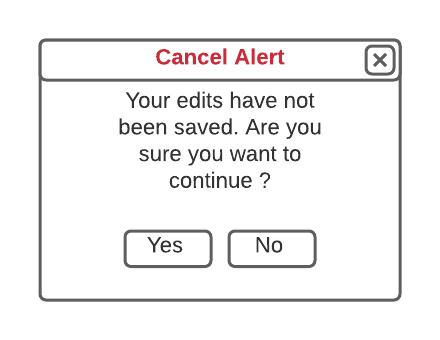
Pop up an alert window to confirm cancel Yes or No
-
If Yes then discard all edits, close pop-up and return to the Rule Definitions List
-
If No, then retain all edits, close pop-up and continue to edit the Rule Definition
|
|
|
|
|
|
|
Cancel Alert Pop-Up
|
|
 Delete Button
Delete the complete rule definition
|
Type
|
Notes
|
Rules
|
Compulsory
|
Format
|
Edit
|
Size
|
Default
|
Error Message
|
|
Button
|
|
-
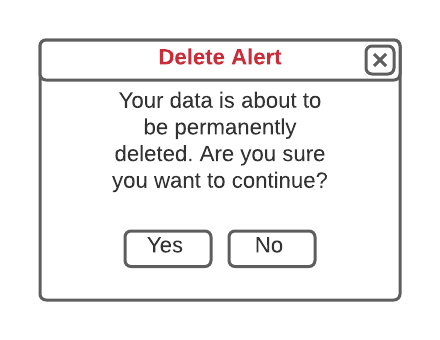
Pop-up alert window to confirm Deletion Yes or No
-
If Yes then discard all edits, close pop-up, delete the record and return to to the Rule Definitions List
-
If No, then retain all edits, close pop-up and continue to edit the Rule Definition
|
|
|
|
|
|
|
Delete Alert Pop-Up
|
|