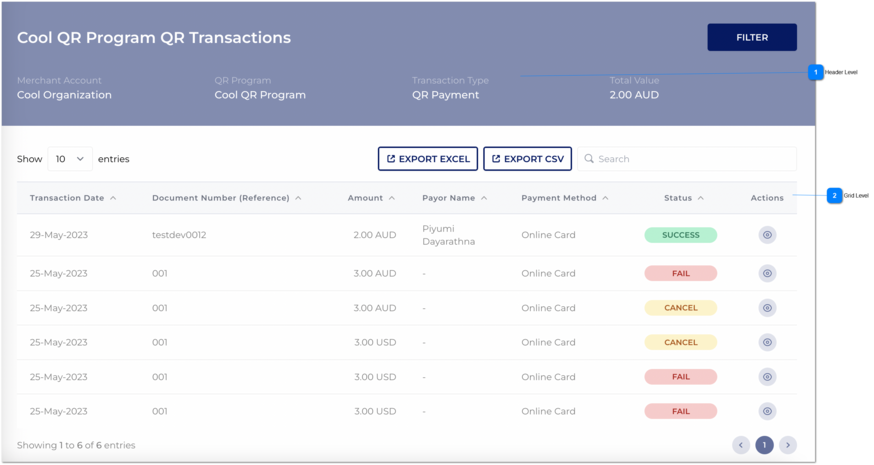
Existing system functionality would apply for show entries.
Button
Export Excel
Following would display in the header details of the excel/ CVS:
QR Program
Exported Date and Time
Merchant Account
Transaction Type
Total Value
Below are the field sequence of the exported Excel / CVS grid:
Transaction Date
Document Number (Reference)
Amount
Payor Name
Payment Method
Status
First Name
Last Name
Email Address
Billing Address line 1
Country
State
City
postal
1. Once the user click on 'export excel' button all the transactions would be exported as a excel and an email would send to logged user's business email address.
2. Excel name should be mentioned as "<<Program Name>> QR Transactions".
1. QR Transaction Excel will be sent to your business email address.
Button
Export CSV
Following would display in the header details of the excel/ CVS:
QR Program
Exported Date and Time
Merchant Account
Transaction Type
Total Value
Below are the field sequence of the exported Excel / CVS grid:
Transaction Date
Document Number (Reference)
Amount
Payor Name
Payment Method
Status
First Name
Last Name
Email Address
Billing Address line 1
Country
State
City
postal
1. Once the user click on 'export CSV' button all the transactions would be exported as a excel and an email would send to logged user's business email address.