To properly display this page you need a browser with JavaScript support.
Transactions Viewing and Reporting A list of Transactions API needs to be exposed to consume data from the data warehouse using the ODATA or similar Technology for analysis and reporting purposes. this should be the same technology as is used for byondpro customer access
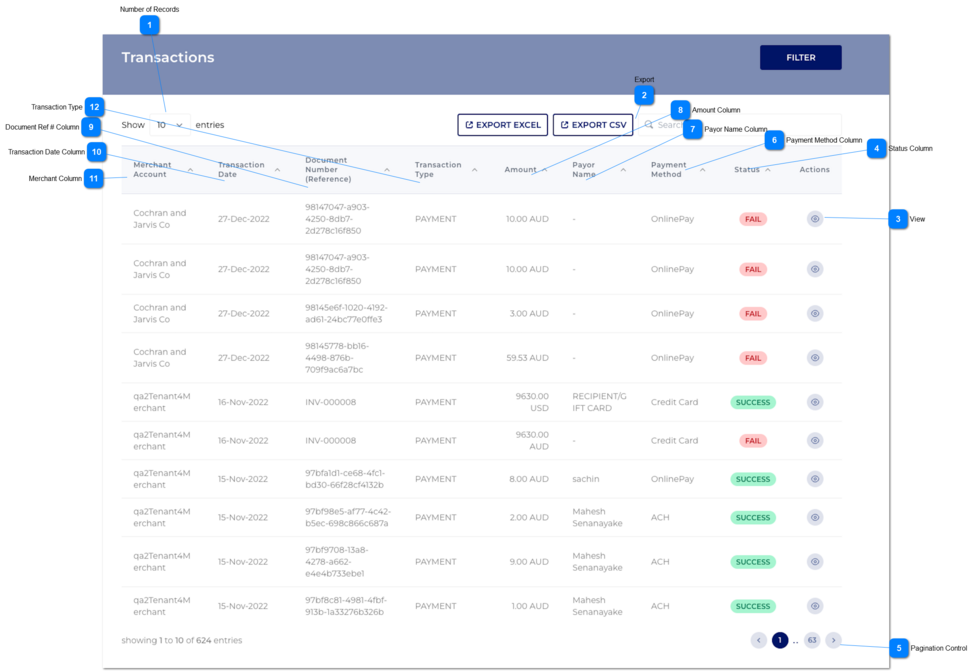
This module allows the user to search through transactions using various parameters.
Number of Records
Type
Notes
Rules
Compulsory
Format
Edit
Size
Default
Error Message
Combo-Box
-
1. This should allow the user to select an option to control the number of transaction records visible in the grid.
2. Displays following options to select from:
-
-
Y
-
10
-
Export
Type
Notes
Rules
Compulsory
Format
Edit
Size
Default
Error Message
-
There are two types of export buttons.
1. Export Excel
2. Export CSV
-
-
Y
-
-
-
Button
Export Excel
If the user clicks on Export Excel button, then transactions were exported into an excel.
Then a success message would display.
Transaction Excel will be sent to the user's business email address.
Button
Export CSV
If the user clicks on Export Excel button, then transactions were exported into a csv file.
Then a success message would display.
Transaction CVS will be sent to the user's business email address.
View
Type
Notes
Rules
Compulsory
Format
Edit
Size
Default
Error Message
Button
-
1. This should allow the user to view transaction details via a pop-up modal. Refer to the specification for that page here .
-
-
-
-
-
-
Status Column
Type
Notes
Rules
Compulsory
Format
Edit
Size
Default
Error Message
Column
-
1. This should display the status of transactions.
2. This should be sort-able.
3. There are 5 type of statuses.
If the system failed the transaction, then it would display as 'Fail'.
If the user canceled the transaction, then it would display as 'Cancel'.
If the user proceed the transaction successfully, then it would display as 'Success'.
If the transaction is still processing, then it would display as 'Pending'.
If the transaction is declined from the gateway, then it would display as 'Decline'.
-
-
N
-
-
-
Pagination Control
Type
Notes
Rules
Compulsory
Format
Edit
Size
Default
Error Message
Button
-
1. This should allow the user to paginate through the transaction records when clicked.
2. To determine the number of pagination buttons to display please follow the current logic that is being used in byondcloud.
-
-
Y
-
-
-
Payment Method Column
Type
Notes
Rules
Compulsory
Format
Edit
Size
Default
Error Message
Column
-
1. This should display the Payment Method for the transactions.
2. This should be sortable.
-
-
N
-
-
-
Payor Name Column
Type
Notes
Rules
Compulsory
Format
Edit
Size
Default
Error Message
Column
-
1. This should display the Payor Name for the transactions.
2. This should be sortable.
-
-
N
-
-
-
Amount Column
Type
Notes
Rules
Compulsory
Format
Edit
Size
Default
Error Message
Column
-
1. This should display the transaction amounts.
2. This should be sortable.
-
-
N
-
-
-
Document Ref # Column
Type
Notes
Rules
Compulsory
Format
Edit
Size
Default
Error Message
Column
-
1. This should display the document number for the transactions.
2. This should be sortable.
-
-
N
-
-
-
Transaction Date Column
Type
Notes
Rules
Compulsory
Format
Edit
Size
Default
Error Message
Column
-
1. This should display the transaction dates.
2. This should be sortable.
-
-
N
-
-
-
Merchant Column
Type
Notes
Rules
Compulsory
Format
Edit
Size
Default
Error Message
Column
-
1. This should display the Merchant Account Name for the transactions.
2. This should be sortable.
-
-
N
-
-
-
Transaction Type
Type
Notes
Rules
Compulsory
Format
Edit
Size
Default
Error Message
Column
If the payment is based on a token then that transaction is identified as 'Recurring'.
The amount of this recurring transaction can be a credit / debit value due to a payment/ refund.
1.This column would capture the transaction types as per below.
-
-
N
-
-
-