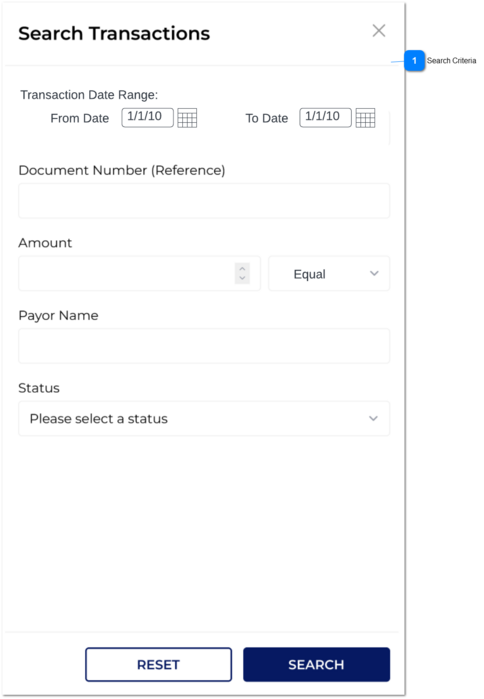
 Search Criteria
|
Type
|
Notes
|
Rules
|
Compulsory
|
Format
|
Edit
|
Size
|
Default
|
Error Message
|
|
Text
|
|
Following would be available as search criteria:
1.Transaction Date Range
a. From Date Picker
b. To Date Picker
2. Document Number (Reference)
3. Amount
4. Payor Name
5. Payment Method
6. Status
As operators for amount, below would be in the drop-down.
1. Equal
2. Greater than
3. Less than
4. Equal or greater than
5. Equal or less than
|
-
|
-
|
-
|
-
|
-
|
-
|
|
Date Picker
|
1. Date Range
a. From Date
b. To Date
|
From Date:
1. Future date cannot be selected. (This should be blocked through the date picker)
2. Always From Date should be the older date than To Date. If not system would show below validation message.
3. If only from date is given according to that given date, system will filter the date.
To Date:
1. Future date cannot be selected. (This should be blocked through the date picker)
2. If only to date is given according to that given date, system will filter the date.
|
|
|
|
|
|
2.Please select a valid date range.
|
|
Textfield
|
Document Number (Reference)
|
opuspay existing Document Number (Reference) filtration would apply here.
|
|
|
|
|
|
|
|
|
Amount
|
As operators for amount, below would be in the drop-down.
1. Equal
2. Greater than
3. Less than
4. Equal or greater than
5. Equal or less than
|
|
|
|
|
|
|
|
|
Payor Name
|
opuspay existing payor Name filtration would apply here.
|
|
|
|
|
|
|
|
|
Status
|
opuspay existing status Name filtration would apply here.
|
|
|
|
|
|
| |
|

