To properly display this page you need a browser with JavaScript support.
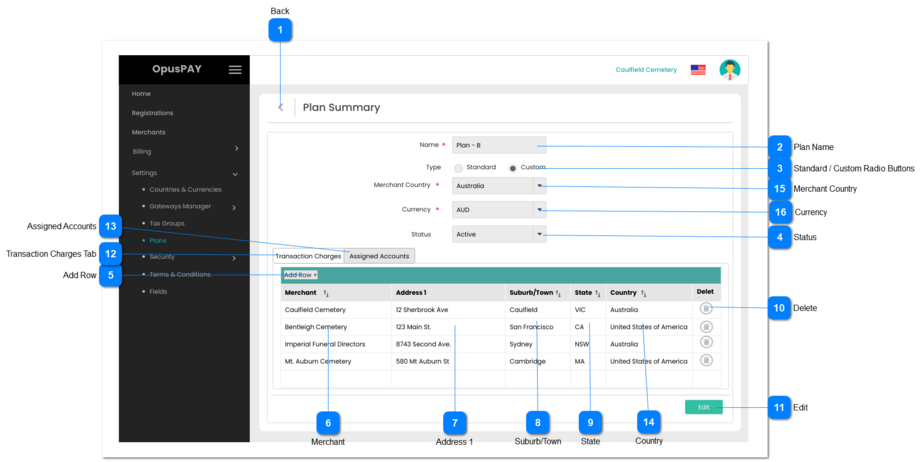
Plan Summary - Custom - Groups View This page allows the user to view a Custom Plan for merchants.
Back
Type
Notes
Rules
Compulsory
Format
Edit
Size
Default
Error Message
Button
-
1. Allows the user to navigate back to the Plans Grid screen. Refer to the specification for that page here .
-
-
-
-
-
-
Plan Name
Type
Notes
Rules
Compulsory
Format
Edit
Size
Default
Error Message
Text
-
1. This displays the name of the Plan.
Y
-
N
255
-
-
Standard / Custom Radio Buttons
Type
Notes
Rules
Compulsory
Format
Edit
Size
Default
Error Message
Radio Buttons
Standard Plan means OpusXenta is invoicing the merchant.
Custom Plan means Gateway is paying OpusXenta.
1. This displays if this is a Standard or Custom Plan.
-
-
N
-
Standard
-
Status
Type
Notes
Rules
Compulsory
Format
Edit
Size
Default
Error Message
Combo-Box
If the Plan Status = Active, the Plan can be assigned to merchants.
If the Plan Status = Inactive, it cannot be assigned to merchants.
1. Displays the Status of the Plan (Active or Inactive).
-
-
N
-
Active
-
Add Row
Type
Notes
Rules
Compulsory
Format
Edit
Size
Default
Error Message
Button
-
1. Allows the user to add Parent Merchant Accounts to the Plan.
-
-
Y
-
-
-
Merchant
Type
Notes
Rules
Compulsory
Format
Edit
Size
Default
Error Message
Dropdown
-
1. This displays the Parent Merchant Account for this Plan.
N
-
N
-
Blank
-
Address 1
Type
Notes
Rules
Compulsory
Format
Edit
Size
Default
Error Message
Text
-
1. Displays Address 1 of the Parent Merchant Account selected.
N
-
N
-
-
-
Suburb/Town
Type
Notes
Rules
Compulsory
Format
Edit
Size
Default
Error Message
Text
-
1. This displays the Suburb / Town of the Parent Merchant Account selected.
N
-
N
-
-
-
State
Type
Notes
Rules
Compulsory
Format
Edit
Size
Default
Error Message
Text
-
1. This displays the State of the Parent Merchant Account selected.
N
-
N
-
-
-
Delete
Type
Notes
Rules
Compulsory
Format
Edit
Size
Default
Error Message
Button
-
1. Allows the user to delete the Merchant from this Group.
-
-
N
-
-
-
Edit
Type
Notes
Rules
Compulsory
Format
Edit
Size
Default
Error Message
Button
-
1. This should open the Plan Summary in Edit mode. Refer to the specification for the modal here .
-
-
Y
-
-
-
Transaction Charges Tab
Type
Notes
Rules
Compulsory
Format
Edit
Size
Default
Error Message
Tab
-
1. This displays the Tier levels for this Plan.
-
-
Y
-
-
-
Assigned Accounts
Type
Notes
Rules
Compulsory
Format
Edit
Size
Default
Error Message
Tab
-
1. This tab displays all Parent Merchant Accounts added to this group plan.
2. This tab should be highlighted to identify the tab the user is on.
-
-
Y
-
-
-
Country
Type
Notes
Rules
Compulsory
Format
Edit
Size
Default
Error Message
Text
-
1. This displays the Country of the Parent Merchant Account selected.
N
-
N
-
-
-
Merchant Country
Type
Notes
Rules
Compulsory
Format
Edit
Size
Default
Error Message
Combo-Box
-
1. Displays the country that this Plan applies to.
2. The country selected determines which merchants the Plan is available for. If a merchant is not in the country selected, this Plan cannot be linked to the merchant.
-
-
-
-
-
-
Currency
Type
Notes
Rules
Compulsory
Format
Edit
Size
Default
Error Message
Combo-Box
-
1. Allows the user to select the billing currency for this Plan. Merchants assigned to this plan will be billed in the currency selected.
2. The country selected determines which currency is available for the Plan. Refer to the specification for this screen here .
3. If only one currency is available for the country selected, set this field to the currency by default.
4. If user clicks on Save without selecting a Currency, display inline error message.
Y
-
Y
-
-
4. Please select a Currency