To properly display this page you need a browser with JavaScript support.
Organisation Name and Address
Type
Notes
Rules
Compulsory
Format
Edit
Size
Default
Error Message
Text
-
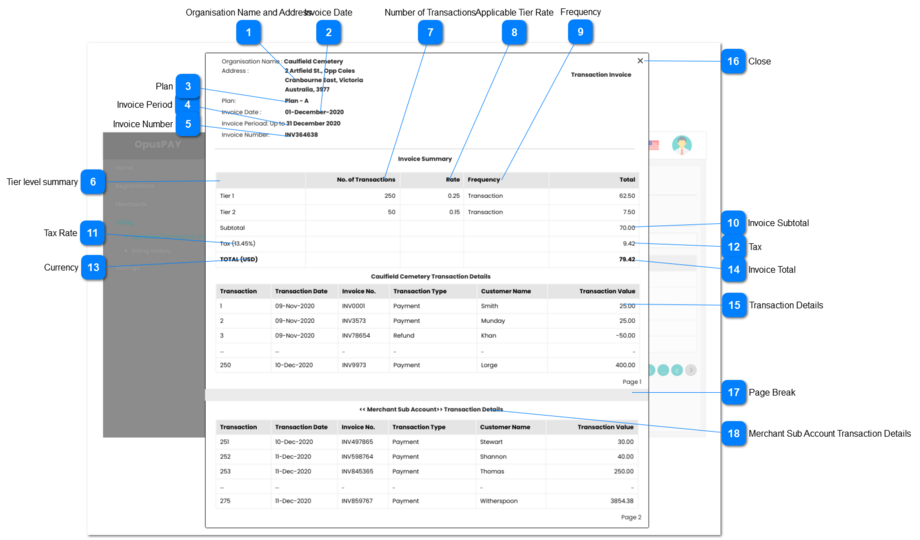
1. Displays the name of merchant the invoice is generated for.
-
-
N
-
-
-
Invoice Date
Type
Notes
Rules
Compulsory
Format
Edit
Size
Default
Error Message
Text
-
1. Displays the Invoice Date provided on the Generate Invoices screen. Refer to the specifications for that screen here .
-
-
N
-
-
-
Plan
Type
Notes
Rules
Compulsory
Format
Edit
Size
Default
Error Message
Text Field
-
1. This will display the Plan assigned to the Merchant. Refer to the specifications of that screen here .
-
-
N
-
-
-
Invoice Period
Type
Notes
Rules
Compulsory
Format
Edit
Size
Default
Error Message
Text Field
If first time invoice generation show as "Up to <Invoice Period To Date>"
2. If there are already generated invoices then, show "<Last Invoice Date> to <Invoice Period To Date>"
1. This will display the Invoice Period provided by the Generate Invoices screen - Preview Button click. Refer to the specifications of that screen here .
-
-
N
-
-
-
Invoice Number
Type
Notes
Rules
Compulsory
Format
Edit
Size
Default
Error Message
Text Field
-
1. This will display the Invoice Number generated by the Generate Invoices - Accept button click. Refer to the specifications for that screen here .
-
-
N
-
-
-
Tier level summary
Type
Notes
Rules
Compulsory
Format
Edit
Size
Default
Error Message
Grid
-
1. This area of the Invoice displays the summary of the transaction fees using the transaction count and applicable rate for that tier. This is calculated on the Generate Invoices screen - Preview Button click. Refer to the specifications of that screen here .
-
-
N
-
-
-
Number of Transactions
Type
Notes
Rules
Compulsory
Format
Edit
Size
Default
Error Message
Text Field
-
1. Displays the number of transactions reached in a given tier.
-
-
N
-
-
-
Applicable Tier Rate
Type
Notes
Rules
Compulsory
Format
Edit
Size
Default
Error Message
Text Field
-
1. Displays the rate applicable per transaction or per month for a given tier. Based on the Plan the merchant is linked to.
-
-
N
-
-
-
Frequency
Type
Notes
Rules
Compulsory
Format
Edit
Size
Default
Error Message
Text Field
-
1. Displays if the tier level rate is applicable per transaction or per month.
-
-
N
-
-
-
Invoice Subtotal
Type
Notes
Rules
Compulsory
Format
Edit
Size
Default
Error Message
Text Field
-
1. This will display the Invoice Subtotal (Sum of Tier-Level Totals).
-
-
N
-
-
-
Tax Rate
Type
Notes
Rules
Compulsory
Format
Edit
Size
Default
Error Message
Text Field
-
1. This will display the Tax Rate assigned to the Merchant as per Tax Groups. For the specifications of assigning the Tax Rate, view the screen here .
2. Display the Tax Rate as a percentage.
-
-
N
-
-
-
Tax
Type
Notes
Rules
Compulsory
Format
Edit
Size
Default
Error Message
Text Field
-
1. This will display the Tax being charged to the merchant as per their Tax Rate (Subtotal multiplied by Tax Rate).
-
-
N
-
-
-
Currency
Type
Notes
Rules
Compulsory
Format
Edit
Size
Default
Error Message
Text Field
-
1. This should display the currency the Merchant will be invoiced in. Based on the Plan the merchant is linked to. Refer to the specifcations of the Plans screen here .
-
-
N
-
-
-
Invoice Total
Type
Notes
Rules
Compulsory
Format
Edit
Size
Default
Error Message
Text Field
-
1. This will display the Invoice Total
(sum of subtotal and applicable tax).
-
-
N
-
-
-
Transaction Details
Type
Notes
Rules
Compulsory
Format
Edit
Size
Default
Error Message
Grid
-
1. Lists all transaction details for the parent merchant that have not been invoiced yet.
2. They should be sorted by transaction dates in ascending order.
-
-
N
-
-
-
Close
Type
Notes
Rules
Compulsory
Format
Edit
Size
Default
Error Message
Grid
-
1. This should close the invoice pop-up and navigate the user to Generate Invoices screen. Refer to the specification for that screen here .
-
-
N
-
-
-
Page Break
Type
Notes
Rules
Compulsory
Format
Edit
Size
Default
Error Message
-
-
1. This can be ignored. It is only here to display an example of what the transactions would look like on multiple pages.
-
-
-
-
-
-
Merchant Sub Account Transaction Details
Displays all transactions for the Merchant Sub Account. Repeat this section for each Merchant Sub Account.