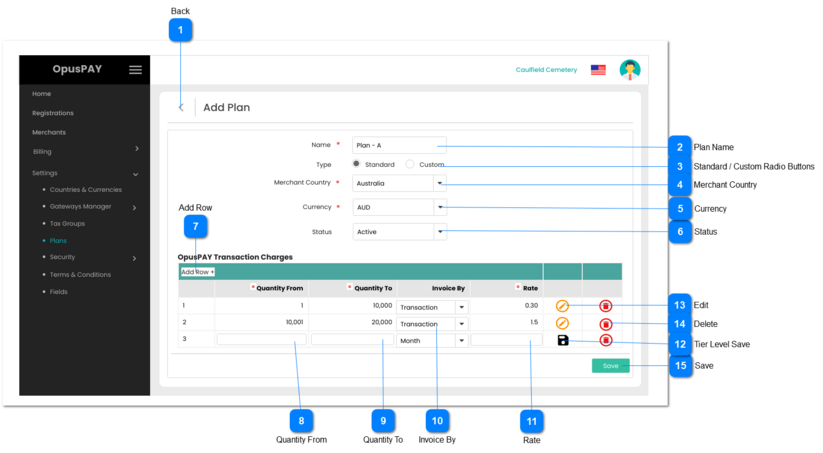
2. If user clicks on Save without entering a Plan name, display inline error message.
3. Plan name must be unique. Check Plan name against other plans in the database. If Plan name matches the name of another plan, display inline error message.
Y
-
Y
255
-
2. Please enter the name of Plan.
3. A Plan with this name already exists. Please enter a new Plan name.
1. Allows the user to select a country that this Plan applies to.
2. The country selected determines which merchants the Plan is available for. If a merchant is not in the country selected, this Plan cannot be linked to the merchant.
3. If user clicks on Save without selecting a Merchant Country, display inline error message.
1. Allows the user to enter the maxiumum number of transactions required for this Tier-Level. Number cannot be less than the number entered in the Quantity From field for this same Tier Level row (can be the same number).
2. Number only, no decimals.
3. If user clicks on Save for this Tier-Level without selecting a minimum number of transactions, display inline error message.
Y
-
Y
-
-
3. Please enter a maximum number of transactions for this Tier-Level.
1. Allows the user to save the Tier Level row of volumes and rates for a Plan.
2. Check the rules mentioned in each input element, starting with Quantity From, Quantity To, and Rate. Show inline error message for the first invalid / unpopulated input the check comes across, stop the check, allow the user to make changes and do not save this new Tier-Level row.
3. If all validation checks are successful, save the Tier-Level row.
1. Check the rules mentioned in each input element, starting with Plan Name, then Merchant Country. Show inline error message for the first invalid / unpopulated input the check comes across, stop the check, allow the user to make changes and do not save this new Plan.
2. If there are no Tier-Level rows, display an inline error message.
3. If all validation checks are successful, save the new Plan.
4. Navigate the user back to the Plans Grid screen. Refer to the specification for that page here.