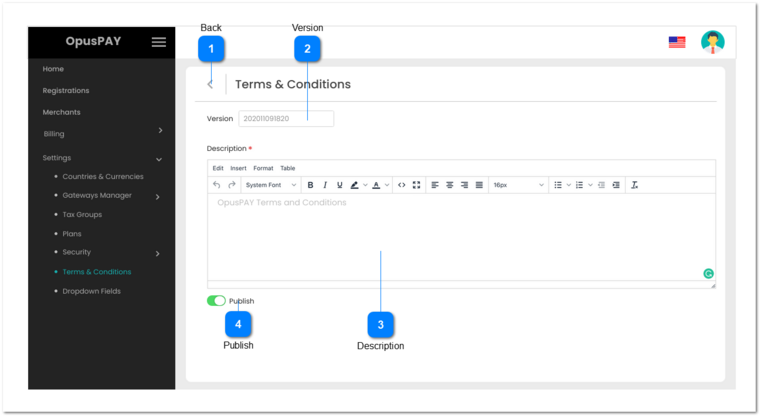
This page allows the user to edit an existing (unpublished) Terms & Conditions record or to enter a new Terms & Condition record for merchants.
 Back
|
Type
|
Notes
|
Rules
|
Compulsory
|
Format
|
Edit
|
Size
|
Default
|
Error Message
|
|
Button
|
-
|
1. When clicked this should navigate the user to the Terms & Conditions screen. Refer to the specification for that screen here.
|
-
|
-
|
Y
|
-
|
-
|
-
| |
|
 Version
|
Type
|
Notes
|
Rules
|
Compulsory
|
Format
|
Edit
|
Size
|
Default
|
Error Message
|
|
Text
|
|
Displays the Version number of the Terms & Conditions
|
-
|
-
|
N
|
-
|
-
|
-
| |
|
 Description
|
Type
|
Notes
|
Rules
|
Compulsory
|
Format
|
Edit
|
Size
|
Default
|
Error Message
|
|
Multi-Line Text
|
-
|
1. This will display the Terms & Conditions.
2. User cannot change the details of the Terms & Conditions, but will need to be able to scroll in order to view the entire Terms & Conditions.
|
-
|
-
|
N
|
-
|
-
|
-
| |
|
 Publish
|
Type
|
Notes
|
Rules
|
Compulsory
|
Format
|
Edit
|
Size
|
Default
|
Error Message
|
|
Switch Button
|
-
|
1. This will display if these Terms & Conditions are published or not. This cannot be changed on this screen.
|
-
|
-
|
N
|
-
|
-
|
-
| |
|