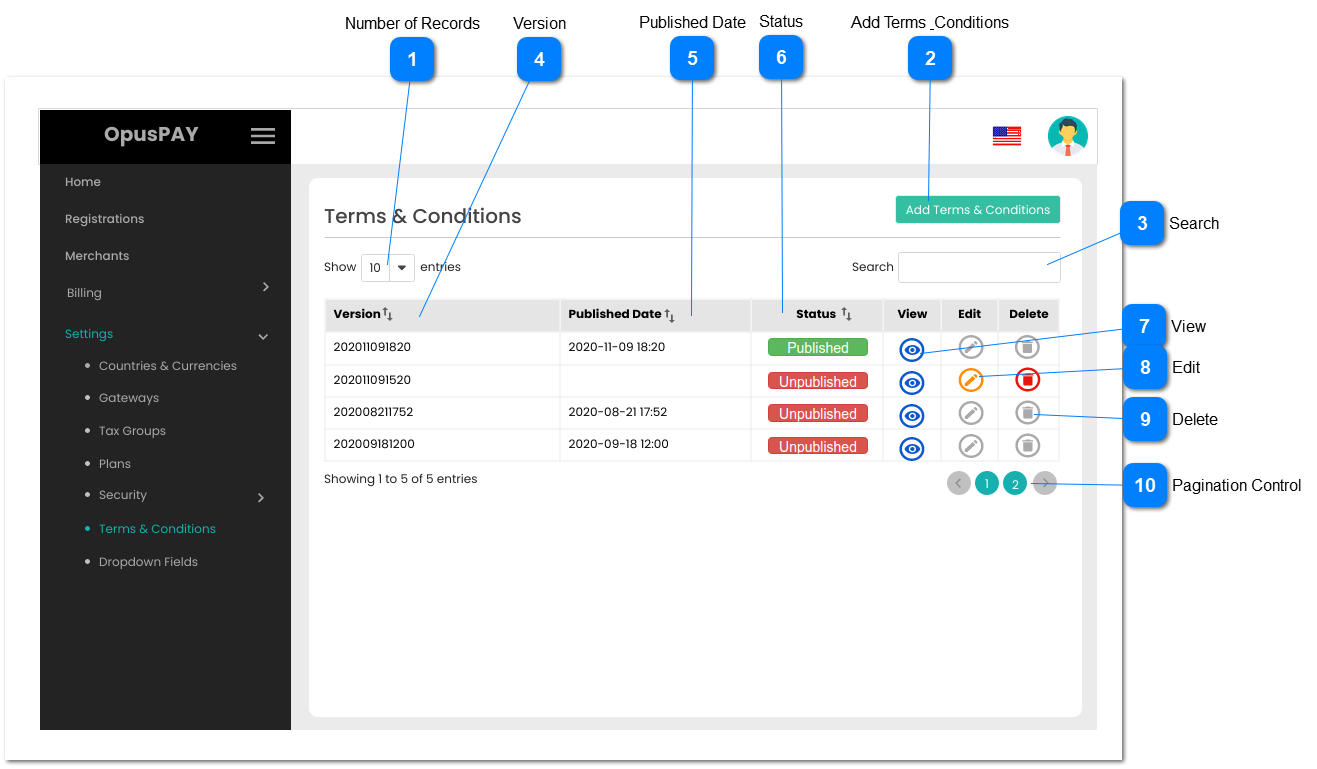
This module allows the user to manage merchant Terms & Conditions.
 Number of Records
|
Type
|
Notes
|
Rules
|
Compulsory
|
Format
|
Edit
|
Size
|
Default
|
Error Message
|
|
Combo-Box
|
-
|
1. This should allow the user to select an option to control the number of Version records visible in the grid.
2. Displays following options to select from:
|
-
|
-
|
Y
|
-
|
10
|
-
| |
|
 Add Terms & Conditions
|
Type
|
Notes
|
Rules
|
Compulsory
|
Format
|
Edit
|
Size
|
Default
|
Error Message
|
|
Button
|
-
|
1. This will open a pop-up modal so that the user can add new Terms & Conditions. Refer to the specification for that screen here.
|
-
|
-
|
Y
|
-
|
-
|
-
| |
|
 Search
|
Type
|
Notes
|
Rules
|
Compulsory
|
Format
|
Edit
|
Size
|
Default
|
Error Message
|
|
Text
|
-
|
1. Filters the grid by matching the input entered by the user across the Version and Published Date columns.
2. Filter results based on each character entered. For example:
if "2020-11" is entered, only the first two rows in the on screen example will be displayed. This is based on date in the Published Date column.
|
-
|
-
|
Y
|
-
|
-
|
-
| |
|
 Version
|
Type
|
Notes
|
Rules
|
Compulsory
|
Format
|
Edit
|
Size
|
Default
|
Error Message
|
|
Column
|
-Every version number must be unique.
|
1. This should display the version numbers of current and previous Terms & Conditions.
2. This should be sortable.
|
-
|
-
|
N
|
-
|
-
|
-
| |
|
 Published Date
|
Type
|
Notes
|
Rules
|
Compulsory
|
Format
|
Edit
|
Size
|
Default
|
Error Message
|
|
Column
|
-
|
1. This should display the dates when the Terms & Conditions were published.
2. This should be sortable.
|
-
|
-
|
N
|
-
|
-
|
-
| |
|
 Status
|
Type
|
Notes
|
Rules
|
Compulsory
|
Format
|
Edit
|
Size
|
Default
|
Error Message
|
|
Column
|
Only one Terms and Conditions can be Published at a time.
|
1. This should display the status of the Terms & Conditions.
2. This should be sortable.
|
-
|
-
|
N
|
-
|
-
|
-
| |
|
 View
|
Type
|
Notes
|
Rules
|
Compulsory
|
Format
|
Edit
|
Size
|
Default
|
Error Message
|
|
Button
|
-
|
1. This should allow the user to view the full Terms & Conditions details in a pop-up modal. Refer to the specification for that screen here.
|
-
|
-
|
-
|
-
|
-
|
-
| |
|
 Edit
|
Type
|
Notes
|
Rules
|
Compulsory
|
Format
|
Edit
|
Size
|
Default
|
Error Message
|
|
Button
|
-
|
1. This should allow the user to edit the full Terms & Conditions details in a pop-up modal. Refer to the specification for that screen here.
2. If Terms & Conditions are (or have ever been) Published, this button must be disabled.
|
-
|
-
|
-
|
-
|
-
|
-
| |
|
 Delete
|
Type
|
Notes
|
Rules
|
Compulsory
|
Format
|
Edit
|
Size
|
Default
|
Error Message
|
|
Button
|
-
|
1. This should allow the user to delete the Terms & Conditions.
2. If Terms & Conditions are (or have ever been) Published, this button must be disabled.
|
-
|
-
|
-
|
-
|
-
|
-
| |
|
 Pagination Control
|
Type
|
Notes
|
Rules
|
Compulsory
|
Format
|
Edit
|
Size
|
Default
|
Error Message
|
|
Button
|
-
|
1. This should allow the users to paginate through the Terms & Conditions records.
2. To determine the number of pagination buttons to display please follow the current logic that is being used in byondcloud.
|
-
|
-
|
-
|
-
|
-
|
-
| |
|