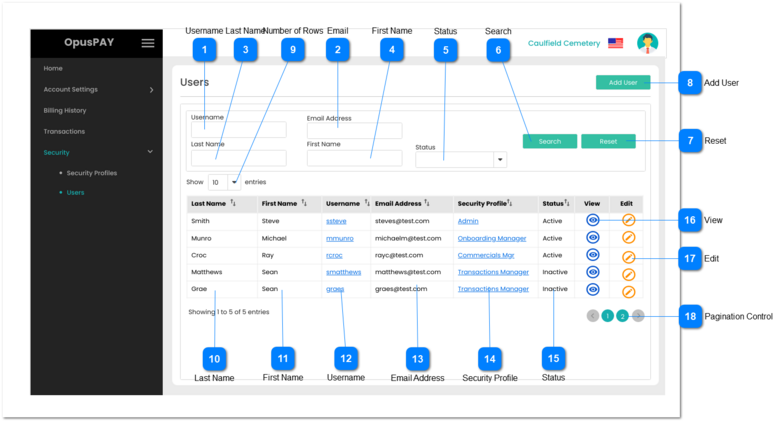
This page allows the user to search and create users in the OpusPAY merchant portal.
 Username
|
Type
|
Notes
|
Rules
|
Compulsory
|
Format
|
Edit
|
Size
|
Default
|
Error Message
|
|
Text
|
-
|
1. Anything entered into this field will be used to search/filter users based on their Username.
|
N
|
-
|
Y
|
255
|
Empty
|
-
| |
|
 Email
|
Type
|
Notes
|
Rules
|
Compulsory
|
Format
|
Edit
|
Size
|
Default
|
Error Message
|
|
Text
|
-
|
1. Anything entered into this field will be used to search/filter users based on their email address.
|
N
|
-
|
Y
|
255
|
Empty
|
-
| |
|
 Last Name
|
Type
|
Notes
|
Rules
|
Compulsory
|
Format
|
Edit
|
Size
|
Default
|
Error Message
|
|
Text
|
-
|
1. Anything entered into this field will be used to search/filter users based on their Last Name
|
N
|
-
|
Y
|
255
|
Empty
|
-
| |
|
 First Name
|
Type
|
Notes
|
Rules
|
Compulsory
|
Format
|
Edit
|
Size
|
Default
|
Error Message
|
|
Text
|
-
|
1. Anything entered into this field will be used to search/filter users based on their First Name
|
N
|
-
|
Y
|
255
|
Empty
|
-
| |
|
 Status
|
Type
|
Notes
|
Rules
|
Compulsory
|
Format
|
Edit
|
Size
|
Default
|
Error Message
|
|
Combo-Box
|
-
|
1. Anything entered into this field will be used to search/filter users based on their Active / Inactive status.
|
N
|
-
|
Y
|
-
|
Nothing selected
|
-
| |
|
 Search
|
Type
|
Notes
|
Rules
|
Compulsory
|
Format
|
Edit
|
Size
|
Default
|
Error Message
|
|
Button
|
-
|
1. Clicking on this button will search for users by applying the filter criteria and populate the grid with returned results.
2. If all of the search/filter fields are blank, display all users.
|
-
|
-
|
Y
|
-
|
-
|
-
| |
|
 Reset
|
Type
|
Notes
|
Rules
|
Compulsory
|
Format
|
Edit
|
Size
|
Default
|
Error Message
|
|
Button
|
-
|
1. This should allow the user to clear all the values from the filter fields.
|
-
|
-
|
Y
|
-
|
-
|
-
| |
|
 Add User
|
Type
|
Notes
|
Rules
|
Compulsory
|
Format
|
Edit
|
Size
|
Default
|
Error Message
|
|
Button
|
-
|
1. This should allow the user to add a new user by navigating them to the Add user page. Refer to the specification for that page here.
|
-
|
-
|
Y
|
-
|
-
|
-
| |
|
 Number of Rows
|
Type
|
Notes
|
Rules
|
Compulsory
|
Format
|
Edit
|
Size
|
Default
|
Error Message
|
|
Combo-Box
|
-
|
1. This should allow the user to select an option to control the number of User records visible in the grid.
2. Displays following options to select from:
|
-
|
-
|
Y
|
-
|
10
|
-
| |
|
 Last Name
|
Type
|
Notes
|
Rules
|
Compulsory
|
Format
|
Edit
|
Size
|
Default
|
Error Message
|
|
Column
|
-
|
1. When populated by the Search button, this will display the users' Last Names.
2. This should be sortable.
|
-
|
-
|
N
|
-
|
-
|
-
| |
|
 First Name
|
Type
|
Notes
|
Rules
|
Compulsory
|
Format
|
Edit
|
Size
|
Default
|
Error Message
|
|
Column
|
-
|
1. When populated by the Search button, this will display the users' First Names.
2. This should be sortable.
|
-
|
-
|
N
|
-
|
-
|
-
| |
|
 Username
|
Type
|
Notes
|
Rules
|
Compulsory
|
Format
|
Edit
|
Size
|
Default
|
Error Message
|
|
Column
|
-
|
1. When populated by the Search button, this will display the users' Username.
2. This should be sortable.
|
-
|
-
|
N
|
-
|
-
|
-
| |
|
 Email Address
|
Type
|
Notes
|
Rules
|
Compulsory
|
Format
|
Edit
|
Size
|
Default
|
Error Message
|
|
Column
|
-
|
1. When populated by the Search button, this will display the users' Email Addresses.
2. This should be sortable.
|
-
|
-
|
N
|
-
|
-
|
-
| |
|
 Security Profile
|
Type
|
Notes
|
Rules
|
Compulsory
|
Format
|
Edit
|
Size
|
Default
|
Error Message
|
|
Column
|
-
|
1. When populated by the Search button, this will display the users' Security Profiles.
2. This should be sortable.
|
-
|
-
|
N
|
-
|
-
|
-
| |
|
 Status
|
Type
|
Notes
|
Rules
|
Compulsory
|
Format
|
Edit
|
Size
|
Default
|
Error Message
|
|
Column
|
-
|
1. When populated by the Search button, this will display the users' Statuses.
2. This should be sortable.
|
-
|
-
|
N
|
-
|
-
|
-
| |
|
 View
|
Type
|
Notes
|
Rules
|
Compulsory
|
Format
|
Edit
|
Size
|
Default
|
Error Message
|
|
Button
|
-
|
1. This will navigate the user to the View User screen. Refer to the specification for that screen here.
|
-
|
-
|
Y
|
-
|
-
|
-
| |
|
 Edit
|
Type
|
Notes
|
Rules
|
Compulsory
|
Format
|
Edit
|
Size
|
Default
|
Error Message
|
|
Button
|
-
|
1. This will navigate the user to the Edit User screen in order to update user details. Refer to the specification for that screen here.
|
-
|
-
|
Y
|
-
|
-
|
-
| |
|
 Pagination Control
|
Type
|
Notes
|
Rules
|
Compulsory
|
Format
|
Edit
|
Size
|
Default
|
Error Message
|
|
Button
|
-
|
1. This should allow the users to paginate through the User grid records.
2. To determine the number of pagination buttons to display please follow the current logic that is being used in byondcloud.
|
-
|
-
|
-
|
-
|
-
|
-
| |
|