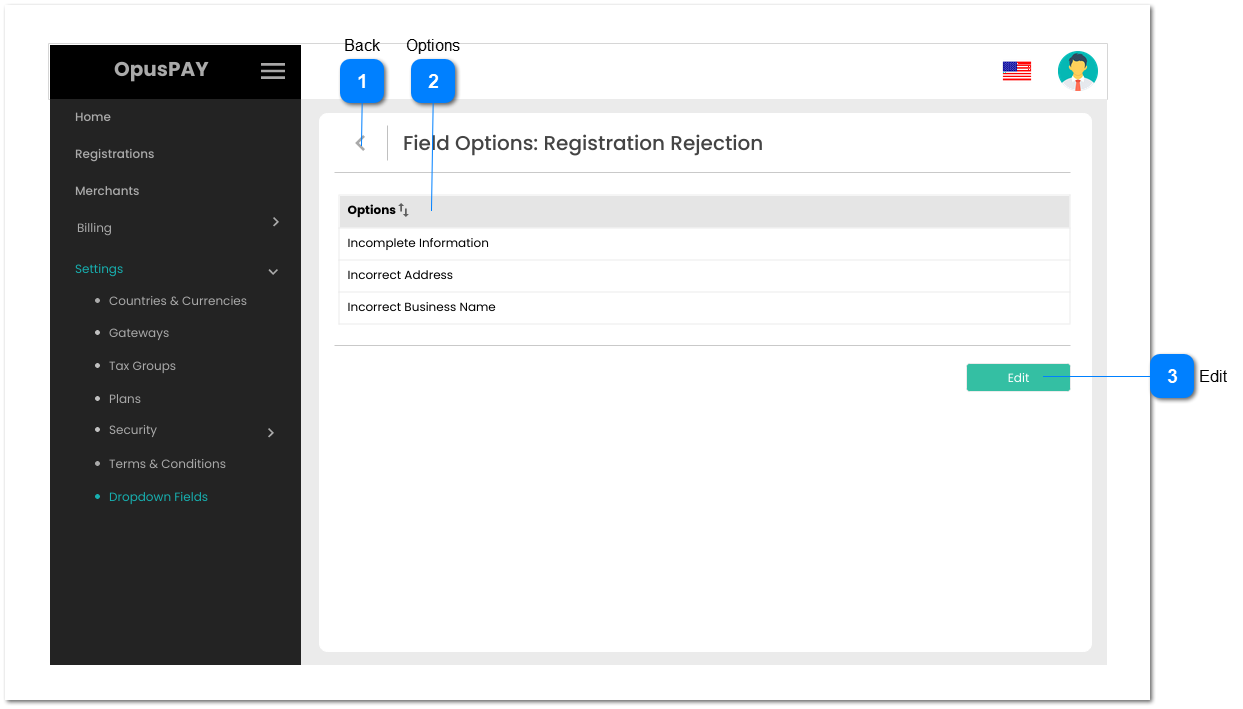
This screen allows the user to view existing combo-box field options.
 Back
|
Type
|
Notes
|
Rules
|
Compulsory
|
Format
|
Edit
|
Size
|
Default
|
Error Message
|
|
Button
|
-
|
1. When clicked this should navigate the user to the Dropdown Fields page. Refer to the specification for the page here.
|
-
|
-
|
-
|
-
|
-
|
-
| |
|
 Options
|
Type
|
Notes
|
Rules
|
Compulsory
|
Format
|
Edit
|
Size
|
Default
|
Error Message
|
|
Column
|
-
|
1. This should display the current option values for a given dropdown list.
2. This should be sortable.
|
-
|
-
|
N
|
-
|
-
|
-
| |
|
 Edit
|
Type
|
Notes
|
Rules
|
Compulsory
|
Format
|
Edit
|
Size
|
Default
|
Error Message
|
|
Button
|
-
|
1. This should navigate the user to the Edit Dropdown Options screen when clicked. Refer to the specification for that screen here.
|
-
|
-
|
Y
|
-
|
-
|
-
| |
|