To properly display this page you need a browser with JavaScript support.
View - Merchant Statement (Single Gateway)
Report Header
Type
Notes
Rules
Compulsory
Format
Edit
Size
Default
Error Message
Text
-
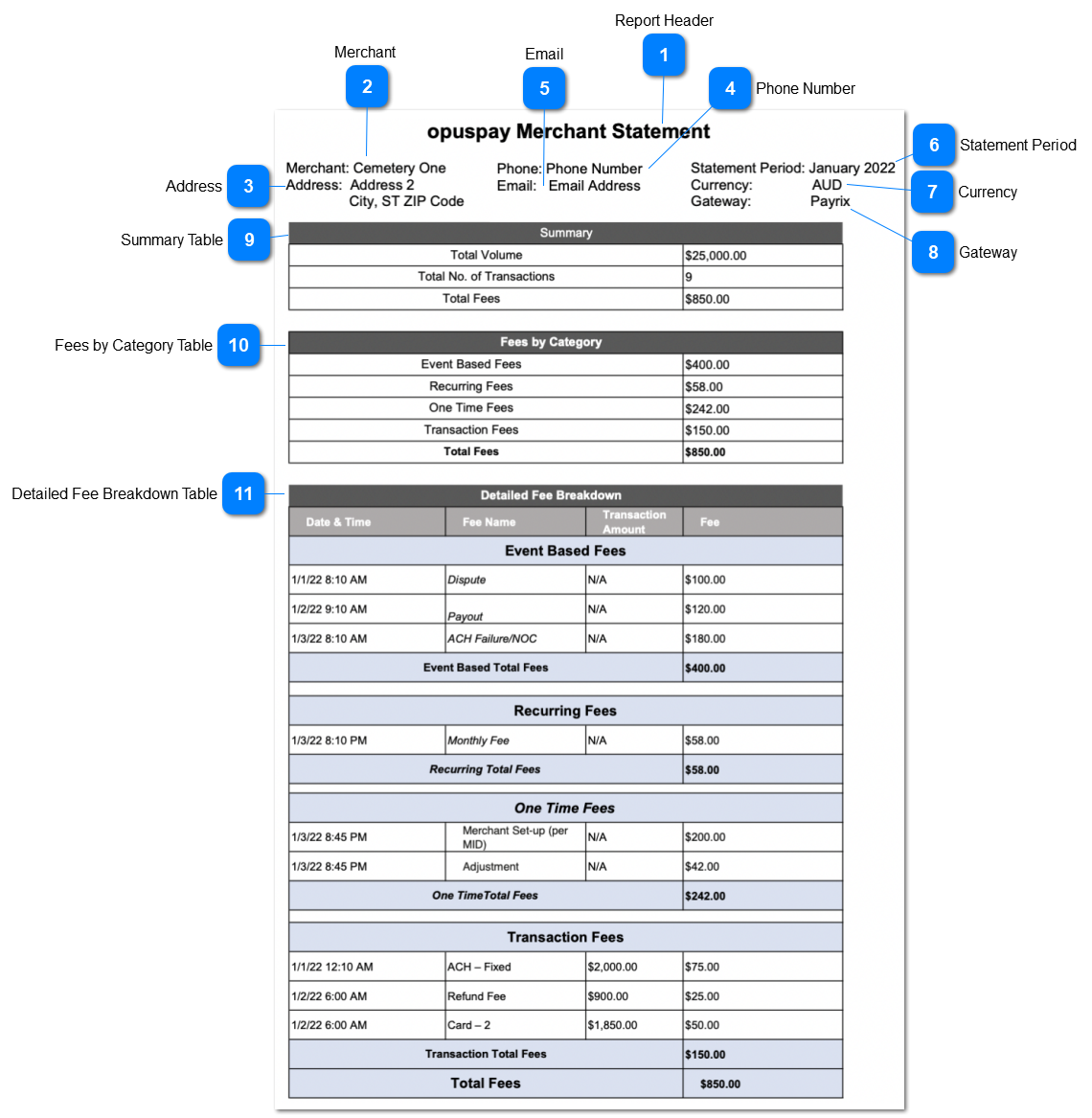
1. The heading of the merchant statement will be displayed as per below.
'opuspay Merchant Statement'.
-
-
-
-
-
-
Merchant
Type
Notes
Rules
Compulsory
Format
Edit
Size
Default
Error Message
Text
-
1. The selected merchant account will be displayed.
2. For the Merchant Account, account will be taken from ' Account ' opuspay Merchant Portal -> Account
-
-
-
-
-
-
Address
Type
Notes
Rules
Compulsory
Format
Edit
Size
Default
Error Message
Text
-
1. The selected merchant address will be displayed.
2. For the Merchant Account, account will be taken from ' Account ' opuspay Merchant Portal -> Account
-
-
-
-
-
-
Phone Number
Type
Notes
Rules
Compulsory
Format
Edit
Size
Default
Error Message
Text
-
1. The selected merchant phone number will be displayed.
2. For the Merchant Account, Phone Number will be taken from ' Account ' opuspay Merchant Portal -> Account
-
-
-
-
-
-
Email
Type
Notes
Rules
Compulsory
Format
Edit
Size
Default
Error Message
Text
-
1. The selected merchant email will be displayed.
2. For the Merchant Account, email will be taken from ' Account ' opuspay Merchant Portal -> Account
-
-
-
-
-
-
Statement Period
Type
Notes
Rules
Compulsory
Format
Edit
Size
Default
Error Message
Date Range
-
1. The date range selected from the report filter will appear here.
-
(MM/DD/YY)
-
-
-
-
Currency
Type
Notes
Rules
Compulsory
Format
Edit
Size
Default
Error Message
Text
-
-
-
-
-
-
-
Gateway
Type
Notes
Rules
Compulsory
Format
Edit
Size
Default
Error Message
Text
-
1. The relevant gateway which the report is generated against should be displayed.
-
-
-
-
-
-
Summary Table
Type
Notes
Rules
Compulsory
Format
Edit
Size
Default
Error Message
Table
-
1. 'Summary' will be the heading of the table.
2. In first row 'Total Volume' and respective amount will be displayed.
3. This total volume is taken from gateway via API call.
4. In second row 'Total no. of Transaction' and respective number will be displayed.
5. In the third row, the 'Total Fees' should be displayed. This is the cumulative value of 'Fees By category' table.
-
-
-
-
-
-
Fees by Category Table
Type
Notes
Rules
Compulsory
Format
Edit
Size
Default
Error Message
Table
-
1. 'Fees by Category will be the heading of the table.
2. Each fee category should be displayed as a new row with an
additional row for the total.
3. Respective to each fee category, the amount of fees will be displayed.
-
-
-
-
-
-
Detailed Fee Breakdown Table
Type
Notes
Rules
Compulsory
Format
Edit
Size
Default
Error Message
Table
The table is horizontally divided into the four main fee categories as per below.
1. 'Detailed Fee Breakdown' will be the heading of the table.
2. Below are the table columns.
The date and the time at which each fee category transaction occurs is captured.
Fee name will be displayed as per the mock-up. This fee name is obtained from ' Fee - Gateway Mapping ' ('name of the gateway' column is referred to here as the fee name)
This column will display values only if the Fee Category is 'Transaction Fees'
Total of Fee column will be same as the total of Fees by Category .
-
-
-
-
-
-