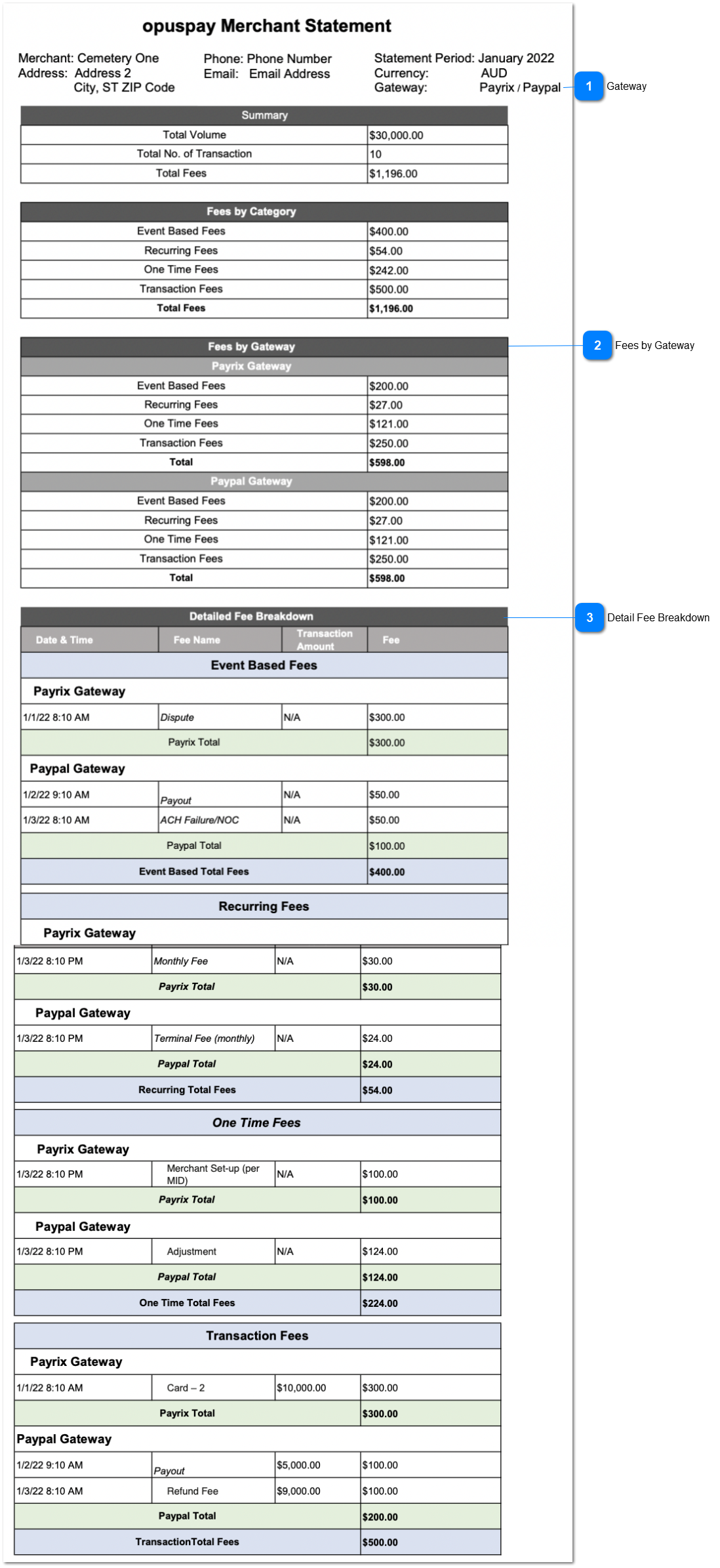
View - Merchant Statement (Multiple Gateway)
 Gateway
|
Type
|
Notes
|
Rules
|
Compulsory
|
Format
|
Edit
|
Size
|
Default
|
Error Message
|
|
Text
|
-
|
The Relevant gateway/s which the report is generated should be displayed.
|
-
|
-
|
-
|
-
|
-
|
-
| |
|
 Fees by Gateway
|
Type
|
Notes
|
Rules
|
Compulsory
|
Format
|
Edit
|
Size
|
Default
|
Error Message
|
|
Table
|
The table is horizontally divided into relevant gateways.
|
1. Fees by Gateway is the table name.
2. The fees are displayed according to the gateway wise.
2a. Under each gateways the main four categories of Fees are displayed.
|
-
|
-
|
-
|
-
|
-
|
-
| |
|
 Detail Fee Breakdown
|
Type
|
Notes
|
Rules
|
Compulsory
|
Format
|
Edit
|
Size
|
Default
|
Error Message
|
|
Table
|
The table is horizontally divided to Fee Categories and Gateways.
Under each Fee categories and Gateways, relevant Fees will be displayed.
|
1. 'Detailed Fee Breakdown' will be the table heading.
2. Below are the table columns.
-
Every fee occurred date and the time is captured.
-
Fee name will be displayed. This fee name is coming from 'Fee - Gateway Mapping' ('name of the gateway' column is refereed as fee name here)
-
This column has values only if the Fee Category is 'Transaction Fees'
-
Total of Fee column will be same as the total of Fees by Category.
|
-
|
-
|
-
|
-
|
-
|
-
| |
|