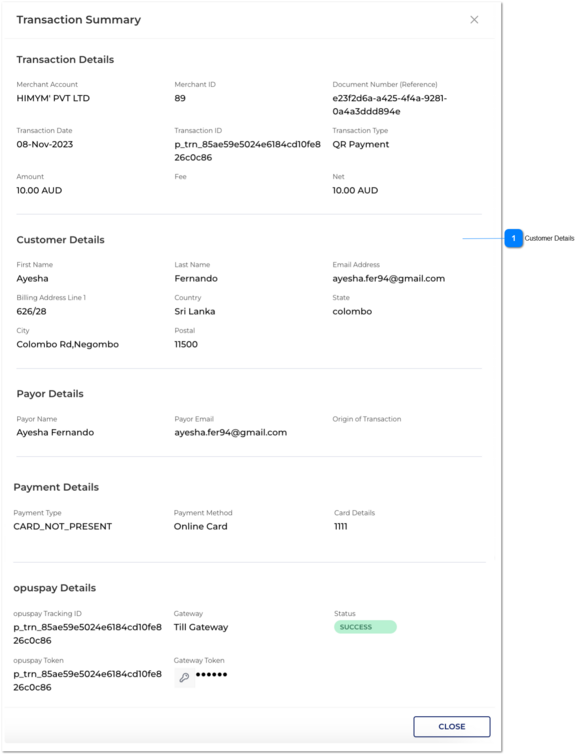
Customer Details
|
Type
|
Notes
|
Rules
|
Compulsory
|
Format
|
Edit
|
Size
|
Default
|
Error Message
|
|
Customer Details Section
|
-
|
In this section, user given information to the widget would be captured as customer details.
|
-
|
-
|
-
|
-
|
-
|
-
|
|
First Name
|
First Name can be viewed.
|
-
|
-
|
-
|
-
|
-
|
-
|
|
Last Name
|
Last Name can be viewed.
|
-
|
-
|
-
|
-
|
-
|
-
|
|
Email address
|
Email address can be viewed.
|
-
|
-
|
-
|
-
|
-
|
-
|
|
Billing Address Line 1
|
Billing Address Line 1 can be viewed.
|
-
|
-
|
-
|
-
|
-
|
-
|
|
Country
|
Country can be viewed.
|
-
|
-
|
-
|
-
|
-
|
-
|
|
State
|
State can be viewed.
|
-
|
-
|
-
|
-
|
-
|
-
|
|
City
|
City can be viewed.
|
-
|
-
|
-
|
-
|
-
|
-
|
|
Postal
|
Postal can be viewed.
|
-
|
-
|
-
|
-
|
-
|
-
| |
|
Once the user clicks on view button in transaction grid level. It would open view transaction slide menu.
That slider will continue the same as existing system. (Device payment details would be not captured.)
Payor Email Address:
1. If the transaction is QR payment, then Payor Email value is Not Applicable. Therefore "N/A" will come for those.
2. The email address which would be captured via the widget, will be displayed under the customer details in the QR transaction.
Origin of Transaction
1. This cannot be captured for QR Payments; therefore, if the transaction is QR Payments, then "N/A" will come for Origin of Transaction.