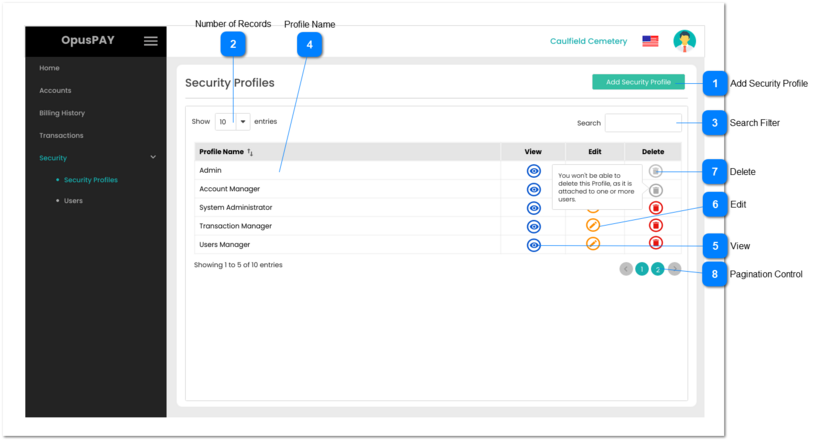
This screen allows the user to manage security profiles in OpusPAY merchant portal.
Admin profile needs to be created and be available to all users by default. Admin Profile has full access to all functions and cannot be Edited or Deleted.
Add Security Profile
Type
Notes
Rules
Compulsory
Format
Edit
Size
Default
Error Message
Button
-
1. The user is navigated to the Add\Edit Profile page after clicking this button. Refer to the specification for that page here.
1. The should open the Security Profile screen in edit mode. Refer to the specification for that screen here.
2. Edit button for the Admin profile should be greyed out and disabled. Hovering over this button should display the following message to the user: "Admin profile cannot be edited."
1. This should allow the user to delete a Security Profile.
2. This should be greyed out and disabled if a Security Profile is attached to a User. Hovering over this button should display the following message to the user: "You won't be able to delete this Profile, as it is attached to one or more users."
3. Delete button for the Admin profile should be greyed out and disabled. Hovering over this button should display the following message to the user: "Admin profile cannot be deleted."