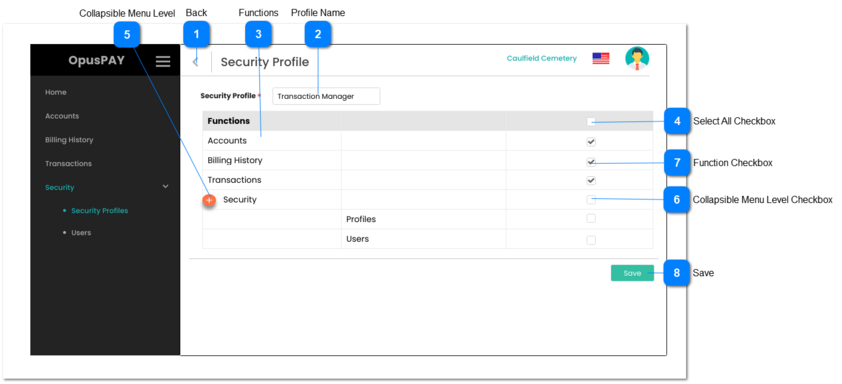
1. This should allow the user to navigate to Security Profiles screen when clicked and no changes will be saved. Refer to the specification for that screen here.
1. The Collapsible menu level allows the functions to appear in groups to reflect the OpusPAY admin portal's menu structure.
2. The menu icon should swap to minus "-" symbol when clicked and expanded.
3. The menu icon should swap to plus "+" when clicked and collapsed.
4. When the checkbox at this level is checked, all functions within this group that are below this level are to be checked as well.
5. If the checkbox at this level is checked, and when the user unchecks it, all functions within this group that are below this level are to be unchecked.
1. The Collapsible Menu Level Checkbox allows the user to check or uncheck all functions within this group to be included or not included in this Security Profile.
2. When the checkbox at this level is checked, all functions within this group that are below this level are to be checked as well.
3. If the checkbox at this level is checked, and the user unchecks it, all functions within this group that are below this level are to be unchecked.
1. Check the rules mentioned in each input elements and show inline error messages for invalid / unpopulated inputs.
2. When clicked, if all validation checks are successful then new Security Profile is created, the profile has access to all functions that are checked, and the profile is saved. Navigate the user to the Security Profile screen. Refer the specifications for that screen here.