To properly display this page you need a browser with JavaScript support.
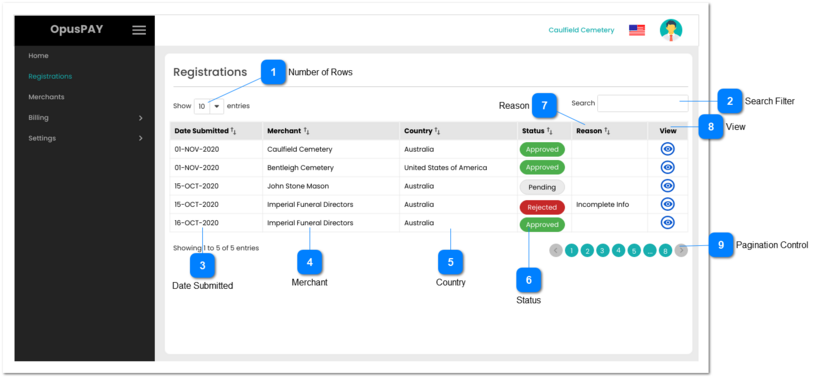
The Registration Grid page lists all OpusPAY registrations submitted by organisations.
Number of Rows
Type
Notes
Rules
Compulsory
Format
Edit
Size
Default
Error Message
Combo-Box
-
1. This should allow the user to select an option to control the number of registration records visible in the grid.
2. Displays following options to select from:
-
-
Y
-
10
-
Search Filter
Type
Notes
Rules
Compulsory
Format
Edit
Size
Default
Error Message
Text
-
1. Filters the grid by matching the input entered by the user across the "Date Submitted", "Merchant", "Country", and "Reason" grid columns.
2. Filter results based on each character entered. For example:
if "oct" is entered, only the last three rows in the on screen example will be displayed. This is based on the month of OCT in the Date Submitted column
If "un" is entered only the second row in the on screen example will be displayed based on "United" in the Country column
-
-
Y
-
-
-
Date Submitted
Type
Notes
Rules
Compulsory
Format
Edit
Size
Default
Error Message
Column
-
1. This column should display the date the merchants submitted their registration.
2. This should be sortable.
-
-
-
-
-
-
Merchant
Type
Notes
Rules
Compulsory
Format
Edit
Size
Default
Error Message
Column
-
1. This column should display the organization names of the merchants who have submitted their registration for OpusPAY.
2. This should be sortable.
-
-
-
-
-
-
Country
Type
Notes
Rules
Compulsory
Format
Edit
Size
Default
Error Message
Column
-
1. This column should display the country the merchant is located in.
2. This should be sortable.
-
-
-
-
-
-
Status
Type
Notes
Rules
Compulsory
Format
Edit
Size
Default
Error Message
Column
-
1. This column should display the status of the registrations submitted by the merchants.
2. The statuses should be colored as per below rules:
Approved - Green
Rejected - Red
Pending - Grey
Exact color coding should be decided by the UI team.
2. This should be sortable.
-
-
-
-
-
-
Reason
Type
Notes
Rules
Compulsory
Format
Edit
Size
Default
Error Message
Column
-
1. This column should display the rejection reason option selected from the dropdown list on the Registration Details Rejection screen (see the spec for this screen here ).
2. This should be sortable.
-
-
-
-
-
-
View
Type
Notes
Rules
Compulsory
Format
Edit
Size
Default
Error Message
Button
-
1. This should allow the user to view the submitted registration details of a merchant. Refer to the specification for that screen here .
-
-
-
-
-
-
Pagination Control
Type
Notes
Rules
Compulsory
Format
Edit
Size
Default
Error Message
Button
-
1. This should allow the users to paginate through the registration grid records.
2. To determine the number of pagination buttons to display please follow the current logic that is being used in byondcloud.
-
-
-
-
-
-