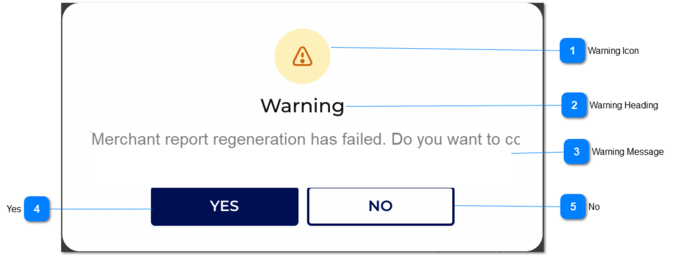
Regenerate Failure Message
 Warning Icon
|
Type
|
Notes
|
Rules
|
Compulsory
|
Format
|
Edit
|
Size
|
Default
|
Error Message
|
|
Icon
|
-
|
1. The warning icon will be shown.
|
-
|
-
|
-
|
-
|
-
|
-
| |
|
 Warning Heading
|
Type
|
Notes
|
Rules
|
Compulsory
|
Format
|
Edit
|
Size
|
Default
|
Error Message
|
|
Text
|
-
|
1. The warning heading will be display as below.
'Warning'
|
-
|
-
|
-
|
-
|
-
|
-
| |
|
 Warning Message
|
Type
|
Notes
|
Rules
|
Compulsory
|
Format
|
Edit
|
Size
|
Default
|
Error Message
|
|
Text
|
-
|
1. The warning message will be display as below.
'Merchant report regeneration has failed. Do you want to contact an Administrator to troubleshoot?'
|
-
|
-
|
-
|
-
|
-
|
-
| |
|
 Yes
|
Type
|
Notes
|
Rules
|
Compulsory
|
Format
|
Edit
|
Size
|
Default
|
Error Message
|
|
Button
|
-
|
1. If the user clicks on button then the email will send to opuspay Admin and then the warning message will be closed.
|
-
|
-
|
-
|
-
|
-
|
-
| |
|
 No
|
Type
|
Notes
|
Rules
|
Compulsory
|
Format
|
Edit
|
Size
|
Default
|
Error Message
|
|
Button
|
-
|
1. If the user clicks on button then the the warning message will be closed.
|
-
|
-
|
-
|
-
|
-
|
-
| |
|