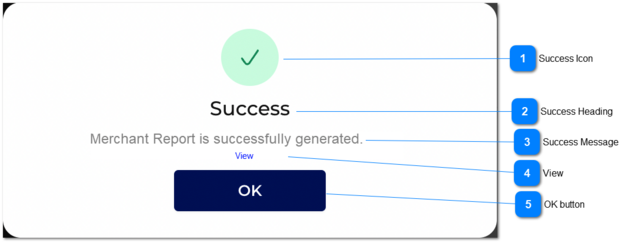
Regenerate: Success Message
 Success Icon
|
Type
|
Notes
|
Rules
|
Compulsory
|
Format
|
Edit
|
Size
|
Default
|
Error Message
|
|
Icon
|
-
|
1. The success icon will be shown.
|
-
|
-
|
-
|
-
|
-
|
-
| |
|
 Success Heading
|
Type
|
Notes
|
Rule
|
Compulsory
|
Format
|
Edit
|
Size
|
Default
|
Error Message
|
|
Text
|
-
|
1. The heading will be displayed as 'Success'.
|
-
|
-
|
-
|
-
|
-
|
-
| |
|
 Success Message
|
Type
|
Notes
|
Rules
|
Compulsory
|
Format
|
Edit
|
Size
|
Default
|
Error Message
|
|
Text
|
-
|
1. The success message will be displayed.
|
-
|
-
|
-
|
-
|
-
|
'Merchant Report is successfully generated'
| |
|
 View
|
Type
|
Notes
|
Rules
|
Compulsory
|
Format
|
Edit
|
Size
|
Default
|
Error Message
|
|
Link
|
-
|
|
-
|
-
|
-
|
-
|
-
|
-
| |
|
 OK button
|
Type
|
Notes
|
Rules
|
Compulsory
|
Format
|
Edit
|
Size
|
Default
|
Error Message
|
|
Button
|
-
|
1. Once the user clicks on 'OK' button, the pop up message will close.
|
-
|
-
|
-
|
-
|
-
|
-
| |
|