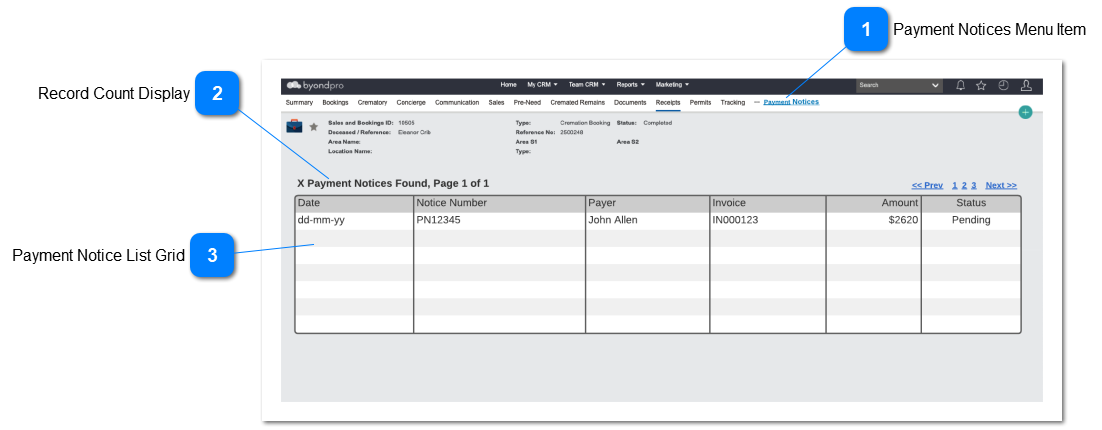
This will show a list of all payment notices issued for the selected Sales and Booking ID
 Payment Notices Menu Item
Menu item on the Sales and Booking functions to open the Payment Notices List.
|
Type
|
Notes
|
Rules
|
Compulsory
|
Format
|
Edit
|
Size
|
Default
|
Error Message
|
|
Menu Item
|
|
-
Only show this menu item if the byondpro customer has registered with opuspay
-
Open the Notice Payments List UI
|
|
|
|
|
|
| |
|
 Record Count Display
Shows the number of Payment Notices for the Sales and Booking ID and the number of pages in the list
|
Type
|
Notes
|
Rules
|
Compulsory
|
Format
|
Edit
|
Size
|
Default
|
Error Message
|
|
TextBox
|
|
-
Perform as standard including pagination navigation functions
|
|
|
|
|
|
| |
|
 Payment Notice List Grid
Grid which displays the detail of all applicable payment notices
|
Type
|
Notes
|
Rules
|
Compulsory
|
Format
|
Edit
|
Size
|
Default
|
Error Message
|
|
Grid
|
|
-
Only show payment notice records for the selected Sales and Booking ID
|
|
|
|
|
|
|
|
|
Date
|
Display the notice creation date
|
|
|
N
|
|
|
|
|
|
Notice Number
|
Display the Notice number. Add a hyperlink to the Payment Notice. Pop-Up the Payment Notice if the hyperlink is selected
|
|
|
N
|
|
|
|
|
|
Payer
|
Display the name of the:
-
If it is a person then the Payer name
-
If it is a Company, then the Company Payer
-
If neither, then the Responsible Person Name
|
|
|
N
|
|
|
|
|
|
Invoice Number
|
Display the Invoice Number
|
|
|
N
|
|
|
|
|
|
Amount
|
Display the amount
|
|
|
N
|
|
|
|
|
|
Status
|
Display the curent Status of the payment notice
|
|
|
N
|
|
|
| |
|