OpusPAY
User guide
×
Menu
Index

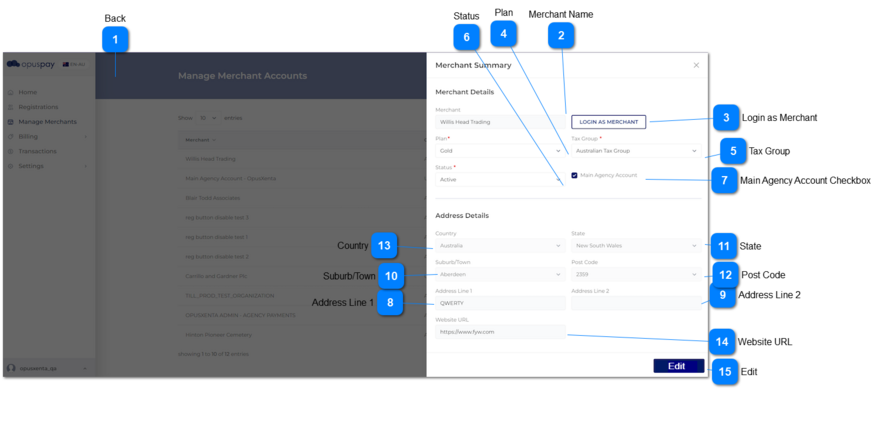
Merchant Summary - View

This screen allows the user to Login as Merchant, view their Plan, Tax Group, and Address details.
 
Merchant Summary - View
1

Back

 
Type
Notes
Rules
Compulsory
Format
Edit
Size
Default
Error Message
Button
-
1. This should navigate the user to the Merchants Grid when clicked. Refer to the specification for Merchants Grid here.
-
-
-
-
-
-
2

Merchant Name

 
Type
Notes
Rules
Compulsory
Format
Edit
Size
Default
Error Message
Text
-
1. This should display the name of a Merchant.
-
-
N
255
-
-
3

Login as Merchant


Type
Notes
Rules
Compulsory
Format
Edit
Size
Default
Error Message
Button
Under merchants in security profile main functions, there are two sub functions.
1. Manage Merchants
 
2. Login As Merchants (Read only)
'Login  as merchant button' would be affected on security profile configuration.
 
1. User can check only 'Manage merchant' checkbox -> As a result manage merchant module would come to the security profile without the 'Login As Merchant' button.
 
2. User can check 'Login as merchant' checkbox -> As a result automatically system will check the 'Manage merchant' checkbox, then the security profile would come with the 'Login As Merchant' button.
1. This should be only visible to users linked to a profile having access to this function.
 
2. The user is able to log into a merchant's portal after clicking this button. The level of access to the merchant's portal will be dependent on the Security Profile assigned to the user. Refer to the specifications for Security Profiles here.
 
3. When logged in as Merchant, display "Logged in as: " before Organisation name at top of window. Refer to the specification for this screen here.
 
-
-
-
-
-
-
4

Plan

 
Type
Notes
Rules
Compulsory
Format
Edit
Size
Default
Error Message
Combo-Box
-
1. This should display the Plan assigned to a merchant.
Y
-
N
-
-
-
5

Tax Group

 
Type
Notes
Rules
Compulsory
Format
Edit
Size
Default
Error Message
Combo-Box
-
1. This should display the Tax Group assigned to a merchant.
Y
-
N
-
-
-
6

Status

 
Type
Notes
Rules
Compulsory
Format
Edit
Size
Default
Error Message
Column
1. Active merchants should be able to be transactions via opuspay.
 
2. When a merchant is inactivate they will no longer be able to process transactions via opuspay. And they will not be able to log into the Merchant Portal.
1. This should display the Status of the merchant.
 
 
-
-
N
-
-
-
7

Main Agency Account Checkbox

 
Type
Notes
Rules
Compulsory
Format
Edit
Size
Default
Error Message
Checkbox
-
1. Name of the checkbox is 'Main Agency Account'.
 
2. When admin selects  'Main Agency Account' checkbox from admin portal and click on Save button following would be happened.
 
A. List down all the gateways inside to parent merchant account and sub accounts' gateway details tab.
 
B. All the sub accounts can be used only parent gateways (List down only the parent gateways and selected, but editable).
 
C. Sub account must be select at least one gateway.
 
D. The option 'Link to an existing gateway accounts' in sub accounts should be disabled.
 
E. If a sub account had a gateway which is not had in parent account, it will be deselected.
 
F. All the sub accounts link to parent gateways.
 
3. When admin de-selects 'Main Agency Account' checkbox from admin portal and click on Save button, following would be happened.
 
A. If main merchant account or sub accounts having gateways which are not in the accounts' country, Admin get a warning message to deselect gateways in the merchant portal which are not in the accounts' country.
 
B. Link to an existing gateway accounts' option should be enabled to all the sub accounts.
 
C. List down all the gateways related to the account's country.
-
-
N
-
-
-
8

Address Line 1

 
Type
Notes
Rules
Compulsory
Format
Edit
Size
Default
Error Message
Text
-
1. This should display the Address Line 1 of the primary address of a merchant.
-
-
N
255
-
-
9

Address Line 2

 
Type
Notes
Rules
Compulsory
Format
Edit
Size
Default
Error Message
Text
-
1. This should display the Address Line 2 of the primary address of a merchant.
-
-
N
255
-
-
10

Suburb/Town

 
Type
Notes
Rules
Compulsory
Format
Edit
Size
Default
Error Message
Combo-Box
-
1. This should display the Suburb/Town of the primary address of a merchant.
-
-
N
-
-
-
11

State

 
Type
Notes
Rules
Compulsory
Format
Edit
Size
Default
Error Message
Combo-Box
-
1. This should display the State of the primary address of a merchant.
-
-
N
-
-
-
12

Post Code

 
Type
Notes
Rules
Compulsory
Format
Edit
Size
Default
Error Message
Combo-Box
-
1. This should display the Post Code of the primary address of a merchant.
-
-
N
-
-
-
13

Country

 
Type
Notes
Rules
Compulsory
Format
Edit
Size
Default
Error Message
Combo-Box
-
1. This should display the Country of the primary address of a merchant.
-
-
N
-
-
-
14

Website URL

 
Type
Notes
Rules
Compulsory
Format
Edit
Size
Default
Error Message
Text
-
1. This should display the website URL of a merchant.
-
-
N
-
-
-
15

Edit

 
Type
Notes
Rules
Compulsory
Format
Edit
Size
Default
Error Message
Button
-
1. This should open the Merchant Summary screen in edit mode. Refer to the specification for that screen here.
-
-
N
-
-
-