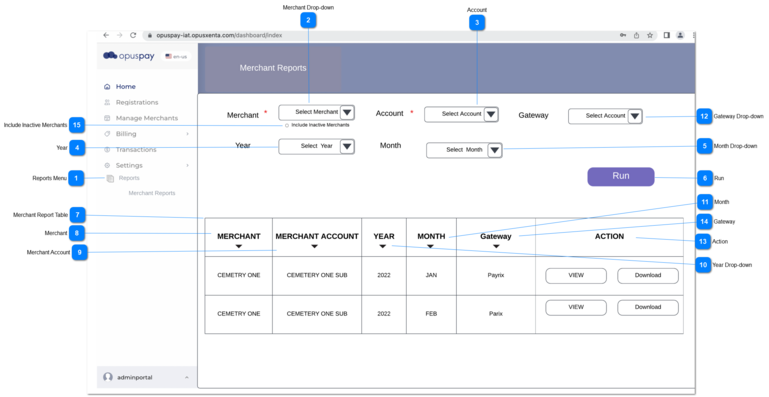
The merchant statement will be created per merchant (including parent merchant), regardless the status of 'Invoice Account Directly' is checked or not in merchant account details (opuspay merchant login -> accounts -> view account).
1. There should be a new menu called Reports in the Admin login.
2. Once the user clicks on 'Reports' then it will expand to display a 'Merchant Reports' sub menu.
3. The user should click on 'Merchant Reports' sub menu to load its screen.
1. All the active merchants will be listed in the drop-down.
a. By default all active merchants will be listed in the drop-down, if the user wants to have inactive users in drop-down, then the user needs to check the checkbox of 'Include Inactive Users'.
2. The user should to pick a merchant from the given list.
3. According to the selected merchant, relevant accounts will be loaded to Account drop down.
4. If the merchant is not selected, then the system shows an error message.
1. Merchant statements are generated in the first week of every month for the prior month, therefore a month will be displayed in the drop-down once the first week of following month is passed.
Ex:
January will be displayed once the first week of February has passed.
1. Two buttons will be displayed within the action column buttons will be displayed as follows.
1a. If the report is generated then a 'View' button and a download button should both be displayed. Once the user clicks on view button the merchant report will open in View mode. If the user clicks on download button then the PDF version will be downloaded to the user's PC.