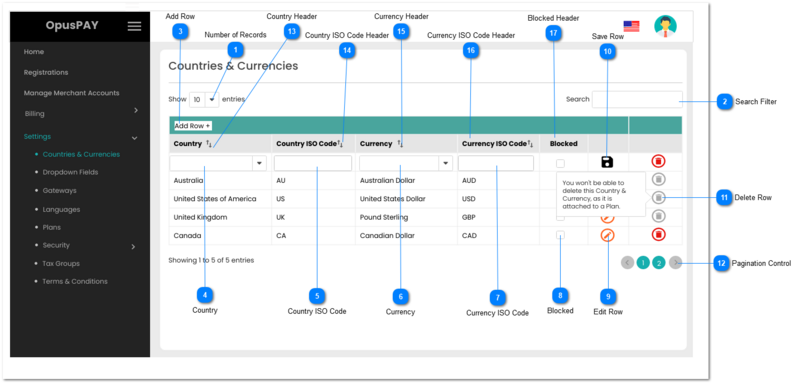
This module enables users to maintain a list of Countries and Currencies that Merchants and Gateways operate in. It also allows users to search Countries & Currencies by names and ISO codes, sort the grid by columns, and add new Country and Currency combination. Also allows users to Block any countries that OpusXenta and/or the Gateways do not deal with.
Need to add Country ISO Code, Currency, and Currency ISO Code to our database.
Only one Country and Currency combination can exist at a time.
Do not allow user to navigate away from this screen if there is a row in edit mode (save button displayed).
Number of Records
Type
Notes
Rules
Compulsory
Format
Edit
Size
Default
Error Message
Combo-Box
-
1. This should allow the user to select an option to control the number of countries and currencies records visible in the grid.
1. Filters the grid by matching the input entered by the user across the "Country", "Country ISO Code", "Currency" and "Currency ISO Code" grid columns.
2. Filter results based on each character entered. For example:
if "u" is entered, only the second and third rows in the on screen example will be displayed. This is based on "United" in the Country column as well as "US" and "UK" in the Country ISO and Currency ISO columns for both rows
If "uk" is entered only the third row in the on screen example will be displayed based on "UK" in the Country ISO Code column
1. This should allow the user to select a Country.
2. List of Countries should come from our database of countries, states, post codes, etc. as used in byondcloud.
3. This should display an inline error message if the user clicks the Save button without populating this field.
4. After selecting the Country, auto-populate the Country ISO Code to match the country's ISO code. Also, if the country only has one currency, auto-populate the Currency and Currency ISO Code to match the country's currency and corresponding currency ISO code.
5. If the selected Country is already in the list and only has one Currency, display an inline error message.
6. If the selected Country is already in the list but has multiple currency options, allow this country to be selected. Auto-populate the Country ISO Code to match the country's ISO code.
Y
-
Y
-
-
3. Please select a Country
5. A country and currency combination matching this selection already exists. Please select another country.
Need to add Country ISO Code, Currency, and Currency ISO Code to our database.
1. Does not populate options until Country is selected.
2. If the country selected only has one currency, this should be auto-populated based on the currency of the country.
3. If the country selected has multiple currencies, display corresponding currencies in this list for user to select.
4. This should display an inline error message if the user clicks the Save button without populating this field.
5. If the country and currency selected matches an already existing country and currency combination in this list, display an inline error message when the currency is selected.
6. If the country and currency selected are unique, auto-populate the Currency ISO Code that corresponds to the currency selected.
Y
-
Y
-
-
4. Please select a Currency.
5. A country and currency combination matching this selection already exists. Please select another currency.
1. Allows user to specify if this country is blocked due to being on the UN AND/OR US or other country banned or embargoed lists.
2. If checked, the country is blocked. If unchecked the country is not blocked.
a) When first checked, check if other Countries exist in the list matching the blocked country.
i) If the same country already exists and is linked to an Active Plan, display inline error message.
ii) If same country already exists and is not linked to an Active Plan (can be linked to an Inactive Plan), change row to being edited, display Save button, and check the blocked column for that country as well.
b) When unchecked, check if other Countries exist in the list matching the blocked country.
i) If the same country already exists, change row to being edited, display Save button, and uncheck the blocked column for that country as well.
3. If a Merchant is from a blocked country, they are not permitted to be registered with OpusPAY.
4. If a Payer is located in a blocked country, they are not permitted to provide a payment.
-
-
-
-
-
2a. i) Country linked to an active Plan, cannot block this country.
1. This should allow the user to update an existing grid when clicked.
2. If this Country and Currency combination is attached to an Active Plan, this row cannot be edited and the Edit button should be disabled.
3. If Greyed out and Disabled, display the following message to user upon hovering over the button: "You won't be able to edit this Country & Currency, as it is attached to a Plan."
4. Country and Currency fields become editable only on the same line as the Edit button.
1. This should allow the user to delete a Country and Currency combination.
2. Grey out and disable the Delete button if it is attached to a Plan.
3. If Greyed out and Disabled, display the following message to user upon hovering over the button: "You won't be able to delete this Country & Currency, as it is attached to a Plan."