To properly display this page you need a browser with JavaScript support.
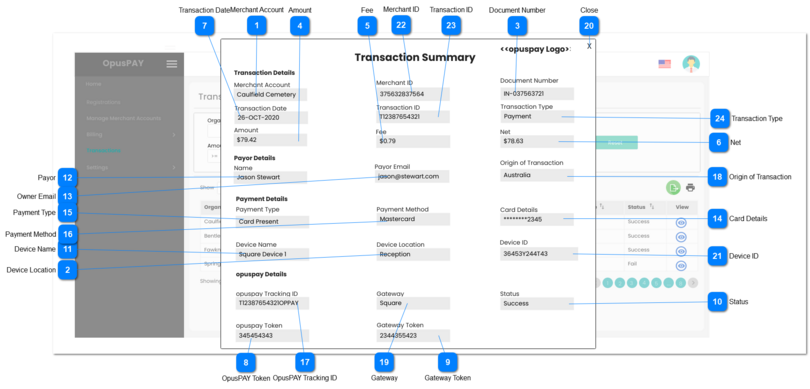
This pop-up modal allows a user to view Transaction Summary.
Merchant Account
Type
Notes
Rules
Compulsory
Format
Edit
Size
Default
Error Message
Text
-
1. Displays the name of the Merchant
-
-
N
-
-
-
Device Location
Type
Notes
Rules
Compulsory
Format
Edit
Size
Default
Error Message
Text
-
1. Display this field and label only if Payment Method = Card Present.
2. Displays the location of the Device used at the merchant's location.
-
-
N
-
-
-
Document Number
Type
Notes
Rules
Compulsory
Format
Edit
Size
Default
Error Message
Text
-
1. Displays the Invoice Number
-
-
N
-
-
-
Amount
Type
Notes
Rules
Compulsory
Format
Edit
Size
Default
Error Message
Currency
-
1. Displays the Invoice Amount paid
-
-
N
-
-
-
Fee
Type
Notes
Rules
Compulsory
Format
Edit
Size
Default
Error Message
Currency
-
1. Displays the fee charged by the Gateway
-
-
N
-
-
-
Net
Type
Notes
Rules
Compulsory
Format
Edit
Size
Default
Error Message
Currency
-
1. Displays the net amount the merchant received for the transaction.
-
-
N
-
-
-
Transaction Date
Type
Notes
Rules
Compulsory
Format
Edit
Size
Default
Error Message
Text
-
1. Displays the date when the transaction occured.
-
dd-MMM-yyyy
N
-
-
-
OpusPAY Token
Type
Notes
Rules
Compulsory
Format
Edit
Size
Default
Error Message
Text
-
1. Displays the OpusPAY token
-
-
N
-
-
-
Gateway Token
Type
Notes
Rules
Compulsory
Format
Edit
Size
Default
Error Message
Text
-
1. Displays the Gateway token
-
-
N
-
-
-
Status
Type
Notes
Rules
Compulsory
Format
Edit
Size
Default
Error Message
Text
-
1. Displays the transaction status
-
-
N
-
-
-
Device Name
Type
Notes
Rules
Compulsory
Format
Edit
Size
Default
Error Message
Text
-
1. Display this field and label only if Payment Method = Card Present.
2. Displays the name of the Device used at the merchant's location.
-
-
N
-
-
-
Payor
Type
Notes
Rules
Compulsory
Format
Edit
Size
Default
Error Message
Text
-
1. Displays the name of the person who made the payment
-
-
N
-
-
-
Owner Email
Type
Notes
Rules
Compulsory
Format
Edit
Size
Default
Error Message
Text
-
1. Displays the payor's email address.
-
-
N
-
-
-
Card Details
Type
Notes
Rules
Compulsory
Format
Edit
Size
Default
Error Message
Text
-
1. Should only display the last 4 digits of the payor's credit card number.
-
-
N
-
-
-
Payment Type
Type
Notes
Rules
Compulsory
Format
Edit
Size
Default
Error Message
Text
-
1. Displays the payment type used for transaction.
-
-
N
-
-
-
Payment Method
Type
Notes
Rules
Compulsory
Format
Edit
Size
Default
Error Message
Text
-
1. Displays the payment method used for transaction.
-
-
N
-
-
-
OpusPAY Tracking ID
Type
Notes
Rules
Compulsory
Format
Edit
Size
Default
Error Message
Text
-
1. Displays the OpusPAY Tracking ID
-
-
N
-
-
-
Origin of Transaction
Type
Notes
Rules
Compulsory
Format
Edit
Size
Default
Error Message
Text
-
1. Displays the country of origin of the transaction
-
-
N
-
-
-
Gateway
Type
Notes
Rules
Compulsory
Format
Edit
Size
Default
Error Message
Text
-
1. Displays the name of the Gateway used for the transaction.
-
-
N
-
-
-
Close
Type
Notes
Rules
Compulsory
Format
Edit
Size
Default
Error Message
Button
-
1. This should close the modal and navigate the user to Transactions screen when clicked. Refer to the specification for that screen here .
-
-
N
-
-
-
Device ID
Type
Notes
Rules
Compulsory
Format
Edit
Size
Default
Error Message
Text
-
1. Display this field and label only if Payment Method = Card Present.
2. Displays the ID of the Device used at the merchant's location.
-
-
N
-
-
-
Merchant ID
Type
Notes
Rules
Compulsory
Format
Edit
Size
Default
Error Message
Text
-
1. Displays the OpusPAY Merchant ID.
-
-
N
-
-
-
Transaction ID
Type
Notes
Rules
Compulsory
Format
Edit
Size
Default
Error Message
Text
-
1. Displays the OpusPAY Transaction ID.
-
-
N
-
-
-
Transaction Type
Type
Notes
Rules
Compulsory
Format
Edit
Size
Default
Error Message
Text
-
1. Displays the type of transaction. opuspay will not have a predefined list of types. This will display the transaction type as sent back from the Gateway.
-
-
N
-
-
-