To properly display this page you need a browser with JavaScript support.
Transactions Viewing and Reporting A list of Transactions API needs to be exposed to consume data from the data warehouse using the ODATA or similar Technology for analysis and reporting purposes. this should be the same technology as is used for byondpro customer access
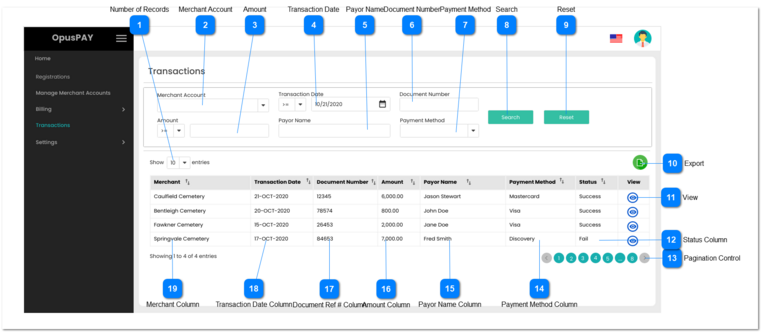
This module allows the user to search through transactions using various parameters.
Number of Records
Type
Notes
Rules
Compulsory
Format
Edit
Size
Default
Error Message
Combo-Box
-
1. This should allow the user to select an option to control the number of transaction records visible in the grid.
2. Displays following options to select from:
-
-
Y
-
10
-
Merchant Account
Type
Notes
Rules
Compulsory
Format
Edit
Size
Default
Error Message
Combo-Box
-
1. This will allow the user to select from a list of Merchant Account Names for which the transactions have occured.
-
-
Y
-
Nothing selected
-
Amount
Type
Notes
Rules
Compulsory
Format
Edit
Size
Default
Error Message
Currency
Works with the drop down to the left of this field. Dropdown only contains:
1. This should allow the user to enter an amount.
2. Only numbers and up to two decimal places can be entered in this field.
3. Should provide either "greater than or equal to", or "less than or equal to" search options in the dropdown.
4. If "greater than or equal to" is selected, filter all transactions with amounts higher than or equal to the amount entered in this field.
5. If "less than or equal to" is selected, filter all transactions with amounts lower than or equal to the amount entered in this field.
N
-
Y
-
Text field default is Blank
Dropdown is <=
-
Transaction Date
Type
Notes
Rules
Compulsory
Format
Edit
Size
Default
Error Message
Date
Works with the drop down to the left of this field. Dropdown only contains:
1. This should allow the user to enter a Transaction Date.
2. Should provide either "greater than or equal to", or "less than or equal to" search options in the dropdown.
4. If "greater than or equal to" is selected, filter all transactions with dates newer than or equal to the date entered in this field.
5. If "less than or equal to" is selected, filter all transactions with dates older than or equal to the date entered in this field.
-
-
Y
-
Default to today's date for date field.
Default to <= for dropdown.
-
Payor Name
Type
Notes
Rules
Compulsory
Format
Edit
Size
Default
Error Message
Text
-
1. Anything entered into this field will be used to search/filter transactions based on the Payor Name.
-
-
Y
-
Blank
-
Document Number
Type
Notes
Rules
Compulsory
Format
Edit
Size
Default
Error Message
Text
-
1. Anything entered into this field will be used to search/filter transactions based on the Document Number.
-
-
Y
255
Blank
-
Payment Method
Type
Notes
Rules
Compulsory
Format
Edit
Size
Default
Error Message
Combo-Box
-
1. This should allow the user to select from a list of Payment Methods. This list is populated based on the dropdown values entered in the Admin portal Dropdown Fields area. Refer to the specifications for this screen here .
-
-
Y
-
Nothing selected
-
Search
Type
Notes
Rules
Compulsory
Format
Edit
Size
Default
Error Message
Button
-
1. When clicked search through the transaction records applying the information entered in the search fields.
2. Display the results in the grid.
-
-
Y
-
-
-
Reset
Type
Notes
Rules
Compulsory
Format
Edit
Size
Default
Error Message
Button
-
1. This will clear all search fields and the results grid.
-
-
Y
-
-
-
Export
Type
Notes
Rules
Compulsory
Format
Edit
Size
Default
Error Message
Button
-
1. This should allow the user to export searched transaction records to XLSX or CSV file formats.
-
-
Y
-
-
-
View
Type
Notes
Rules
Compulsory
Format
Edit
Size
Default
Error Message
Button
-
1. This should allow the user to view transaction details via a pop-up modal. Refer to the specification for that page here .
-
-
-
-
-
-
Status Column
Type
Notes
Rules
Compulsory
Format
Edit
Size
Default
Error Message
Column
-
1. This should display the status of transactions.
2. This should be sortable.
-
-
N
-
-
-
Pagination Control
Type
Notes
Rules
Compulsory
Format
Edit
Size
Default
Error Message
Button
-
1. This should allow the user to paginate through the transaction records when clicked.
2. To determine the number of pagination buttons to display please follow the current logic that is being used in byondcloud.
-
-
Y
-
-
-
Payment Method Column
Type
Notes
Rules
Compulsory
Format
Edit
Size
Default
Error Message
Column
-
1. This should display the Payment Method for the transactions.
2. This should be sortable.
-
-
N
-
-
-
Payor Name Column
Type
Notes
Rules
Compulsory
Format
Edit
Size
Default
Error Message
Column
-
1. This should display the Payor Name for the transactions.
2. This should be sortable.
-
-
N
-
-
-
Amount Column
Type
Notes
Rules
Compulsory
Format
Edit
Size
Default
Error Message
Column
-
1. This should display the transaction amounts.
2. This should be sortable.
-
-
N
-
-
-
Document Ref # Column
Type
Notes
Rules
Compulsory
Format
Edit
Size
Default
Error Message
Column
-
1. This should display the document number for the transactions.
2. This should be sortable.
-
-
N
-
-
-
Transaction Date Column
Type
Notes
Rules
Compulsory
Format
Edit
Size
Default
Error Message
Column
-
1. This should display the transaction dates.
2. This should be sortable.
-
-
N
-
-
-
Merchant Column
Type
Notes
Rules
Compulsory
Format
Edit
Size
Default
Error Message
Column
-
1. This should display the Merchant Account Name for the transactions.
2. This should be sortable.
-
-
N
-
-
-