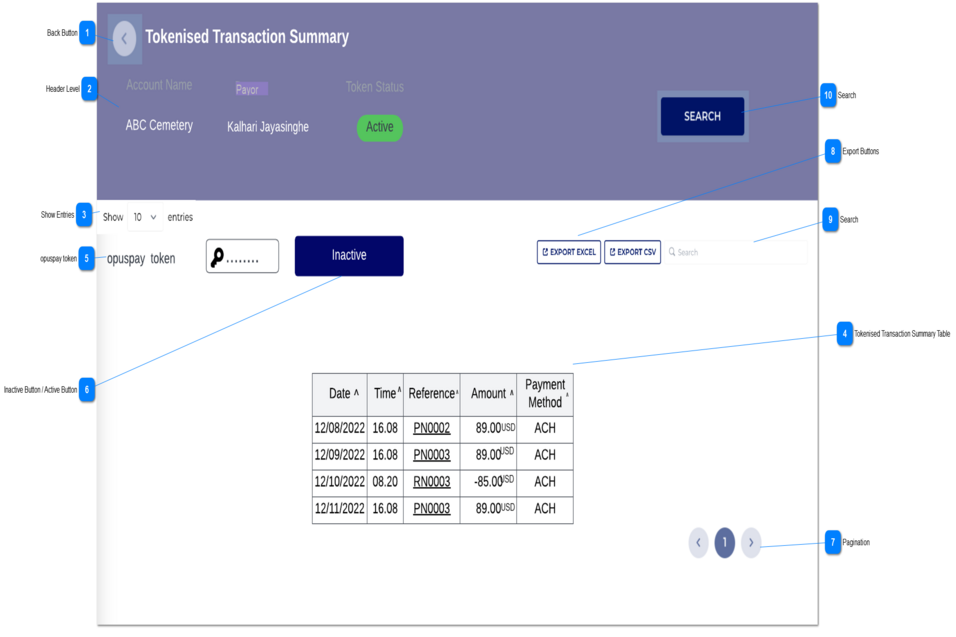
1. Name of the page would be ' Tokenised Transaction Summary'.
2. In header level following information would be displayed.
Account Name
Payor
Status
-
-
-
-
-
-
Account Name
Text-filed
The relevant account name would display here.
Payer
The relevant payer of the transaction would display here.
Status
The relevant status of the token would display here.
The token status values can be as followed.
1. Active - The token is in activated and can be used for recurring payment transactions.
2. Inactive - The token is inactivated through API call to avoid further tokenised transactions.But this inactive token can be activated through API call if required.
3. Expired - The token is expired automatically and can not be used for tokenised transactions.
All the columns are sort-able according to ascending and descending order.
By default the data would load from newest to oldest.
1. The tokenised transaction summary table would show below columns.
Date
Time
Reference
Amount
Payment Method
-
-
-
-
-
-
Column
Name of the column: Date
The date when the transaction is processed displays in the Tokenised Transaction Summary screen needs to update the date formate as 'dd-mm-yyyy' format.
Column
Name of the column: Time
The transaction processed time is captured in 24hr clock format.
The time format would be HH.MM.
Column
Name of the column: Reference
The transaction related reference would capture here.
This is a hyperlink, once the user clicks on this hyperlink, that would load 'Transaction Summary' Screen.
Column
Name of the column: Amount
The amount relevant to a particular transaction would display here.
The relevant currency would display here with the amount (ex: 85.00 USD).
If there is a refund based on the token, then that value would capture as a minus value.
Column
Name of the column: Payment Method
The transaction based payment method would display here.
The following conditions would apply to display either 'Active Button' or 'Inactive Button'.
1. The 'Inactive' button would display when the token status is 'Active'.
1a. When the token status is 'Expired' then the 'Active' button would not show.
2. The 'Active' button would display when the token status is 'Inactive' and 'not expired'
2a. When the token status is 'Expired', then the Active button would not show.
3. If the token status is 'Expired', then any of 'Active' or 'Inactive' buttons would not display.
1. Once the user clicks on this inactive button, a warning message would display. Refer here.
In the warning message there are two buttons.
Yes -> Once the user clicks on yes button, then the token would be inactive. (the status should be updated in Database and the token status in header level would be updated.)
No-> Once the user clicks on no button, then the token would remain as in its status.
2. Once the user clicks on this Active button, a warning message would display as per below.
"You are about to active a token.
Are you sure do you want to continue?"
In the warning message there are two buttons.
Yes -> Once the user clicks on yes button, then the token would be Active. (the status should be updated in Database the token status in header level would be updated.)
No-> Once the user clicks on no button, then the token would remain as in its status.