OpusPAY
User guide
×
Menu
Index

Tax Groups

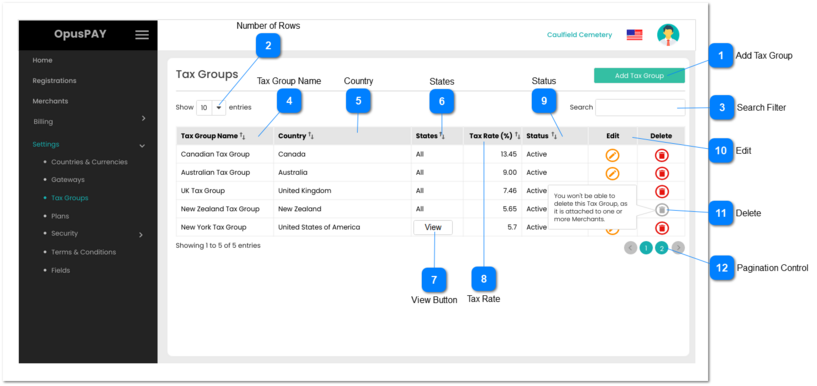
This module helps the user to manage Tax Groups that may be used to assign merchants for invoicing purposes.
 
Tax Groups
1

Add Tax Group

 
Type
Notes
Rules
Compulsory
Format
Edit
Size
Default
Error Message
Button
-
This should open a Add Tax Group pop-up modal when clicked. Refer to the specification for that modal here.
-
-
-
-
-
-
2

Number of Rows

 
Type
Notes
Rules
Compulsory
Format
Edit
Size
Default
Error Message
Combo-Box
-
1. This should allow the user to select an option to control the number of Tax Group records visible in the grid.
 
2. Displays following options to select from:
 
  • 10
  • 25
  • 50
  • 100
 
-
-
Y
-
10
-
3

Search Filter

 
Type
Notes
Rules
Compulsory
Format
Edit
Size
Default
Error Message
Text
-
1. Filters the grid by matching the input entered by the user across the "Tax Group Name" and "Country" grid columns.
 
2. Filter results based on each character entered. For example:
  • if "c" is entered, only the first row in the on screen example will be displayed. This is based on "Canadian" with the Tax Group Name column or on "Canada" within the Country column
  • If "ne" is entered only the fourth and fifth rows in the on screen example will be displayed based on "New" in the Tax Group Name column
 
-
-
Y
-
-
-
4

Tax Group Name

 
Type
Notes
Rules
Compulsory
Format
Edit
Size
Default
Error Message
Column
-
1. This should display the Tax Group names.
 
2. This should be sortable.
-
-
-
-
-
-
5

Country

 
Type
Notes
Rules
Compulsory
Format
Edit
Size
Default
Error Message
Column
-
1. This should display the Country.
 
2. This should be sortable.
-
-
-
-
-
-
6

States

 
Type
Notes
Rules
Compulsory
Format
Edit
Size
Default
Error Message
Column
-
1. This should display 'All' if All States is checked in the Add Tax Group pop-up modal. Refer to the function here.
 
2. If not all States are checked, this should display a 'View' button that will open a pop-up modal displaying the list of seleted States the tax rate applies to.
-
-
-
-
-
-
7

View Button

 
Type
Notes
Rules
Compulsory
Format
Edit
Size
Default
Error Message
Button
-
1. Pressing this will display a view only pop-up modal that will list all States within the Country selected. Refer to the specifications for this screen here.
-
-
-
-
-
-
8

Tax Rate

 
Type
Notes
Rules
Compulsory
Format
Edit
Size
Default
Error Message
Column
Tax Rate is a percentage
1. This should display the Tax Rate.
 
2. This should be sortable.
-
-
-
-
-
-
9

Status

 
Type
Notes
Rules
Compulsory
Format
Edit
Size
Default
Error Message
Column
1. Active Tax Groups should be available to be assigned to the Merchants.
 
2. When a Tax Group is deactivated it should no longer be available to be selected and assigned to Merchants.
1. This should display the Status of Tax Rate.
 
2. This should be sortable.
-
-
-
-
-
-
10

Edit

 
Type
Notes
Rules
Compulsory
Format
Edit
Size
Default
Error Message
Button
-
1. This should open the Tax Group pop-up modal in edit mode when clicked. Refer to the specification for the modal here.
-
-
-
-
-
-
11

Delete

 
Type
Notes
Rules
Compulsory
Format
Edit
Size
Default
Error Message
Button
-
1. This should delete the Tax Group record.
 
2. This should be greyed out and disabled if a Tax Group is attached to at least one Merchant. User should see a pop-up message upon hovering action over the button: "You won't be able to delete this Tax Group as it is attached to one or more merchants."
-
-
-
-
-
-
12

Pagination Control

 
Type
Notes
Rules
Compulsory
Format
Edit
Size
Default
Error Message
Button
-
1. This should allow the users to paginate through the Tax Group grid records.
 
2. To determine the number of pagination buttons to display please follow the current logic that is being used in byondcloud.
-
-
-
-
-
-