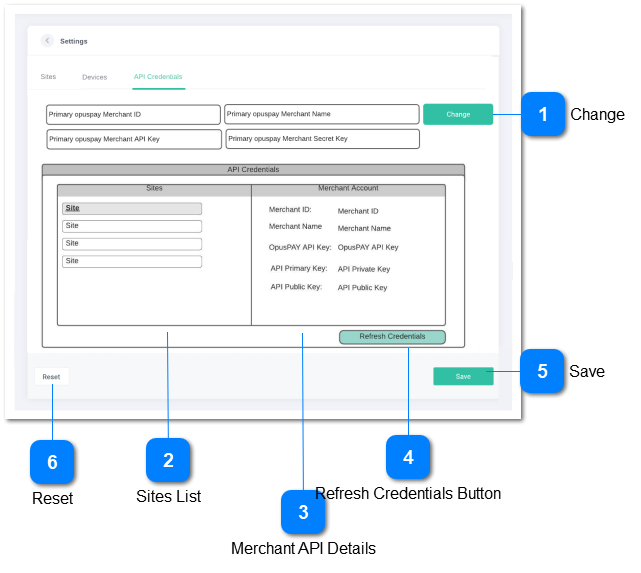
Settings - API Credentials
View merchant account API details across all merchants accounts in opuspay
 Change
Makes the fields in the UI editable
|
Type
|
Notes
|
Rules
|
Compulsory
|
Format
|
Edit
|
Size
|
Default
|
Error Message
|
|
Button
|
|
|
|
|
|
|
|
| |
|
 Sites List
Displays a list of the byondcloud sites
|
Type
|
Notes
|
Rules
|
Compulsory
|
Format
|
Edit
|
Size
|
Default
|
Error Message
|
|
TextBox
|
|
-
Display a list of all byondcloud Sites
-
-
If the hyperlink is selected, then:
-
select the merchant account linked to the site
-
display the opuspay Merchant API credentials that are store in byondcloud
|
|
|
N
|
|
|
| |
|
 Merchant API Details
Shows the merchant API credentials that are stored in byondcloud
|
Type
|
Notes
|
Rules
|
Compulsory
|
Format
|
Edit
|
Size
|
Default
|
Error Message
|
|
TextBox
|
|
-
For the selected Site, credential fields to display include:
-
-
-
-
-
|
|
|
N
|
|
|
| |
|
 Refresh Credentials Button
Function to check the current opuspay API credentials for each merchant account and update any changes
|
Type
|
Notes
|
Rules
|
Compulsory
|
Format
|
Edit
|
Size
|
Default
|
Error Message
|
|
Button
|
|
-
For each Site call the opuspay API and collected the current Merchant Credentials for the Merchant Account linked to the site
-
Store the collected credentials
-
|
|
|
|
|
|
| |
|
 Save
Save data
|
Type
|
Notes
|
Rules
|
Compulsory
|
Format
|
Edit
|
Size
|
Default
|
Error Message
|
|
Button
|
|
-
Refer here for business rules
|
|
|
|
|
|
| |
|
 Reset
Reset all fields with data
|
Type
|
Notes
|
Rules
|
Compulsory
|
Format
|
Edit
|
Size
|
Default
|
Error Message
|
|
Button
|
|
-
Refer here for business rules
|
|
|
|
|
|
| |
|