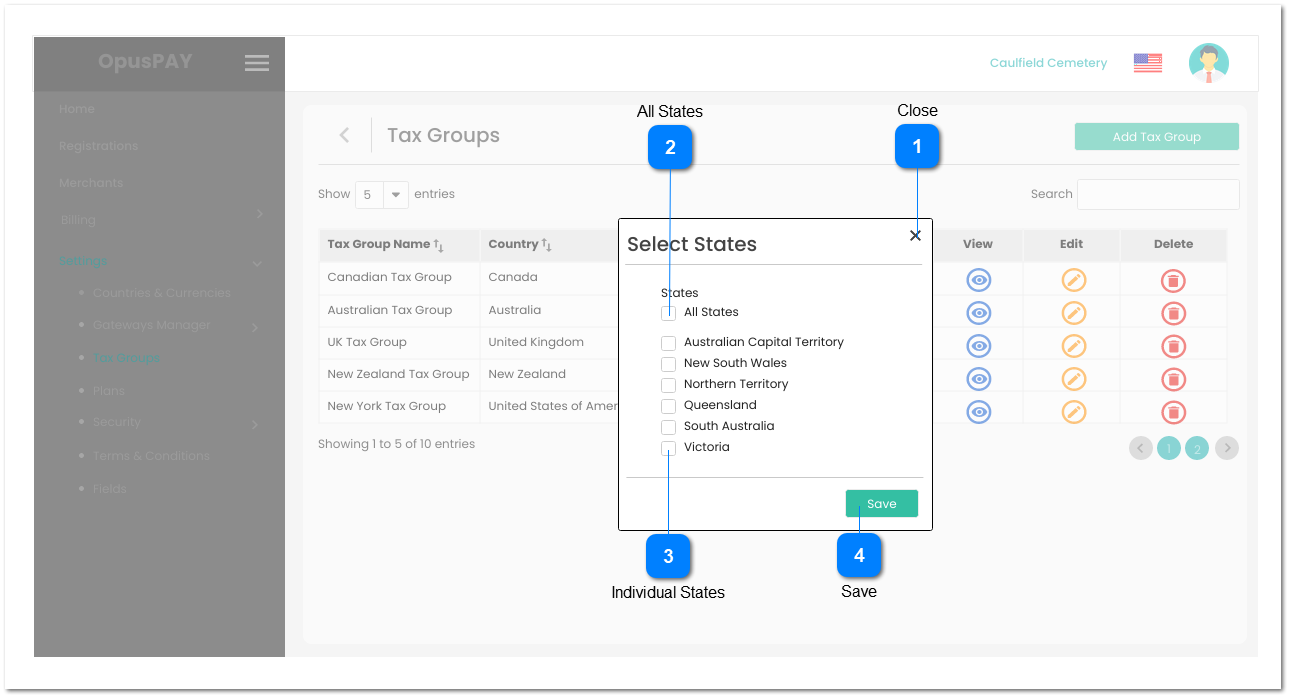
1. When checked, this State is included in the Tax Group.
2. If an Individual State is checked by default and the user unchecks the State. Check the database, if there is an ACTIVE merchant in this State and with this Tax Group assigned to them, this State cannot be unchecked. Display an inline error message and do not uncheck this State.
3. If "All States" is checked and an individual State is unchecked, uncheck "All States" checkbox.
4. If "All States" is unchecked and the user selects every State individually, check "All States" checkbox when the last individual State is selected.
N
-
Y
-
If All States is checked by default, all Individual States are also checked by default.
If All States is unchecked by default, check the database and check this box for any States currently selected for this Tax Group in the database.
If All States is unchecked and this Tax Group is not in the database, default all individual States to unchecked.
2. There is at least one merchant in the State selected for this Tax Group. This State cannot be unchecked until a different Tax Group is assigned to all merchants in the State.
1. At least one State must be selected. If no States are selected, display an inline error message and do not close this screen.
2. Check existing ACTIVE Tax Groups for existing Country and State combinations that match the selected States on this screen. If there is already an existing ACTIVE Tax Group with this combination, display inline error message and do not close this screen.
3. If "All States" checkbox is selected, close this screen and set "All States" checkbox as checked on the screen user is returned to.
4. If at least one State is selected, but fewer than all States are selected, close this screen and pass the States selected to the screen the user is being returned to.
-
-
-
-
-
1. At least one State must be selected.
2. Tax Group already exists for the combination of Country and State(s) selected.