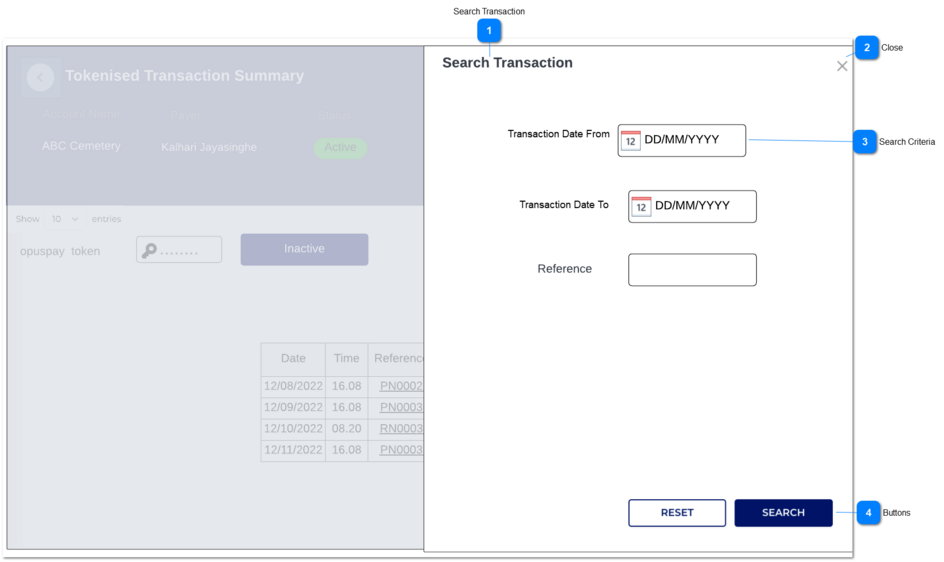
1. Following are the search criteria that would apply to filter the data.
From
To
Reference
-
-
-
-
-
-
Date - Picker
Search Criteria: Transaction Date From
This date should be the older than the From date.
If this date is not older than the from date following warning message should be given in a pop-up once the user clicks on 'submit' button.
when the pop-up box is closed by clicking the 'X' in right hand side top corner, the dialog box would disappeared.
By default when the details are loaded to 'Tokenised Transaction Summary' grid, the date range drop - down would display only date format (DD-MM-YYYY).
System should allow only to pick a date which is current or past. (Future dates cannot be selected.)
The given date range is not valid.
Date - Picker
Search Criteria: Transaction Date To
This date should be the newest than the From date.
If this date is not the newest than the from date following warning message should be given in a pop-up once the user clicks on 'submit' button.
when the pop-up box is closed by clicking the 'X' in right hand side top corner, the dialog box would disappeared.
By default when the details are loaded to 'Tokenised Transaction Summary' grid, the date range drop - down would display only date format (DD-MM-YYYY).
System should allow only to pick a date which is current or past. (Future dates cannot be selected.)
The given date range is not valid.
Text-field
Search Criteria: Reference
In this text-filed, the user can give the reference and filter the data.
There are two buttons in 'Search Transaction' slider.
Reset
Search
-
-
-
-
-
-
Name of the button: Reset
Once the user clicks on ' Reset' button, all the values in search criteria would be reset to its initiate values as per below.
Transaction Date From -> DD-MM-YYYY
Transaction Date To: DD-MM-YYYY
Reference: This field would be empty.
Name of the button: Search
1. When the user clicks, the system would check above validations related to search criteria given and the system would filter the data in ' Tokenised Transaction Summary' table.