To properly display this page you need a browser with JavaScript support.
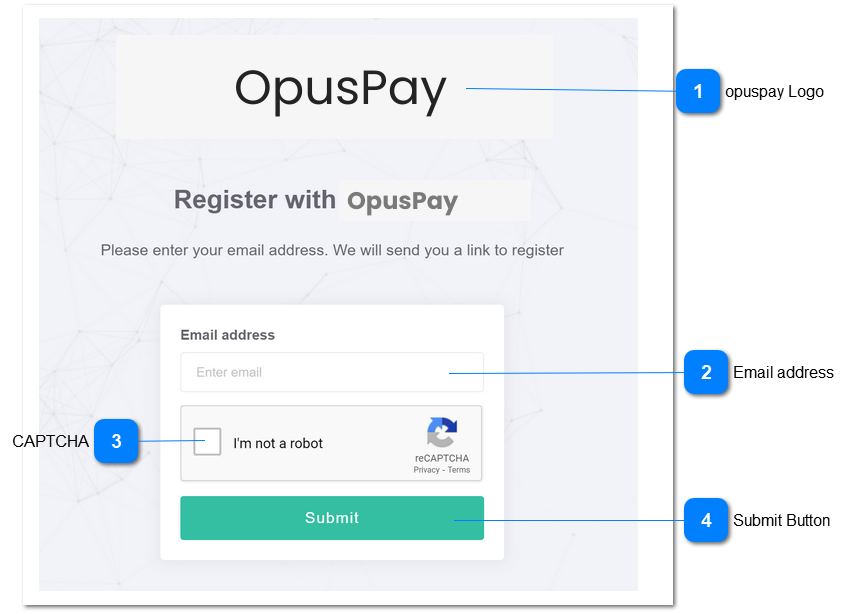
The opuspay register email form allows any organisation FD/CEM/CREM to register their email address for a merchant account with opuspay. If registration is launched from byondpro or byondcloud, this page is not required and user is directed to the Registration form. Refer to the specification of this screen
here .
opuspay Logo
Type
Notes
Rules
Compulsory
Format
Edit
Size
Default
Error Message
Logo
-
1. This should display the opuspay logo
-
-
-
-
-
-
Email address
Type
Notes
Rules
Compulsory
Format
Edit
Size
Default
Error Message
Text
-
1. This should allow the user to enter their email address.
2. If user presses <ENTER> while in this field:
This should display an error message in red below this field if the user presses <ENTER> without entering an email address.
This should display an error message in red below this field if the user presses <ENTER> without entering a valid email address.
Y
-
Y
255
-
2. Please enter a valid email address.
CAPTCHA
Type
Notes
Rules
Compulsory
Format
Edit
Size
Default
Error Message
CAPTCHA
-
1. This will verify the user is human
Y
-
-
-
-
-
Submit Button
Type
Notes
Rules
Compulsory
Format
Edit
Size
Default
Error Message
Button
-
1. Validate email address:
This should display an error message in red below email address field if no email address is entered.
This should display an error message in red below email address field if the email address is not valid.
If email address is valid continue with rules 2 & 3:
2. Send registration verification email. Refer to the specifications for this screen here .
3. Display the following message in green above the submit button after email is sent:
Please check your email for registration details.
Y
-
Y
255
-
1. Please enter a valid email address.