|
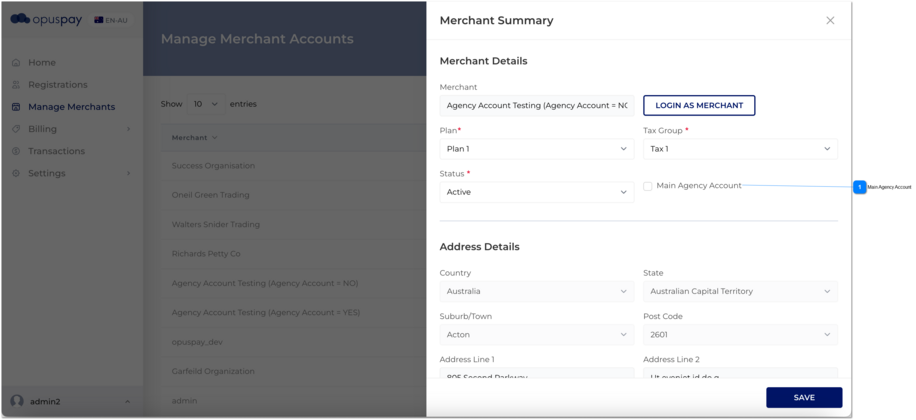
Checkbox
|
-
|
1. Name of the checkbox is 'Main Agency Account'.
2. When admin selects 'Main Agency Account' checkbox from admin portal and click on Save button following would be happened.
A. List down all the gateways inside to parent merchant account.
B. All the sub accounts can be used only parent gateways which are compatible with accepted countries of the sub merchant account. (Gateways must be checked in parent account in order to show in sub account)
C. Sub account must be selected at least one gateway.
D. The option 'Link to an existing gateway accounts' in sub accounts should be disabled.
E. If a sub account had a gateway which is not had in parent account, it will be deselected.
F. All the sub accounts link to parent gateways.
3.I When admin deselects 'Main Agency Account' checkbox from admin portal and click on Save button, following warning message would display. (3.I)
3.II. At that moment, if the Merchant accounts (parent account and its sub accounts) have gateways which are not compatible with the country of the agency account, then the user needs to remove those gateways manually first from the sub accounts and then from parent account.
3.III Once step 3.II is done successfully, user needs to come and un-check the checkbox of 'Main Agency Account', in order to disable Main Agency Account.
As a result of above, following would be occur.
A. Link to an existing gateway accounts' option should be enabled to all the sub accounts.
B. List down all the gateways related to the account's country
|
-
|
-
|
N
|
-
|
-
|
3.I Are you sure you want to save the changes to the merchant account?
This will affect to your sub merchant account too.
Yes ->The account will not have main agency account functionality
No ->The account will reamin main agency account functionality
If the user click on Yes and proceed then below warning message would display.
3.II. Merchant accounts have gateways which are not compatible with the country of the agency account. Please manually uncheck (<<gateway1>>, <<gateway2>>, <<gatewayN>>) gateways from merchant account.
OK - once the user click on OK button, this pop up message would disappear.
3.III Merchant Details updated successfully.
OK - once the user click on OK button, this pop up message would disappear.
|