OpusPAY
User guide
×
Menu
Index

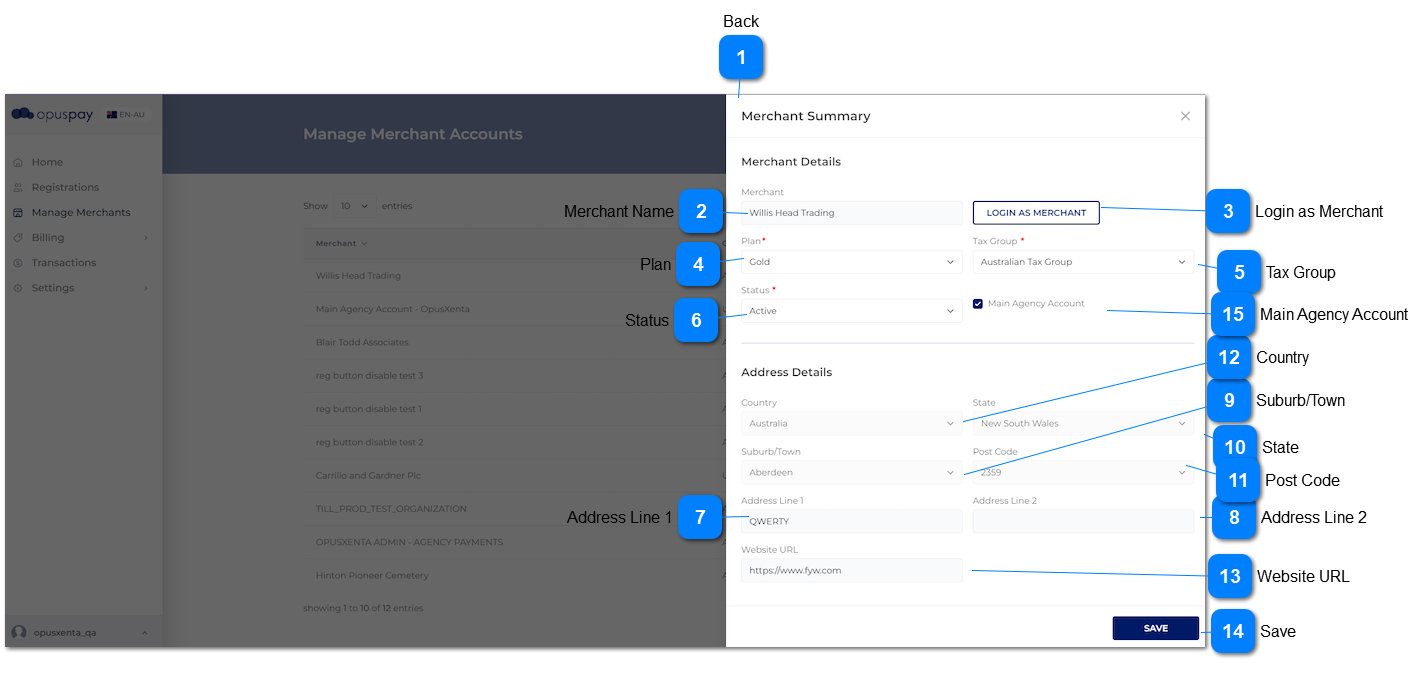
Merchant Summary__Main Agency Account(Yes) - Edit

 
This screen allows the user to Login as Merchant, view their Address details, and change the Plan and/or Tax Group for invoicing purposes.
 
Merchant Summary__Main Agency Account(Yes) - Edit
1

Back

 
Type
Notes
Rules
Compulsory
Format
Edit
Size
Default
Error Message
Button
-
1. This should navigate the user to the Merchants Grid when clicked. Refer to the specification for Merchants Grid here.
-
-
-
-
-
-
2

Merchant Name

 
Type
Notes
Rules
Compulsory
Format
Edit
Size
Default
Error Message
Text
-
1. This should display the name of a Merchant.
-
-
N
255
-
-
3

Login as Merchant

 
Type
Notes
Rules
Compulsory
Format
Edit
Size
Default
Error Message
Button
-
1. This should be only visible to users linked to a profile having access to this function.
 
2. The user is able to log into a merchant's portal after clicking this button. The level of access to the merchant's portal will be dependent on the Security Profile assigned to the user. Refer to the specifications for Security Profiles here.
 
3. When logged in as Merchant, display "Logged in as: " before Organisation name at top of window. Refer to the specification for this screen here.
-
-
-
-
-
-
4

Plan

 
Type
Notes
Rules
Compulsory
Format
Edit
Size
Default
Error Message
Combo-Box
Pre-conditions:
There should be at least one active Plan created within Settings -> Plans.
1. This should display the Plan assigned to a merchant.
 
2. If Merchant is assigned to a Custom Plan, do not enable this combo-box.
 
3. When clicked, this should display a list of 'active' Plans belonging to the country of merchant only.
Y
-
Y
-
-
-
5

Tax Group

 
Type
Notes
Rules
Compulsory
Format
Edit
Size
Default
Error Message
Combo-Box
Pre-conditions:
There should be at least one active Tax Group created within Settings -> Tax Groups.
1. This should display the Tax Group assigned to a merchant.
 
2. When clicked, this should display a list of 'active' Tax Groups belonging to the country and state of merchant only.
Y
-
Y
-
-
-
6

Status

 
Type
Notes
Rules
Compulsory
Format
Edit
Size
Default
Error Message
Column
1. Active merchants should be able to be transactions via opuspay.
 
2. When a merchant is inactivate they will no longer be able to process transactions via opuspay. However, they will still be able to log into the Merchant Portal.
1. This will allow for the updating of the Status of the merchant. If for any reason the merchant needs to be prevented from processing further transactions, this should be set to Inactive.
 
2. If Status is changed to Inactive, this should send a 'your merchant account has been suspended' email to the merchant user advising them that they can no longer process transactions via opuspay. Refer to the email body content here. byondpro should also be updated to show that the merchant account is inactive (which would display as On-Hold in byondpro).
 
3. Merchant Status cannot be set to Inactive if they are linked to a Custom Plan. If Merchant is linked to a Custom Plan display an inline error message if user attempts to set the Status to Inactive.
Y
-
Y
-
Default to merchant Status as in the database.
3. Merchant is linked to a Custom Plan. Remove Merchant from the Custom Plan before setting status to Inactive.
7

Address Line 1

 
Type
Notes
Rules
Compulsory
Format
Edit
Size
Default
Error Message
Text
-
1. This should display the Address Line 1 of the primary address of a merchant.
-
-
N
255
-
-
8

Address Line 2

 
Type
Notes
Rules
Compulsory
Format
Edit
Size
Default
Error Message
Text
-
1. This should display the Address Line 2 of the primary address of a merchant.
-
-
N
255
-
-
9

Suburb/Town

 
Type
Notes
Rules
Compulsory
Format
Edit
Size
Default
Error Message
Combo-Box
-
1. This should display the Suburb/Town of the primary address of a merchant.
-
-
N
-
-
-
10

State

 
Type
Notes
Rules
Compulsory
Format
Edit
Size
Default
Error Message
Combo-Box
-
1. This should display the State of the primary address of a merchant.
-
-
N
-
-
-
11

Post Code

 
Type
Notes
Rules
Compulsory
Format
Edit
Size
Default
Error Message
Combo-Box
-
1. This should display the Post Code of the primary address of a merchant.
-
-
N
-
-
-
12

Country

 
Type
Notes
Rules
Compulsory
Format
Edit
Size
Default
Error Message
Combo-Box
-
1. This should display the Country of the primary address of a merchant.
-
-
N
-
-
-
13

Website URL

 
Type
Notes
Rules
Compulsory
Format
Edit
Size
Default
Error Message
Text
-
1. This should display the website URL of a merchant.
-
-
N
-
-
-
14

Save

 
Type
Notes
Rules
Compulsory
Format
Edit
Size
Default
Error Message
Button
-
1. Save changes to record, if any and navigate the user to the Merchant Summary screen in view mode. Refer to the specification for that screen here.
 
2. When the user clicks on 'Save' button, following warning message would be displayed.
 
-
-
N
-
-
2. Are you sure you want to save the changes to the merchant account?
 
Yes - Changes would be updated in record.
 
No - Changes would not be updated in record.
15

Main Agency Account

 
Type
Notes
Rules
Compulsory
Format
Edit
Size
Default
Error Message
Checkbox
-
1. Name of the checkbox is 'Main Agency Account'.
 
2. When admin selects  'Main Agency Account' checkbox from admin portal and click on Save button following would be happened.
 
A. List down all the gateways inside to parent merchant account.
 
 B. All the sub accounts can be used only parent gateways which are compatible with accepted countries of the sub merchant account.
 
C. Sub account must be select at least one gateway.
 
D. The option 'Link to an existing gateway accounts' in sub accounts should be disabled.
 
E. If a sub account had a gateway which is not had in parent account, it will be deselected.
 
 F. All the sub accounts link to parent gateways.
 
3.I When admin deselects 'Main Agency Account' checkbox from admin portal and click on Save button, following warning message would display. (3.I)
 
3.II. At that moment, if the Merchant accounts (parent account and its sub accounts) have gateways which are not compatible with the country of the agency account, then the user needs to remove those gateways manually first from the sub accounts and then from parent account.
 
3.III Once step 3.II is done successfully, user needs to come and un-check the checkbox of 'Main Agency Account', in order to disable Main Agency Account.
 
As a result of above, following would be occur.
 
A. Link to an existing gateway accounts' option should be enabled to all the sub accounts.
 
B. List down all the gateways related to the account's country
-
-
N
-
-
3.I Are you sure you want to save the changes to the merchant account?
This will affect to your  sub merchant account too.
Yes ->The account will not have main agency account functionality
No ->The account will  reamin main agency account functionality
 
If the user click on Yes and proceed then below warning message would display.
 
3.II. Merchant accounts have gateways which are not compatible with the country of the agency account. Please manually uncheck (<<gateway1>>, <<gateway2>>, <<gatewayN>>) gateways from merchant account.
 
OK - once the user click on OK button, this pop up message would disappear.
 
3.III Merchant Details updated successfully.
 
OK - once the user click on OK button, this pop up message would disappear.