To properly display this page you need a browser with JavaScript support.
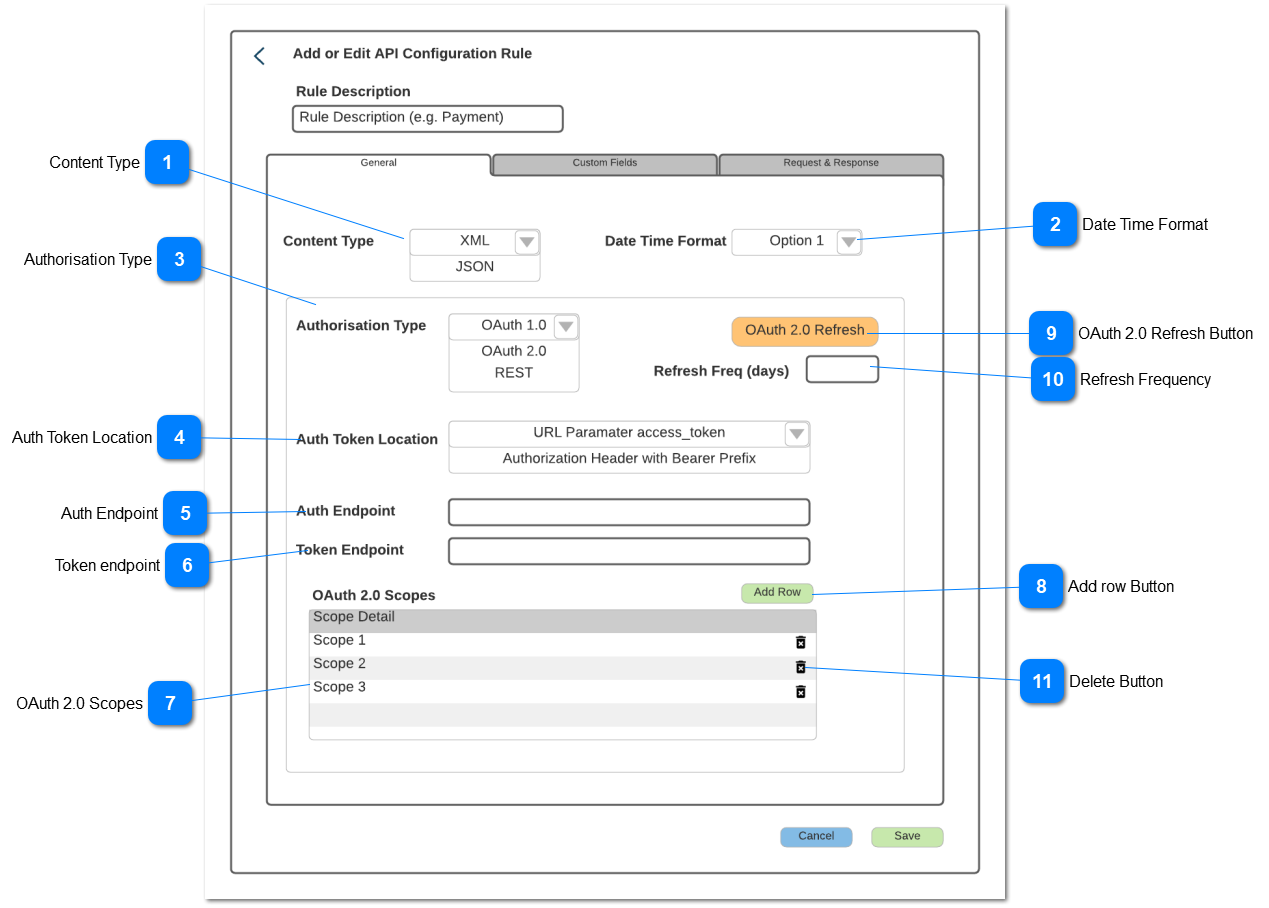
Content Type
Defines the load type be used by the gateway
Type
Notes
Rules
Compulsory
Format
Edit
Size
Default
Error Message
Combo-Box
-
Options to be provided include:
Y
-
Y
-
XML
Please select a Content Type
Date Time Format
Defines the required date format for the gateway
Type
Notes
Rules
Compulsory
Format
Edit
Size
Default
Error Message
Combo-Box
-
Options to be provided include:
Y
-
Y
-
yyyymmddhhmmss
Please select the date format
Authorisation Type
Defines the authentication method being used by the gateway
Type
Notes
Rules
Compulsory
Format
Edit
Size
Default
Error Message
Combo-Box
-
Options to be provided include:
Y
-
Y
-
OAuth 2.0
Please select the authorisation type
Auth Token Location
Defines the type of location lookup required for the gateway
Type
Notes
Rules
Compulsory
Format
Edit
Size
Default
Error Message
ComboBox
Grey out if OAuth 2.0 Authorisation Type not selected
URL Paramater access_token
Authorisation Header with Bearer Prefix
Y if OAuth 2.0 Autorisation Type Selected, otherwise N
Y
URL Paramater access_token
Please select a location type
Auth Endpoint
The URL address for connecting to the gateway API authorisation function
Type
Notes
Rules
Compulsory
Format
Edit
Size
Default
Error Message
Text
User to enter URL address
Y if OAuth 2.0 Autorisation Type Selected, otherwise N
Y
Null
Please enter a endpoint address
Token endpoint
The URL address for connecting to the gateway API authorisation token function
Type
Notes
Rules
Compulsory
Format
Edit
Size
Default
Error Message
Text
User to enter URL address
Y if OAuth 2.0 Autorisation Type Selected, otherwise N
Y
Null
Please enter a endpoint address
OAuth 2.0 Scopes
Grid to load OAuth 2.0 scopes as required by the gateway
Type
Notes
Rules
Compulsory
Format
Edit
Size
Default
Error Message
Grid
Text
Scope Details
User to enter the scope rule
When adding a new row, add/edit that row in the grid
Hyperlink on the Scope to open and edit it
N
Y
On save, if no scopes have been loaded, then warn the user: Please not that you have not loaded any scopes. If these are required, then please enter them.
Add row Button
Adds new Scope rows
Type
Notes
Rules
Compulsory
Format
Edit
Size
Default
Error Message
Button
Grey out if Autorisation type is not OAuth 2.0
When selected add a new row into the grid in edit mode
OAuth 2.0 Refresh Button
Collects a new OAuth 2.0 token from the gateway to replace an expired one
Type
Notes
Rules
Compulsory
Format
Edit
Size
Default
Error Message
Button
When selected call the Gateway Auth API and collect and store a new token
Refresh Frequency
Automates the collection of new tokens from the Gateway
Type
Notes
Rules
Compulsory
Format
Edit
Size
Default
Error Message
Numeric
Grey out if Autorisation type is not OAuth 2.0
All to enter the number of days
No negative values permitted
If set to Zero then no automatic refresh will be done
If qty is greater than zero then auto schedule the execution of the OAuth 2.0 Refresh function
Automatically run the refresh function every X days as defined by the qty entered
Y
Whole number equal to or greater than Zero
Y
0
Delete Button
Function to delete a scope
Type
Notes
Rules
Compulsory
Format
Edit
Size
Default
Error Message
Button
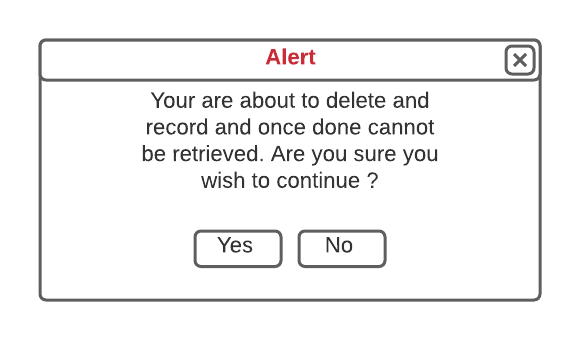
When selected pop-up the Delete message
Delete Alert Pop-Up
Type
Notes
Rules
Compulsory
Format
Edit
Size
Default
Error Message
Pop-Up
If Yes is selected then delete the row, close pop-up and return to the active tab (the tab that the user was in at the time of pressing the cancel button) in view mode
If No, close pop-up and continue to edit the Active tab