To properly display this page you need a browser with JavaScript support.
This page describes the enhancements and the general dependencies covered within this version of opuspay.
QR Payments
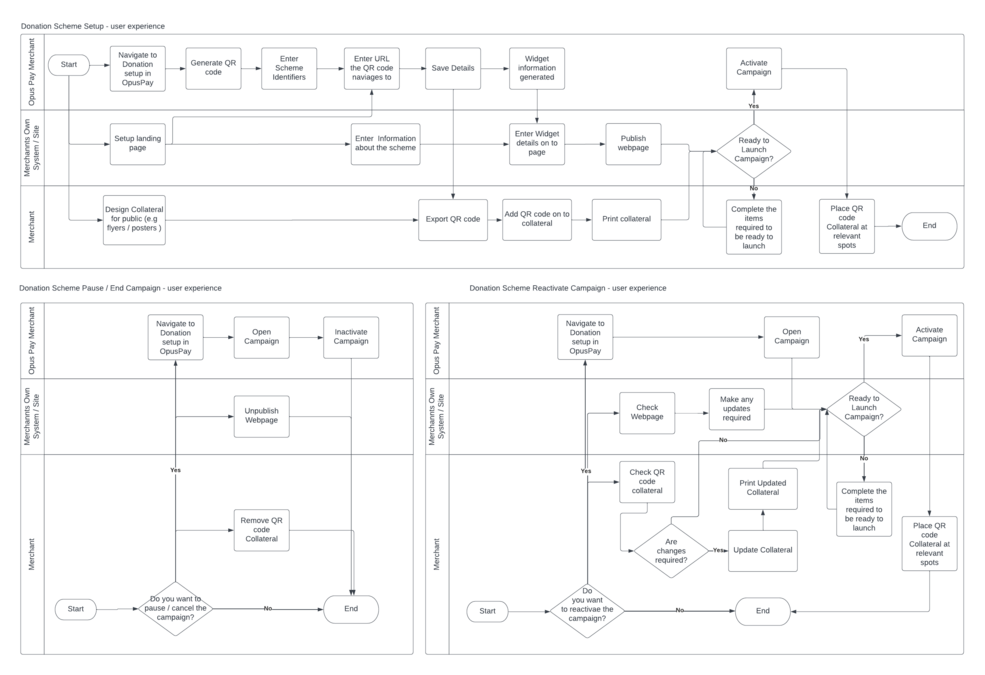
The user can scan a QR code, it would direct to an admin given landing page, in the landing page there is opuspay widget to enter amount and card details.
By using that widget, a person who directs to the landing page by scanning QR would able to do a payment.
QR Payment functionality would be available in Admin portal and Merchant portal.
Heading of the widget is changed to "Donation amount :" <Amount>
Agency Payment
Merchant Summary - View and Merchant Summary - Edit pages are updated according to agency payment enhancement.
Transaction Failure
Status of transaction, can be listed as follows:
These status are available in transaction grid and transaction summary.
In transaction summary, if the transaction fails, the failure reason should be visible in transaction summary.
Below mentioned tickets are updated in the spec.
Ticket No
Description
Updated in General Page
opuspay admin portal -> Manage Merchant Accounts -> Merchant Grid -> Merchant Summary - View
opuspay admin portal -> Manage Merchant Accounts -> Merchant Grid -> Merchant Summary - Edit
byondcloud -> Manage Account -> opuspay ->Registration
Updated in General page under QR payments
Validation Messages for the payment summary page:
#
scenario
Message
1
Already expired (When URL is copied in more than one tab)
Payment link expired. Please contact merchant.
2
Payment processing (When URL is copied in more than one tab)
Payment failed, Please Try again.
3
Payment completed (When URL is copied in more than one tab)
Payment already completed successfully.
For UI guidance, please refer below URL:
Please Refer below URL for UI prototype: