This page describes the enhancements and the general dependencies covered within this version of opuspay
Agency Payment
Business Scenario:
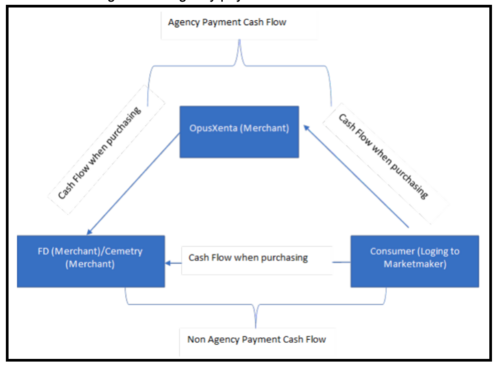
Agency Payment Cash Flow:
1. When the consumer purchase through marketmaker, if the cash flows through OpusXenta (Merchant) account and then to Funeral Director / Cemetery is identified as an agency payment.
2. For Agency Payment Transactions 'OpusXenta' merchant ID would be captured.
Non Agency Payment Cash Flow:
When the consumer purchase through marketmaker, if the cash flows directly to Funeral Director / Cemetery is identified as a non-agency payment.
For Non - Agency Payment Transactions relevant funeral director/Cemetery merchant ID would be captured.
Refer below image for the agency payment cash flow business scenario.
Followings are related to agency payments.
1. There is a new development to opuspay application.
Enabling and Disabling Agency Payment Functionality
2. There should be a separate tenant account called 'OpusXenta' in opuspay.
This account would be used for agency payments.
If the FD / Cemetery is using agency payments then, this 'OpusXenta' merchant account would be available to for account mapping.
Acquirer Conversion
What is an Acquirer?
Acquirer runs a process by which a bank or a licensed company establishes business terms with credit card networks to offer merchants accounts to process their credit / debit card transactions
Example: till, payrix, linkly
What is a gateway?
A gateway connects your shopping cart, point of sale system or virtual terminal to the next point in the payment authorization process
Example: opuspay
opuspay give its registered users a unique ID called merchant ID.
Please refer below table for the for the scenarios covered in this project.
|
#
|
Scenario
|
|
1
|
Changing Acquirer
Due to change of acquirer opuspay need to setup new acquire according to the workflow described here.
|
|
2
|
Agency Payments
Enabling Agency Payment Functionality
(i). Agency Payment for Existing Tenant
An account which doesn't have agency payment functionality, request to have agency payment functionality. (refer workflow here)
(ii). Agency Payment for New Tenant Registration
At new account registration in opuspay the admin can give agency payment functionality as a main agency account, main agency account's sub account will also have agency payment functionality. (refer workflow here)
|
|
Disabling Agency Payment Functionality
An account which has agency payment functionality, request to disable agency payment. (refer workflow here) company.
If the relevant disabled merchant want to have NON Agency Payment, the merchant should be registered in opuspay as a separate account which process Non Agency Payment.
| |
Once the user is added, an email would be generated to given business email for further registration and it would be expired after 24 hours and there is no regeneration option for the link.
1. Give re-generation email functionality